16 Optomed Aurora
3.1 Part list and unpacking
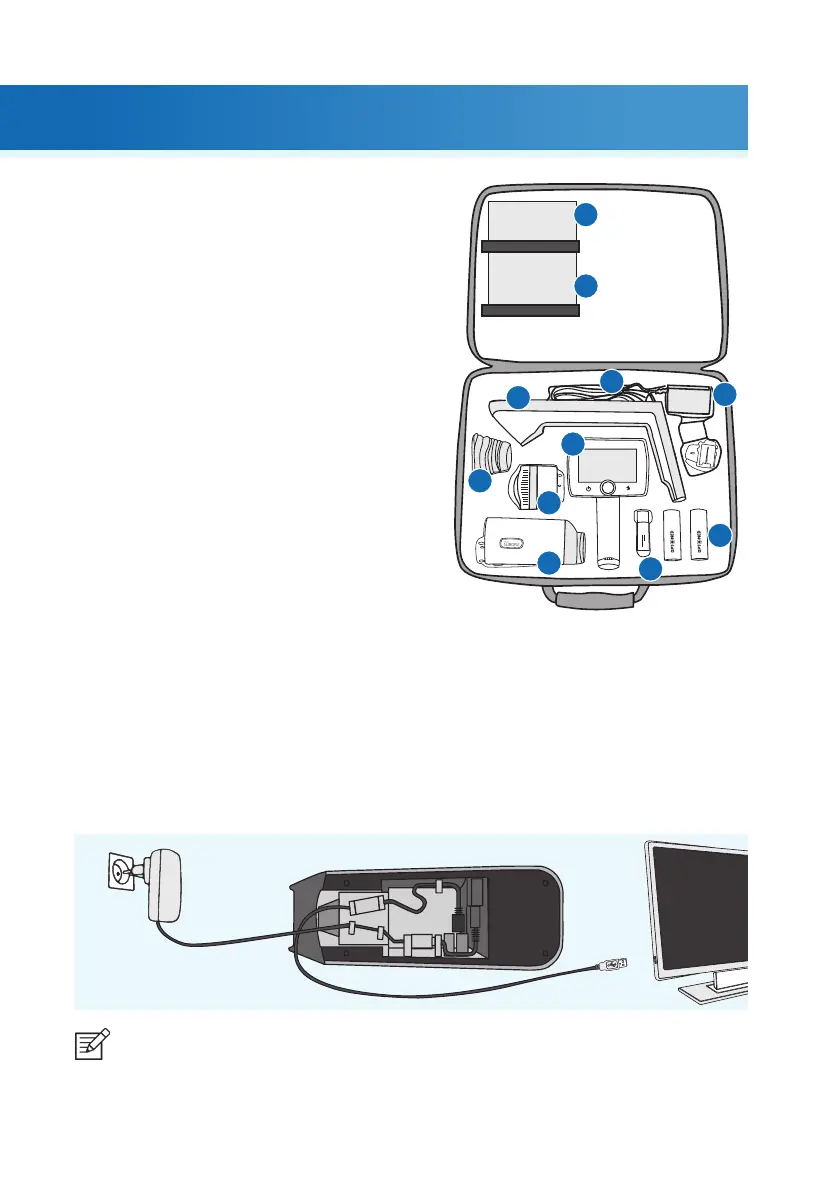
The Optomed Aurora sales package contains the
following items:
DEVICES
1. Camera
2. Retinal Module
3. Anterior Module
ACCESSORIES
4. Charging Station
5. USB Cable
6. Power Supply
7. Eye Cup (2 pcs)
8. Battery (2 pcs)
9. USB Flash Drive
10. Cleaning Cloth
11. User Manual and other material
Open the sales packaging. Remove Optomed Aurora and accessories from the sales package and check that
all parts are present and undamaged. Packaging materials should be retained for future relocation or repair.
3.2 Preparations
Place Charging Station (4) next to the PC. Charging Station must be outside the patient environment at a
distance of least 1.5 meters from the patient. Connect the USB cable (5) and the power supply cable (6)
to Charging Station and to the PC and to the mains.
3. Getting started
1.
2.
3.
4.
5.
6.
7.
8.
9.
10.
11.
| Getting started
NOTE!
Position the power supply so that the mains plug is easily disconnected.



 To Next Page