5.1.1 PG11 function check with the “Gas Test kit”
Using the PG11 Gas Test kit allows for quickly verifying the functionality of the Detector
without having to remove the Environment shield if fitted. The Gas Test kit has an opening in
the front between the gas nozzles that allows for the Operator to see the indicator showing
the status of the Detector.
Requirements:
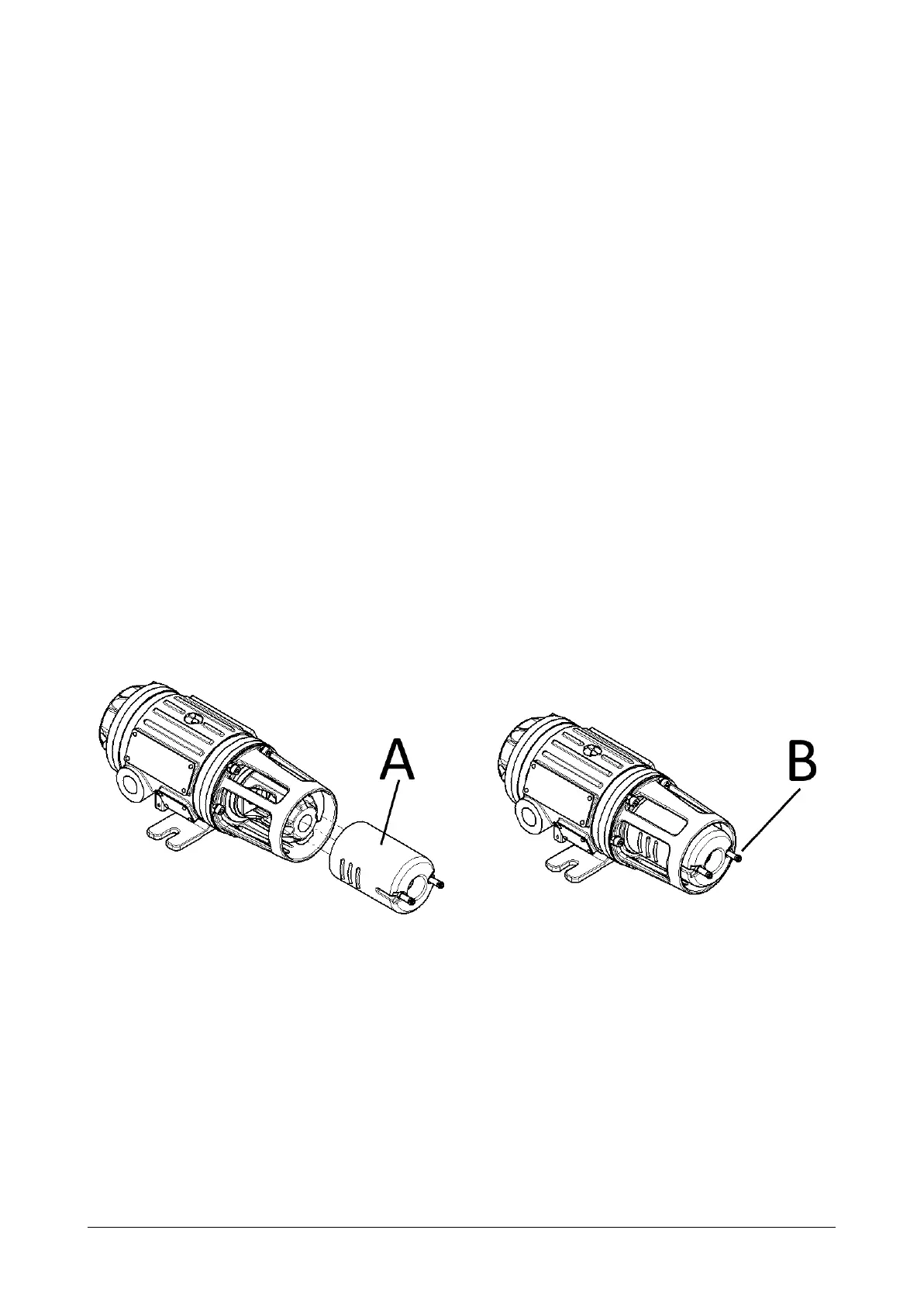
● Gas Test kit (A in illustration below)
● Gas cylinder with same type of gas as Detector is rated to detect
○ Concentration of test gas shall be higher than 30%FS
○ Flow rate of minimum 1 liters/min.
● Flexible gas hose
Procedure:
1. Connect the tube from the Gas cylinder to one of the Gas Test kit nozzles (B in
illustration)
2. Slide the Gas Test kit on the outside of the detector sensor section as illustrated below.
3. Apply the gas from the Gas cylinder with at least 1 liters/min flow rate
4. Observe that the detector indicator is showing gas alarm or that a gas response is
received at the control system
5. With a response of more than 20 %FS the Gas Detector has passed the test
Document 022-80036-OM Revision R03 Page 23 of 48


 To Next Page