12
Setup Manual - Butler XT2
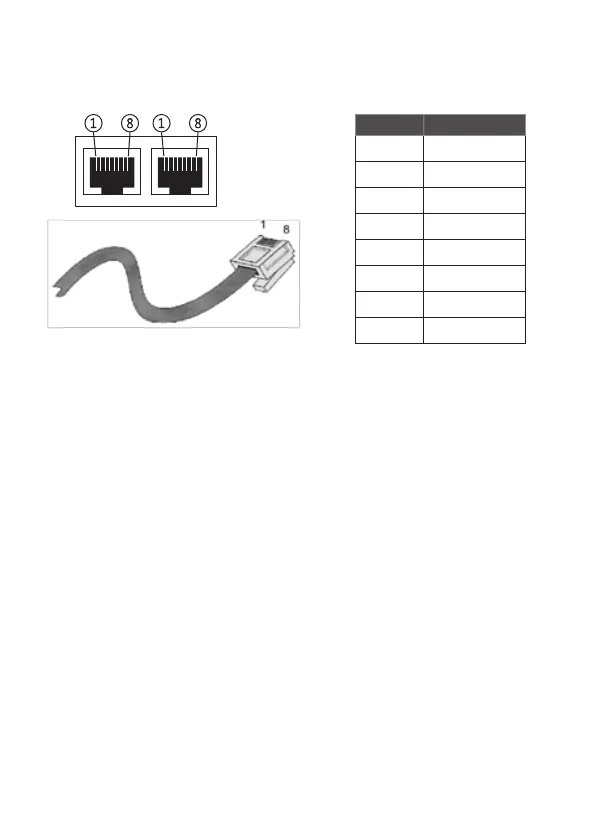
pin no. signal
1 DMX-
2 DMX+
3 GND
4 n/c
5 VCC in
6 GND
7 nc
8 nc
e:bus
The e:bus is a 2-wire bus system using clamp/screw terminal connectors to attach
the wires safely and robust. The wiring between the devices is extremely flexible. In
addition to the free topology design, you do not need to pay attention to polarities.
As long as the two e:bus connectors of a user terminal are connected to the master
unit’s connectors, everything will work fine. The two e:bus connectors of a user
terminal can be connected to the master unit‘s connectors either way. The terminal
devices will recognize the polarity and configure themselves the proper way. Please
refer to the e:bus short introduction or Network Configuration Guide, available
at www.ecue.com/download for more details about e:bus.
RS-232
For communication between different systems the Butler XT2 offers an RS-232
interface (configuration: 9600 baud, 8 databits, no parity, 1 stopbit).
Format:
[CMD1] [CMD2] [Param1 (3 digits)] {[Param2 (3 digits) ]} 0x0d 0x0a
Parameters always must have 3 Characters with leading 0s. Transmission must
end with CR LF, e.g. Play Cuelist 1: PC001\r\n Set G-Master Intensity to 20%:
IN000020\r\n


 To Next Page