22
Setup Manual - Butler XT2
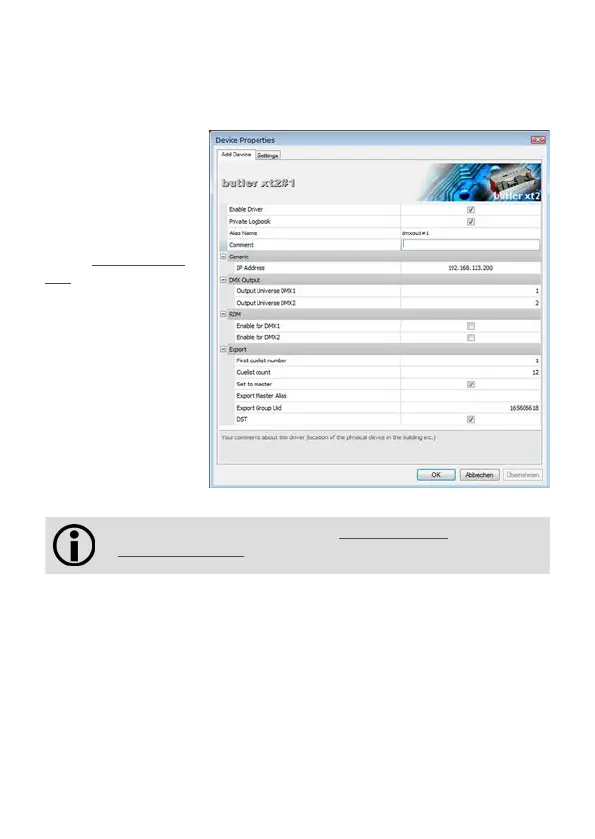
Manager and an additional configuration dialog gets displayed to set more param-
eters for the Butler XT2.
Using this device setup
dialog you can set the
DMX universes as well as
the required Actions for
system buttons and
digital inputs.
Set the Set to mas-
ter checkmark to
define this Butler XT as a
master engine and give it
a unique master alias in
the Export section.
When finished close
the device setup dialog
with Ok.
The DST settings are taken from the Sunrise Timer settings in the
Show Properties of the Programmer.
Connecting more than one Butler XT2
In case you have several Butlers XT2 they need to be configured one at a time. Do
not connect all of them to the network immediately! This is due to the fact that the
devices all come with the same IP-address by factory default. If they are connected
simultaneously an IP-address conflict will occur and configuration is not possible.
Instead, connect the Butlers XT2 one at a time. Connect the first Butler XT2 and
assign a new IP-address to the device (e.g. 192.168.123.11). Repeat this sequence
until all devices have been assigned with an individual IP-address. In a next step all
devices can be hooked up to the connecting network.


 To Next Page