8
Setup Manual - Butler XT2
Delivery content
Order numbers
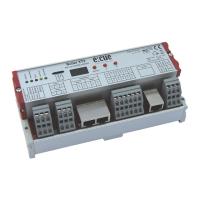
y Butler XT2 AA557270131
y microSDHC card for show storage AA6137401HA
y Setup Manual English/German
Optional accessories:
y DIN rail engine accessory pack AA556690035
(power supply, serial cable, LAN cable)
y LAN cross cable 2 m AA666220055
y Serial cable
y e:cue Lighting Application CD AA620030031
y RJ45 to XLR5p adapter cable AA611810135
Transport
Only transport the Butler XT2 in its original packaging. This protects the device from
damage. Only unpack the at its installation location. To protect the device against
condensation water, unpack it and wait until all moisture remaining in the Butler XT2
has evaporated. Condensation can occur when the device is moved from a cold to
a warm location.
Inspect the delivery content
Unpack the Butler XT2 and inspect all parts for completeness. Keep the packag-
ing for use in case of further transport. If there is apparent damage to the device or
parts are missing from the delivery scope, please contact e:cue service.


 To Next Page