20
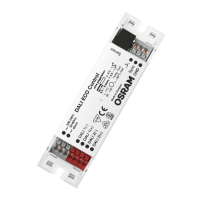
DALIeco Control - Installation and Operation
Contents
1 General................................................................................................21
1.1 Symbols and abbreviations in these instructions................................21
1.2 Intended use ........................................................................................21
2 Mounting and installation .................................................................21
2.1 Connection allocation in the control unit
3 .................................21
2.2 Dimensions and mounting dimensions
2
...................................21
2.3 Connection diagram for electrical system components
4 ..........21
2.4 Sensor and networking
5 ............................................................21
2.5 External push-button
4 ...............................................................21
2.6 Connection of additional sensors and push-buttons via
the DALI line
6 .............................................................................22
2.6.1 Integration of push-buttons via push-button coupler .........................22
2.6.2 Integration of sensors via sensor coupler ...........................................22
3 Function and external components .................................................23
3.1 Fundamental operating principle .........................................................23
3.2 DALI 1 / DALI 2 twin-channel control ..................................................23
3.3 External push-button
4 ...............................................................23
3.4 Behavior after mains interruption .......................................................23
4 Operation ............................................................................................23
4.1 Master Remote remote control
7 (and separate instructions) .23
4.2 User Remote remote control
6 (and separate instructions) .....24
4.3 Switch system on/off ...........................................................................24
4.4 Dimming the system ............................................................................24
5 Step-by-step system programming using Master Remote ...........24
5.1 Programming mode (PROG mode) ....................................................24
5.2 Function modes
8 ........................................................................25
5.3 Auto setup ...........................................................................................25
5.4 Manual setup .......................................................................................25
5.5 Switch off delay (overrun time) ...........................................................25
5.6 Test function ........................................................................................25
5.7 Stand-by level ......................................................................................25
5.8 Stand-by-time ......................................................................................26
5.9
Daylight and
motion-sensing functions .................................26
5.10 Setting offset .......................................................................................26
5.11 100 h Burn-in .......................................................................................26
5.12 Sensor select .......................................................................................26
5.13 PC modes ............................................................................................27
5.14 Macro Recorder ..................................................................................27
6 System operation using User Remote ..........................................27
6.1 Scene push-buttons [1] to [4]
7 ..................................................27
6.2 Push-button [Holiday] ..........................................................................27
6.3 Push-button [Resume] ........................................................................27
6.4 Independent operation of several systems .........................................28
7 Reset ...................................................................................................28
7.1 System reset (using Master Remote) ..................................................28
7.2 Reset Master Remote ..........................................................................28
7.3 Reset User Remote .............................................................................28
8 Technical data ...................................................................................28


 To Next Page
 Loading...