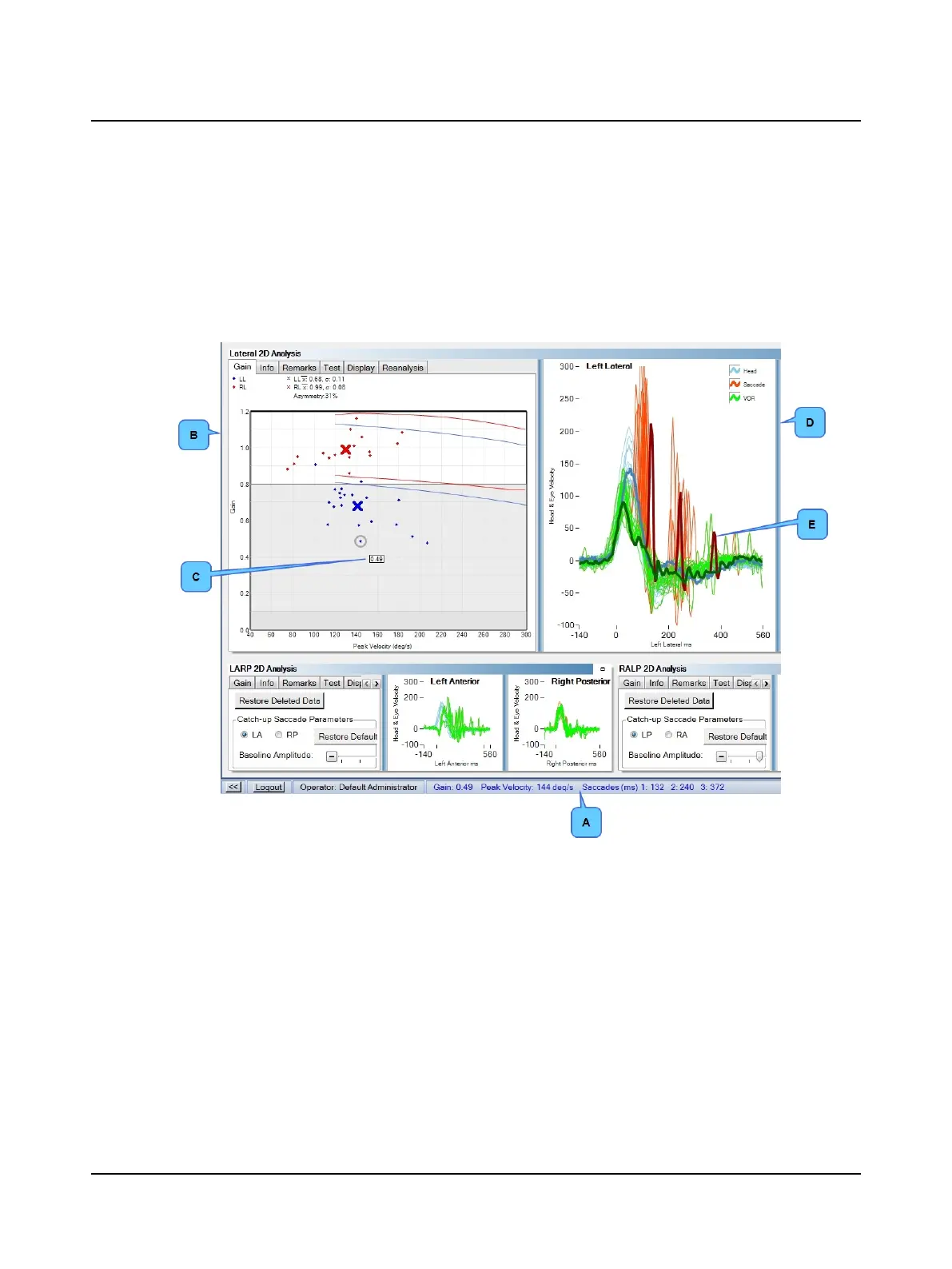
Gain, peak velocity, and saccade latency values for an individual impulse display in the status bar (A) whenever a gain point
or a trace is selected.
• Select a gain point: Click in the Gain window (B) and move the cursor over the gain point to select it. The gain value(C)
for the selected point displays next to the point. In the trace window, the corresponding trace is highlighted.
• Select a trace: Click in the trace window (D) and use the arrow keys or the scroll wheel on the mouse to move from
trace to trace. The highlighted trace is the selected trace(E). In The corresponding gain point is selected (gain value is
not displayed).
A. Status bar
B. Gain window
C. Gain value
D. Trace window
E. Selected trace
To delete a selected head impulse:
• Move the cursor over the gain point. Double-click the mouse.
• Click in the trace window. Use the arrow keys or the scroll wheel on the mouse to select an individual trace. Press the
Delete key.
To restore all deleted head impulses, click the Reanalysis window tab. Click Restore Deleted Data.
62 Otometrics - ICS Impulse USB
9 Head Impulse












 To Next Page