Appendix A – Connecting the OTT Pluvio
2
S to an OTT datalogger
A.1 Connecting the OTT Pluvio
2
S to an OTT netDL or OTT DuoSens
via SDI-12 or RS-485 interface
Method A: Connecting the OTT Pluvio
2
S via the SDI-12 interface (protocol
a
nd physical interface: SDI-12). The maximum length of the cable is 70 m!
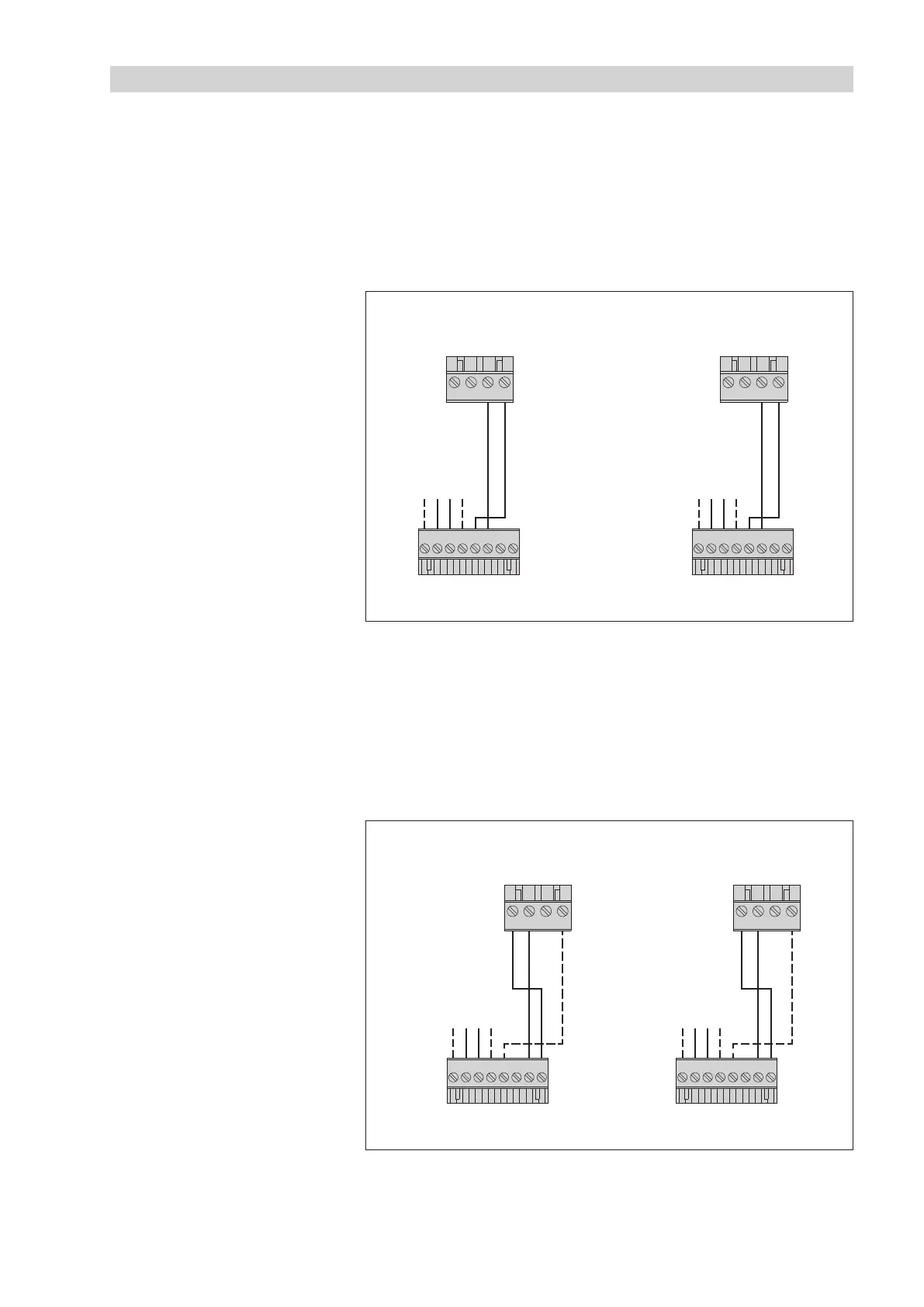
䡵 Connect the OTT Pluvio
2
S to the OTT netDL IP datalogger or to the
OTT DuoSens Compact Datalogger as shown in Figure A1.
Also refer to the OTT netDL/OTT DuoSens Operating Instructions.
Method B: Connect the OTT Pluvio
2
S using the physical RS-485 interface
(SDI-12 protocol via physical RS-485 interface). The maximum cable length
is 1000 m.
䡵 Connect the OTT Pluvio
2
S to the OTT netDL IP datalogger or to the
OTT DuoSens Compact Datalogger as shown in Figure A2.
Also refer to the OTT netDL/OTT DuoSens Operating Instructions.
+12 … +24 V
DC
GND
+12 … +24 V
DC
GND
S
DI-12
Input
A
4
31 2
OTT DuoSens
S
DI-12
Input
C
4
31 2
OTT netDL
OTT Pluvio
2
S
1 2 3 4 5 6 78
OTT Pluvio
2
S
1 2 3 4 5 6 7 8
Fig. A1: Connecting the OTT Pluvio
2
S
to an OTT netDL or OTT DuoSens via
the SDI-12 interface.
The letters above the screw terminal strips
identify the connectivity options available
on the OTT netDL/OTT DuoSens.
For this application, only the 8-wire
screw terminal strip is needed.
+12 … +24 V
DC
GND
+12 … +24 V
DC
GND
RS-485
Input
A
431 2
OTT DuoSens
RS-485
Input
C
431 2
OTT netDL
OTT Pluvio
2
S
1 2 3 4 5 6 7 8
OTT Pluvio
2
S
1 2 3 4 5 6 7 8
Fig. A2: Connecting the OTT Pluvio
2
S to an
OTT netDL or OTT DuoSens via the RS-485
interface (SDI-12 protocol).
The letters above the screw terminal strips
identify the connectivity options available on
the OTT netDL/OTT DuoSens.
For this application, only the 8-wire
screw terminal strip is needed.
The GND connection represented
by the dashed line is necessary
only in case the OTT Pluvio
2
S and
the OTT netDL/OTT DuoSens are
powered by separate power supplies.
47



 To Next Page