10400589-001 ©2008-14 Overland Storage, Inc. 40
SnapServer / GuardianOS 7.6 Administrator’s Guide 3 - SnapServer Settings
Date/Time
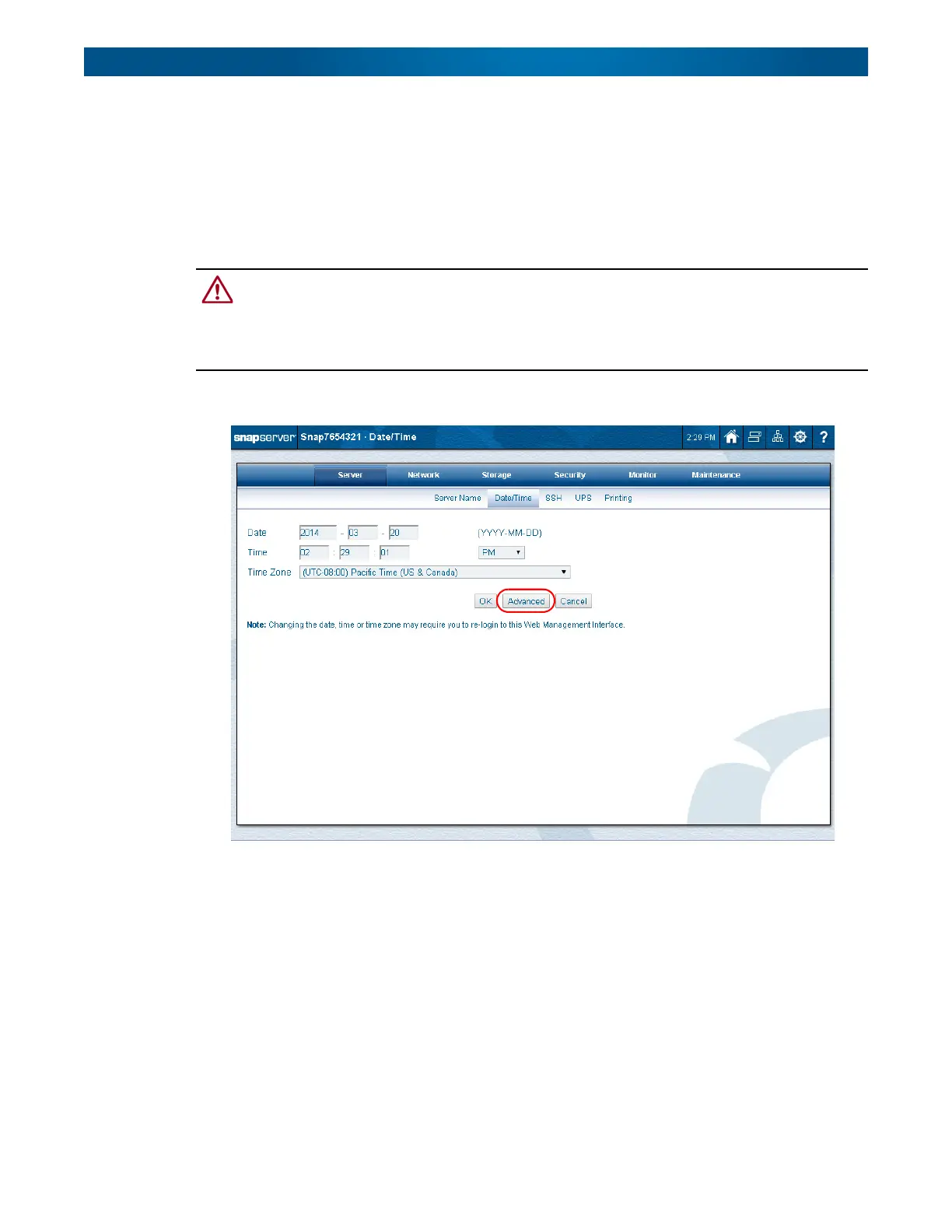
Use this page to configure date and time settings in ISO 8601 formatting. You can set the
server date and time manually, or have it set automatically via NTP or Windows Active
Directory domain membership.
The time stamp is applied when recording server activity in the Event Log (
Monitor
tab), when
creating or modifying files and when scheduling snapshot operations.
CAUTION: If the current date and time are reset to an earlier date and time, the change does not
automatically propagate to any scheduled events you have already set up for snapshot,
antivirus, or Snap EDR operations. These operations will continue to run based on the previous date
and time setting. To synchronize these operations with the new date and time settings, you must
reschedule each operation.
If NTP was not selected during the setup process, only the manual configuration is shown:







 To Next Page