10400589-001 ©2008-14 Overland Storage, Inc. 71
SnapServer / GuardianOS 7.6 Administrator’s Guide 4 - Network Settings
5. Click
OK
to save the configuration.
NOTE: After enabling NFSv4 with Kerberos security, read-write host entries for
gss/krb5,
gss/krb5i, and gss/krb5p are automatically added to the NFS access entries for each
NFS-enabled share.
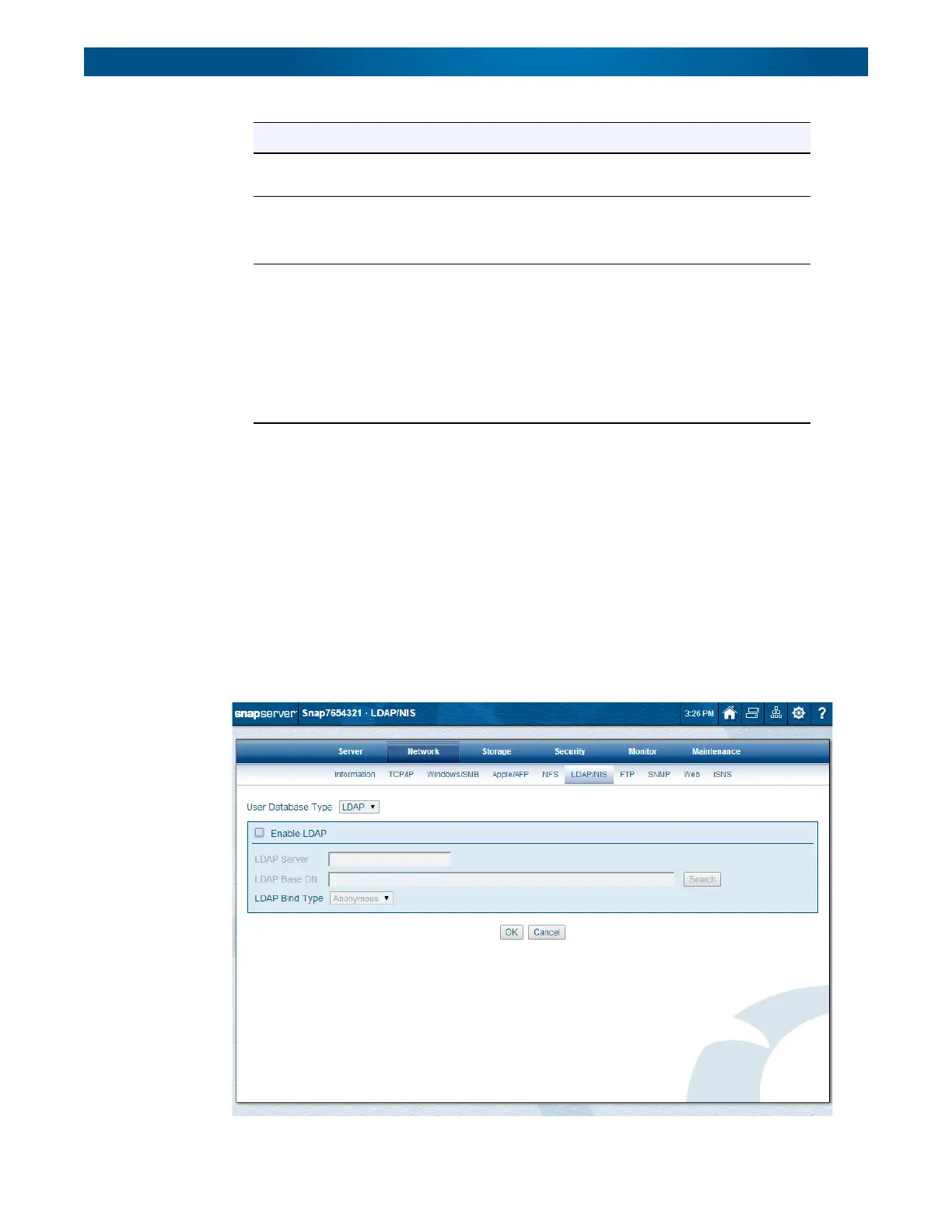
LDAP/NIS
LDAP and NIS databases are configured on the
Network > LDAP/NIS
page of the Web
Management Interface. Use the drop-down list to choose either LDAP or NIS as the user
database type to be configured.
Option Description
KDC Host Name Enter the host name of the Kerberos server (for example,
“kerberos-2000.mit.edu”).
Realm Name Enter the Kerberos realm name (For example, “ATHENA.MIT.EDU”).
NOTE: Realm names are conventionally specified in all CAPITAL
letters, but this is not required to function correctly.
Key Tab File Click Browse to locate and upload the Kerberos key tab file (for
example, “zeus.keytab”).
This file can have any name the administrator wishes to give it. If you
do not have a keytab file for the SnapServer:
• Create a host and NFS principle for the SnapServer on the KDC.
• Generate a keytab file.
• Save it to a location the client administering the SnapServer can
access.




 To Next Page