10400589-001 ©2008-14 Overland Storage, Inc. 63
SnapServer / GuardianOS 7.6 Administrator’s Guide 4 - Network Settings
Guest Account Access to the SnapServer
The
Network > Windows/SMB
page in the Web Management Interface contains an option
that allows unknown users to access the SnapServer using the guest account.
Configure Windows/SMB Networking
Windows SMB and security settings are configured from this page. The server can be
configured as part of a Workgroup or an Active Directory Domain.
Before performing the configuration procedures provided here, be sure you are familiar with
the information provided in Support for Windows/SMB Networking and Support for Windows
Network Authentication.
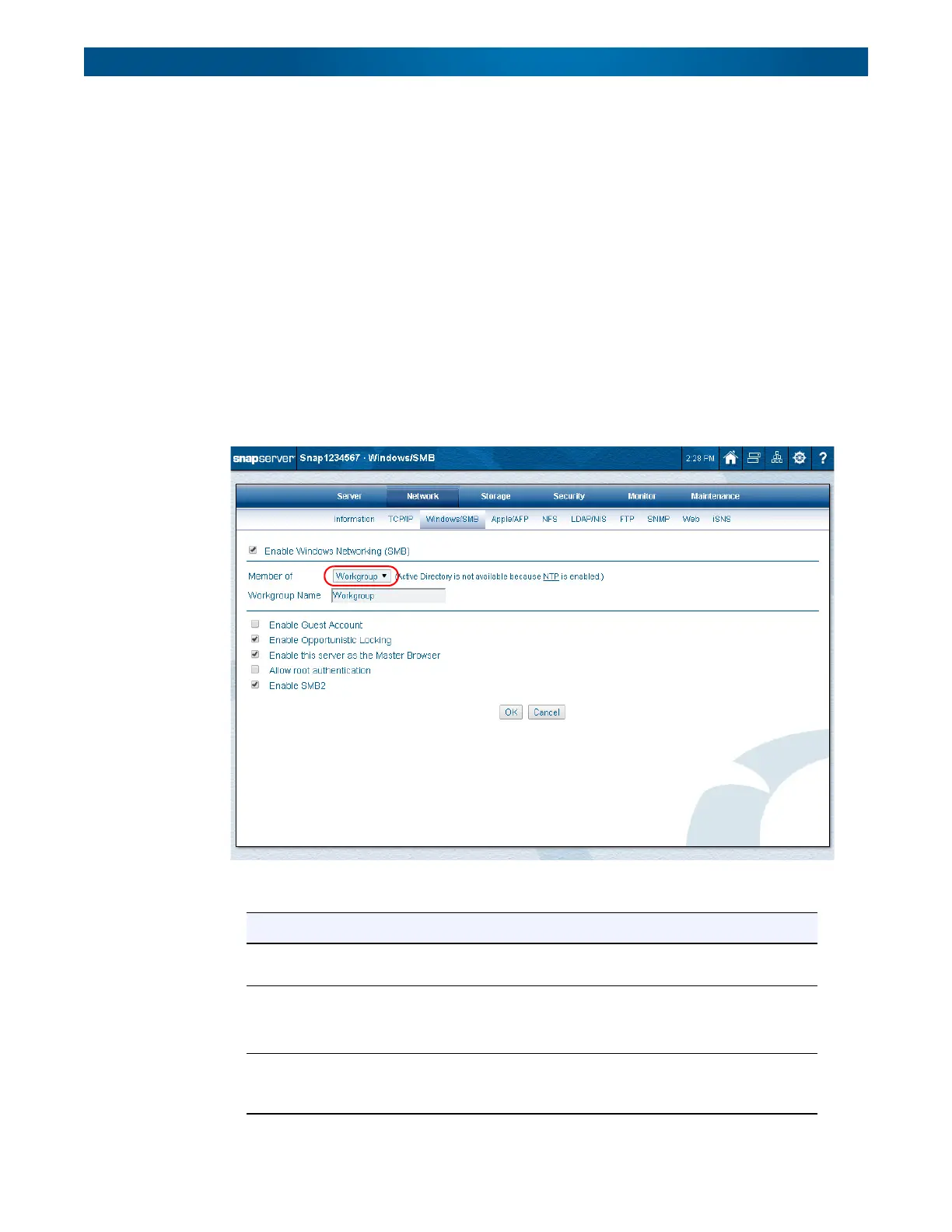
To Join a Workgroup
1. Go to
Network > Windows/SMB
.
2. At the member drop-down list, verify that the default
Workgroup
is selected.
3. Edit the options shown in the following table:
Option Settings
Enable Windows
Networking (SMB)
Check the box to enable SMB and activate the options. Clear the
box to disable.
Member Of Verify that it is set to Workgroup.
NOTE: For the Active Directory Domain option, see To Join an
Active Directory Domain below.
Workgroup Name The default settings make the SnapServer available in the
workgroup named Workgroup. Enter the workgroup name to
which the server belongs.




 To Next Page