10400589-001 ©2008-14 Overland Storage, Inc. 85
SnapServer / GuardianOS 7.6 Administrator’s Guide 5 - DynamicRAID Storage
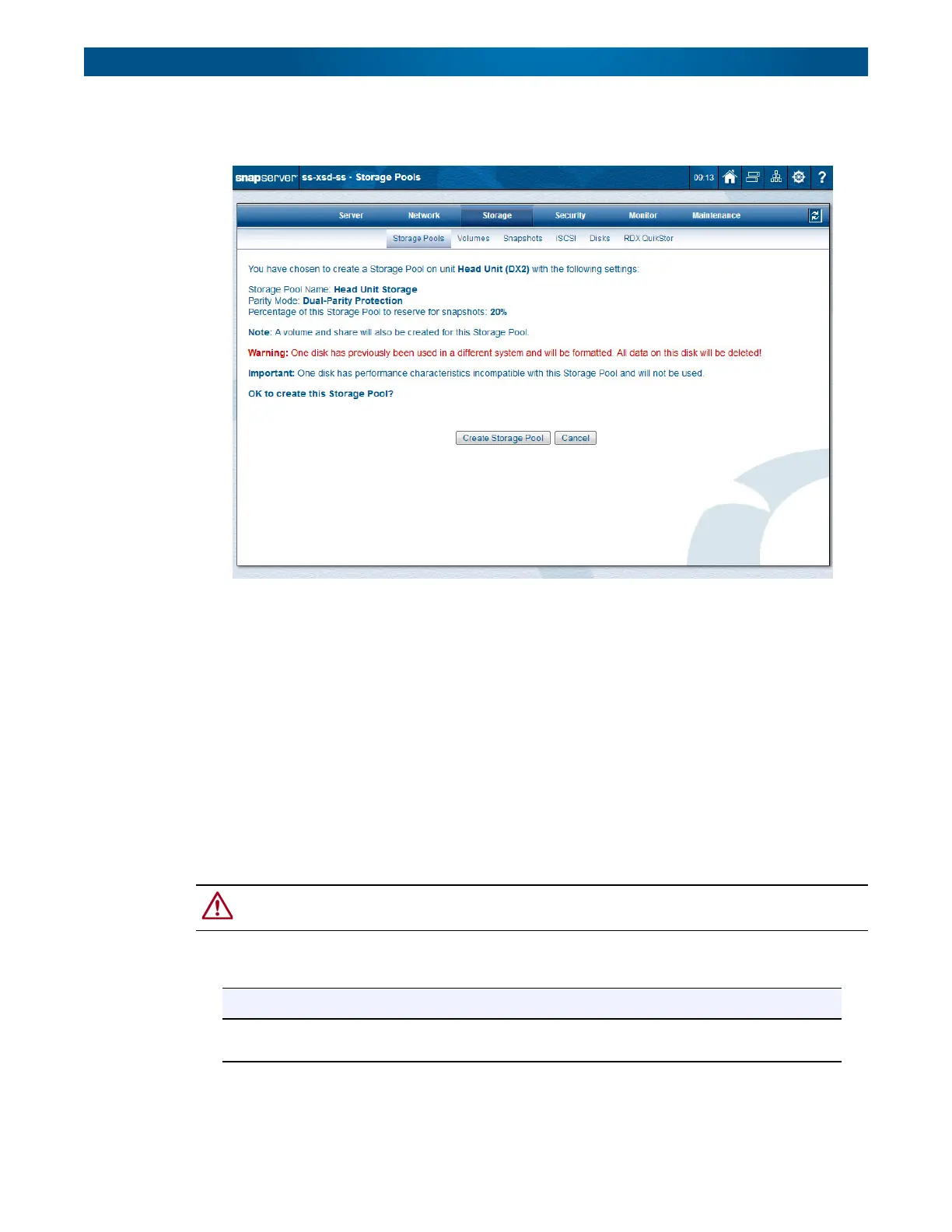
The example below demonstrates the notification of both a disk that has previously been used
in a different system and an incompatible drive.
Storage Pool Creation
Storage pools can be created on head and expansion units that do not yet have pools, one pool
per unit, with each pool completely contained within the unit.
During the initial setup process, storage pools are created on the head and expansion units
using all disk drives available in each unit. DynamicRAID always maximizes the space
available based on both the parity mode type and the snapshot pool size requested.
NOTE: The first detected drive is used as the basis for the drive-size characteristics of the storage
pool. All other drives in the storage pool must conform to the size characteristics of the first
drive. Otherwise, the drives are not used.
To create a new storage pool, click the link in the
Status
column of the Storage Pool table to
open the
Create Storage Pool
page.
CAUTION: When a storage pool is created, any disks in the storage pool that have previously
been used in a different system will be reformatted and all data on the disks will be deleted.
At the
Create Storage Pool
page, you can configure these options:
Option Description
Storage Pool Name Use this field to enter the name of the storage pool. It can be up to 32
alphanumeric characters and spaces.




 To Next Page