Four-Channel Digital Video Recorder
19
Mute Button: Click to mute the recorded audio.
Brightness Revert Button: Click to reload to the original image.
Brightness Control Slide Bar: Click to adjust the brightness of the backup images by clicking the
mouse and dragging along the slider bar. Minute brightness changes can be made by using the arrow
buttons located at each end of the bar.
OSD (On-Screen Display) Button: It switches the OSD option. The OSD information includes
camera location and date/time.
Quit Button: Click to exit the Player program.
NOTES: It is suggested that the computer used for the Player program has at least an 800MHz Pentium
III. If your CPU is slower than this, minibank files recorded at maximum speed with very high image
quality will be played back slowly.
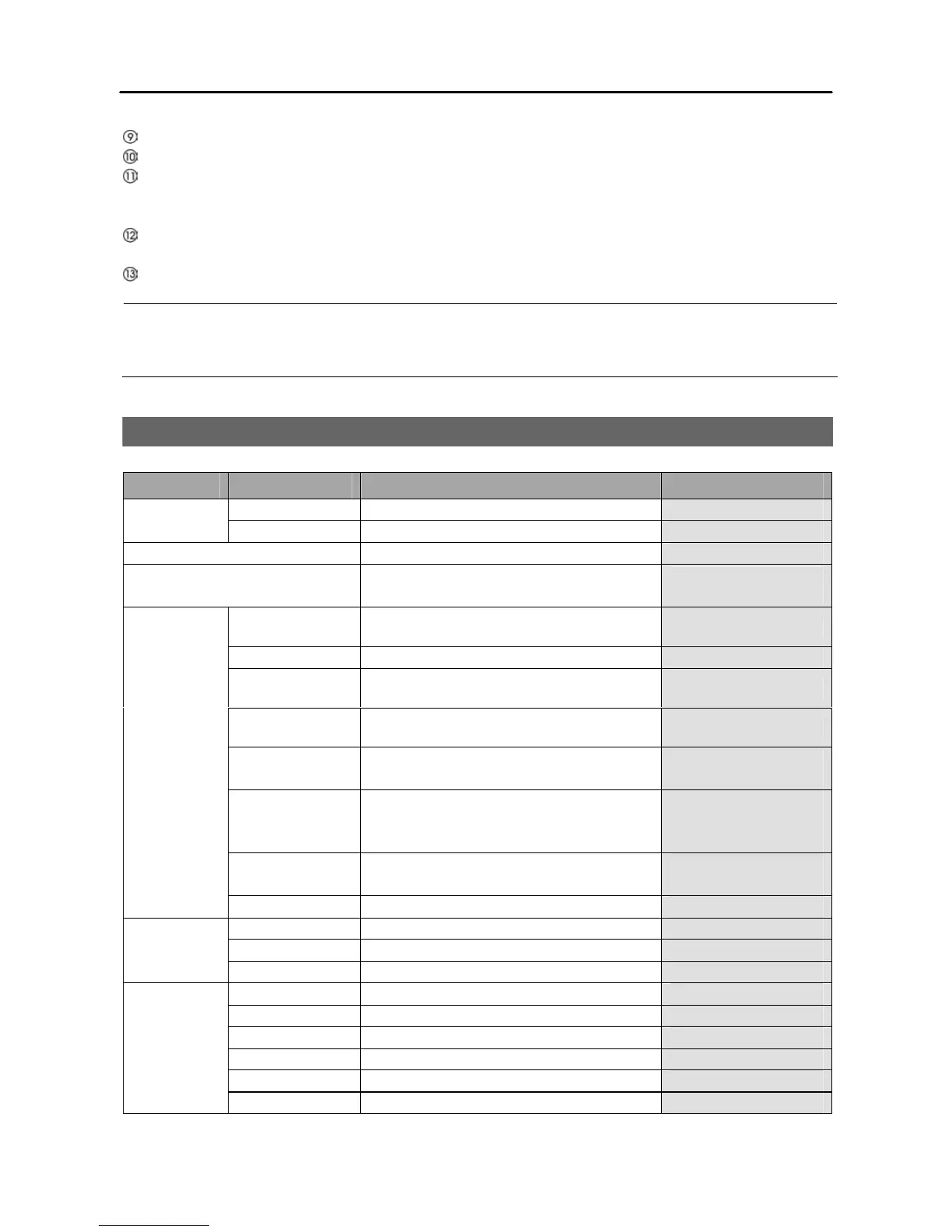
FACTORY DEFAULT SETTINGS
MENU ITEM PARAMETER
DEFAULT SETTING
STANDARD
RECORD SPEED
7.5 / 6.25 / 6 / 5 / 4 / 3 / 2 / 1 / OFF (NTSC)
6.25 / 6 / 5 / 4 / 3 / 2 / 1 / OFF (PAL)
7.5 (NTSC)
6.25 (PAL)
SYSTEM
DATE/TIME
[YYYY-MM-DD] [H-M-S] Current Date/Time
SYSTEM OSD YES / NO YES
SYSTEM SET
PASSWORD
- 4321
STORAGE
OVERWRITE
YES / NO NO
RECORD IPS
30 ~ 1 / OFF (NTSC)
25 ~ 1 / OFF (PAL)
7.5 (NTSC)
6.25 (PAL)
MOTION
DETECT: ON / OFF
SENS:
1 / 2 / 3 / 4 / 5
ZONE:
16x12 blocks
OFF
3
16x12 blocks
ALARM
IN: NC / NO / OFF
OUT: ON / OFF
OFF
OFF
ADVANCED
SETUP
BUZZER BEEP ON / OFF ON
TYPE MANUAL / ADSL / DHCP MANUAL
DNS SERVER - 192.168.1.1
NETWORK
DVRNS ON / OFF OFF
ID 0 ~ 99 0
Protocol Supported PTZ models NONE
BAUD RATE 300 ~ 115200 9600
DATA BIT 7 / 8 8
STOP BIT 1 / 2 1
PTZ
PARITY NONE / EVEN / ODD NONE







 To Next Page