User’s Manual
8
PTZ CONTROL
PTZ control is available for only PTZ cameras that allow pan, tilt, zoom, focus or preset etc.
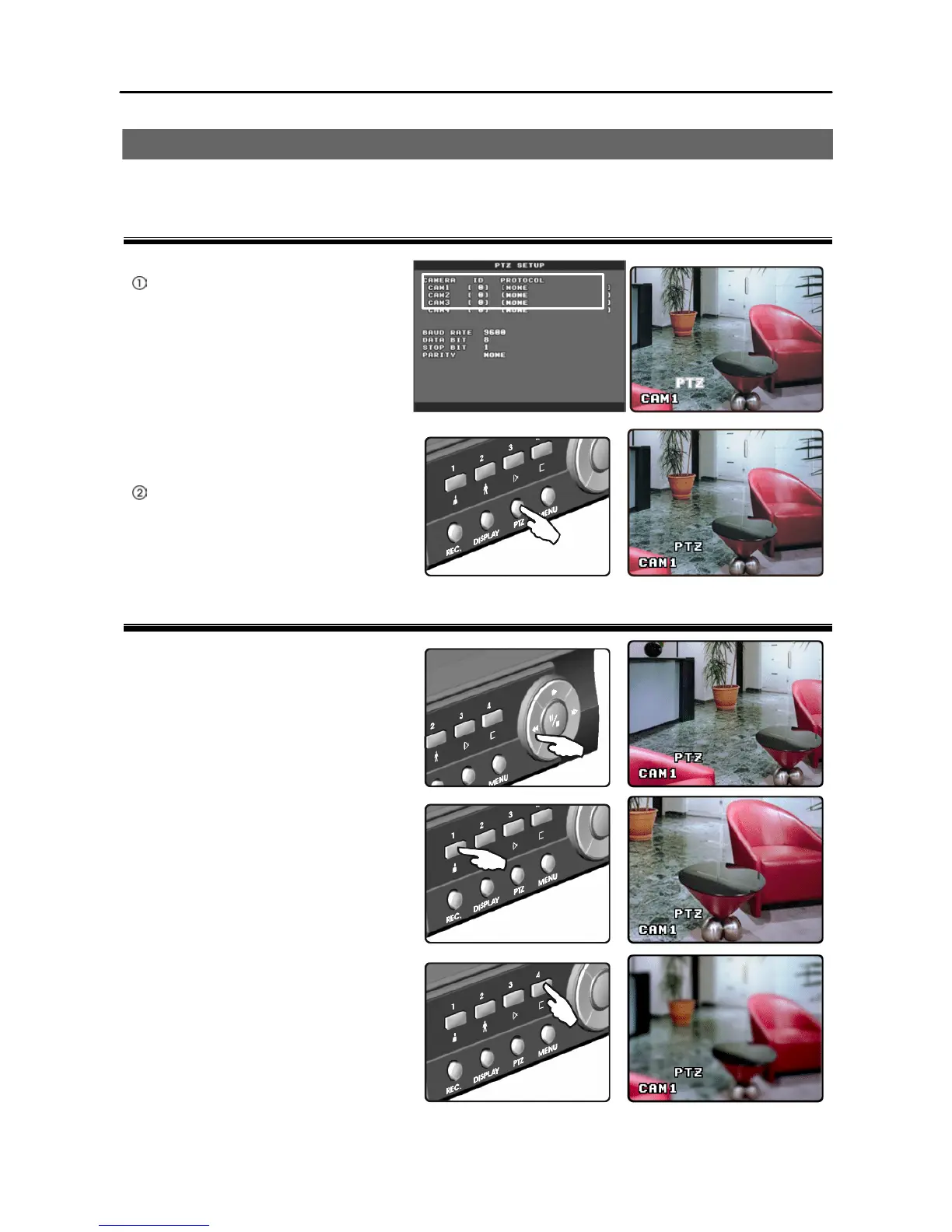
To Enter PTZ Mode
Connect a PTZ device to the
DVR and select the PTZ model at
Main Menu à Advanced
Setup à PTZ Setup.
When the
PTZ model is selected, the PTZ
icon appears on the screen.
Pressing the PTZ button enters PTZ
mode.
To Control PTZ Cameras
Ÿ Pan and tilt
Selecting the PTZ camera to control
and pressing the arrow buttons in
PTZ mode pans or tilts the selected
camera.
Ÿ Zoom
Selecting the PTZ camera to control
and pressing the camera button 1 in
PTZ mode zooms in and pressing the
camera button 2 zooms out.
Ÿ Focus
Selecting the PTZ camera to control
and pressing the camera button 3 in
PTZ mode focuses near and pressing
the camera button 4 focuses far.







 To Next Page