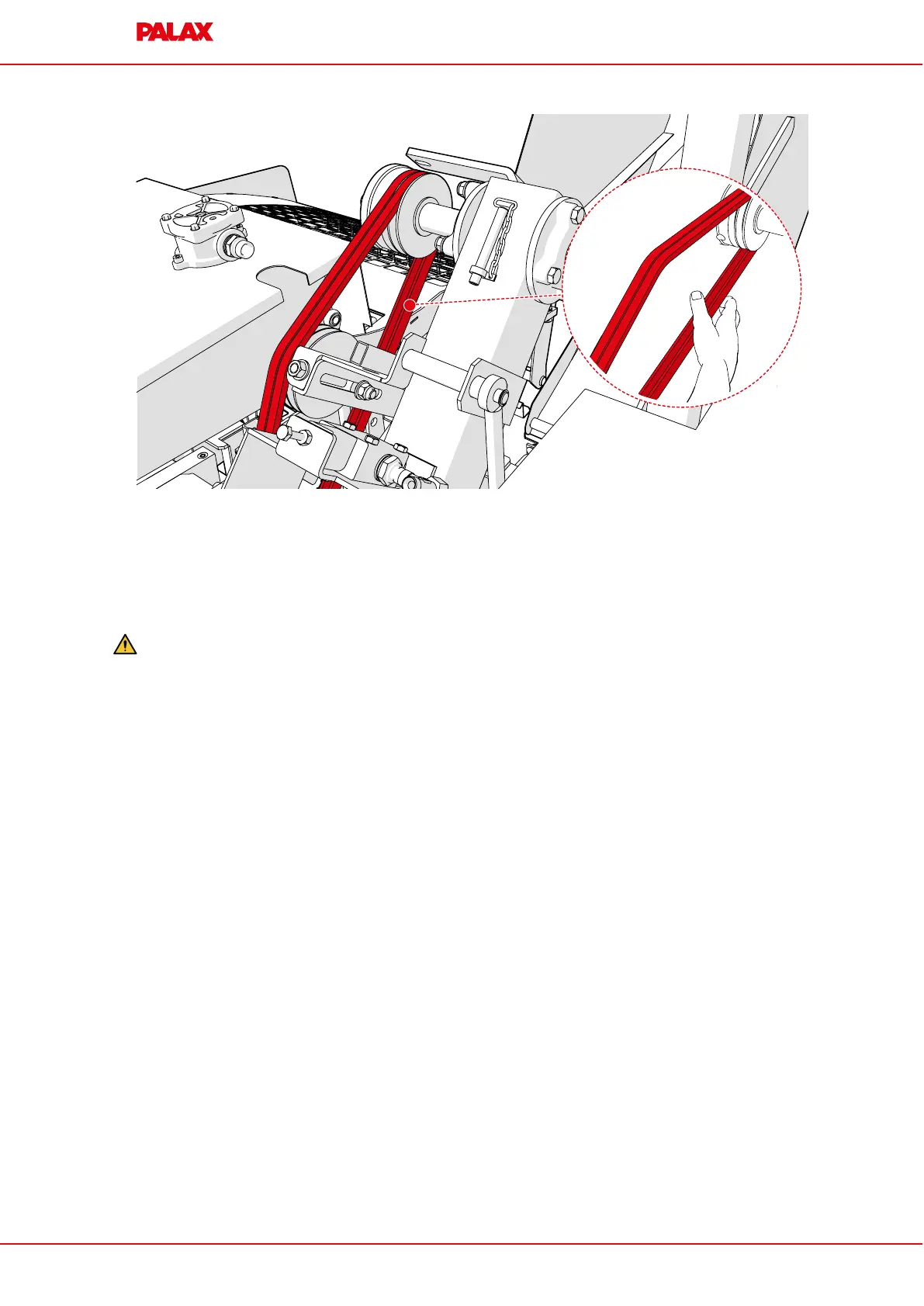
14.12 Replace the V-belts, centre shaft/blade shaft
14.12 Replace the V-belts, centre shaft/blade shaft
If the machine is powered by electric motor, loosen the motor mounting and move the
motor outwards so that there is a gap in which the V-belts fit through.
Warning: Only use V-belts obtained from an official dealer.
1. Remove the circular saw blade.
2. Remove the four nuts on the mounting plate
3. Remove the mounting plate
4. Using the emergency stop lever, loosen the V-belts.
5. Remove the old V-belts and replace them with new ones.
6. Tighten the V-belts using the emergency stop lever.
7. Install the mounting plate back in place.
8. Install the circular saw blade back in place.
9. Tighten the V-belts.
10.Attach the rear protective guard back in place.
11.Install the protective guard back in place.
©
TP SILVA 2023
Version 1.1
63 / 70 Palax C750.2
ORIGINAL INSTRUCTIONS


 To Next Page