EasyManua.ls Logo

Panasonic AG-A800 - System Combinations

Panasonic AG-A800
43 pages
Print Icon
To Next Page IconTo Next Page
To Previous Page IconTo Previous Page
Loading...
System
Combinations
|
Basic
system
|
|
Connection
to
the
video
camera
x
|
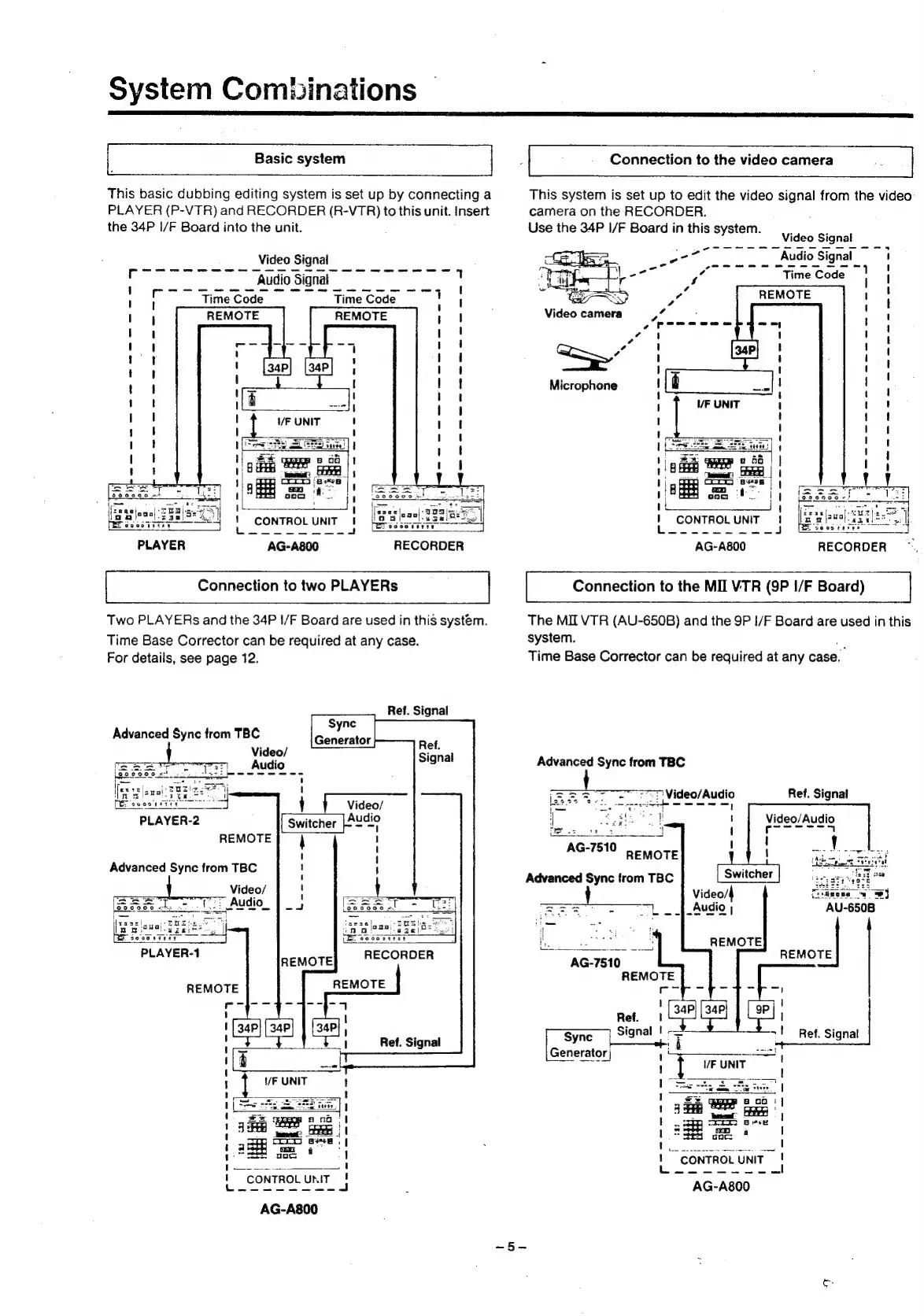
This
basic
dubbing
editing
system
is
set
up
by
connecting
a
This
system
is
set
up
to
edit
the
video
signal
from
the
video:
PLAYER
(P-VTR)
and
RECORDER
(R-VTR)
to
this
unit.
Insert
camera
on
the
RECORDER.
the
34P
I/F
Board
into
the
unit.
Use
the
34P
1/F
Board
in
this
system.
Video
Signal
Video
Signal
Microphone
ise
PLAYER
AG-A800
RECORDER
AG-A800
RECORDER
Connection
to
two
PLAYERs
Connection
to
the
MII
VTR
(9P
I/F
Board)
|
Two
PLAYERs
and
the
34P
I/F
Board
are
used
in
this
system.
The
MII
VTR
(AU-650B)
and
the
9P
I/F
Board
are
used
in
this
Time
Base
Corrector
can
be
required
at
any
case.
system.
ish
For
details,
see
page
12.
Time
Base
Corrector
can
be
required
at
any
case.
Advanced
Sync
from
TBC
7:
Video/Audio
ade
Ref.
Signal
Ue:
REMOTE
AG-7510
PeMOTE
Ad
d
Sync
f
TBC
aiaie
adios
Advanced
Sync
from
TBC
if
ae
A
<
Ss
as
PLAYER-1
etn
REMOTE
REMOTE
|
Ref.
Signal
|
-—
=!
Ref.
Signal
Ref.
Signal
Sync
g
Tt
ef.
Signa
Generator
|
a)
“CONTROL
UNIT
eee
AG-A800

Related product manuals