EasyManua.ls Logo

Panasonic AG-A800 - Control Panel Connectors

Panasonic AG-A800
43 pages
Print Icon
To Next Page IconTo Next Page
To Previous Page IconTo Previous Page
Loading...
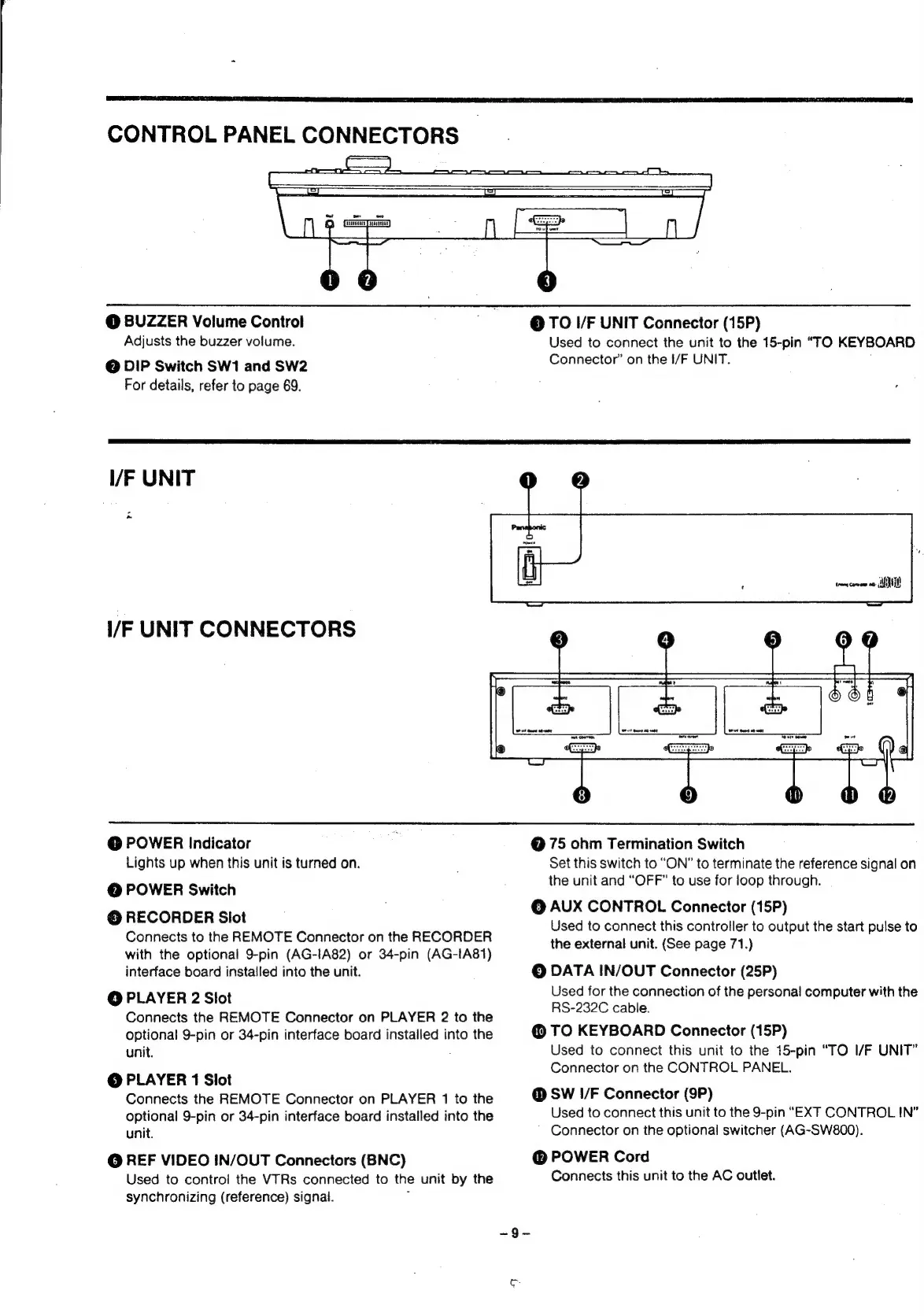
CONTROL
PANEL
CONNECTORS
@
BUZZER
Volume
Control
Adjusts
the
buzzer
volume.
@
DIP
Switch
SW1
and
SW2
For
details,
refer
to
page
69.
@
TO
I/F
UNIT
Connector
(15P)
Used
to
connect
the
unit
to
the
15-pin
“TO
KEYBOARD
Connector’
on
the
I/F
UNIT.
I/F
UNIT
I/F
UNIT
CONNECTORS
rors
come
oo.
MUL
@
POWER
Indicator
Lights
up
when
this
unit
is
turned
on.
@
POWER
Switch
©
RECORDER
Slot
Connects
to
the
REMOTE
Connector
on
the
RECORDER
with
the
optional
9-pin
(AG-IA82)
or
34-pin
(AG-1A81)
interface
board
installed
into
the
unit.
©
PLAYER
2
Slot
Connects
the
REMOTE
Connector
on
PLAYER
2
to
the
optional
9-pin
or
34-pin
interface
board
installed
into
the
unit.
©
PLAYER
1
Slot
Connects
the
REMOTE
Connector
on
PLAYER
1
to
the
optional
9-pin
or
34-pin
interface
board
installed
into
the
unit.
@
REF
VIDEO
IN/OUT
Connectors
(BNC)
Used
to
control
the
VTRs
connected
to
the
unit
by
the
synchronizing
(reference)
signal.
:
@
75
ohm
Termination
Switch
Set
this
switch
to
“ON”
to
terminate
the
reference
signal
on
the
unit
and
“OFF”
to
use
for
jioop
through.
©
AUX
CONTROL
Connector
(15P)
Used
to
connect
this
controller
to
output
the
start
pulse
to
the
external
unit.
(See
page
71.)
©
DATA
IN/OUT
Connector
(25P)
Used
for
the
connection
of
the
personal
computer
with
the
RS-232C
cable.
@
TO
KEYBOARD
Connector
(15P)
Used
to
connect
this
unit
to
the
15-pin
“TO
I/F
UNIT”
Connector
on
the
CONTROL
PANEL.
@
SW
!/F
Connector
(9P)
Used
to
connect
this
unit
to
the
9-pin
“EXT
CONTROL
IN”
Connector
on
the
optional
switcher
(AG-SW800).
POWER
Cord
Connects
this
unit
to
the
AC
outlet.

Related product manuals