EasyManua.ls Logo

Panasonic AG-A800 - Interface Board

Panasonic AG-A800
43 pages
Print Icon
To Next Page IconTo Next Page
To Previous Page IconTo Previous Page
Loading...
INTERFACE
BOARD
|
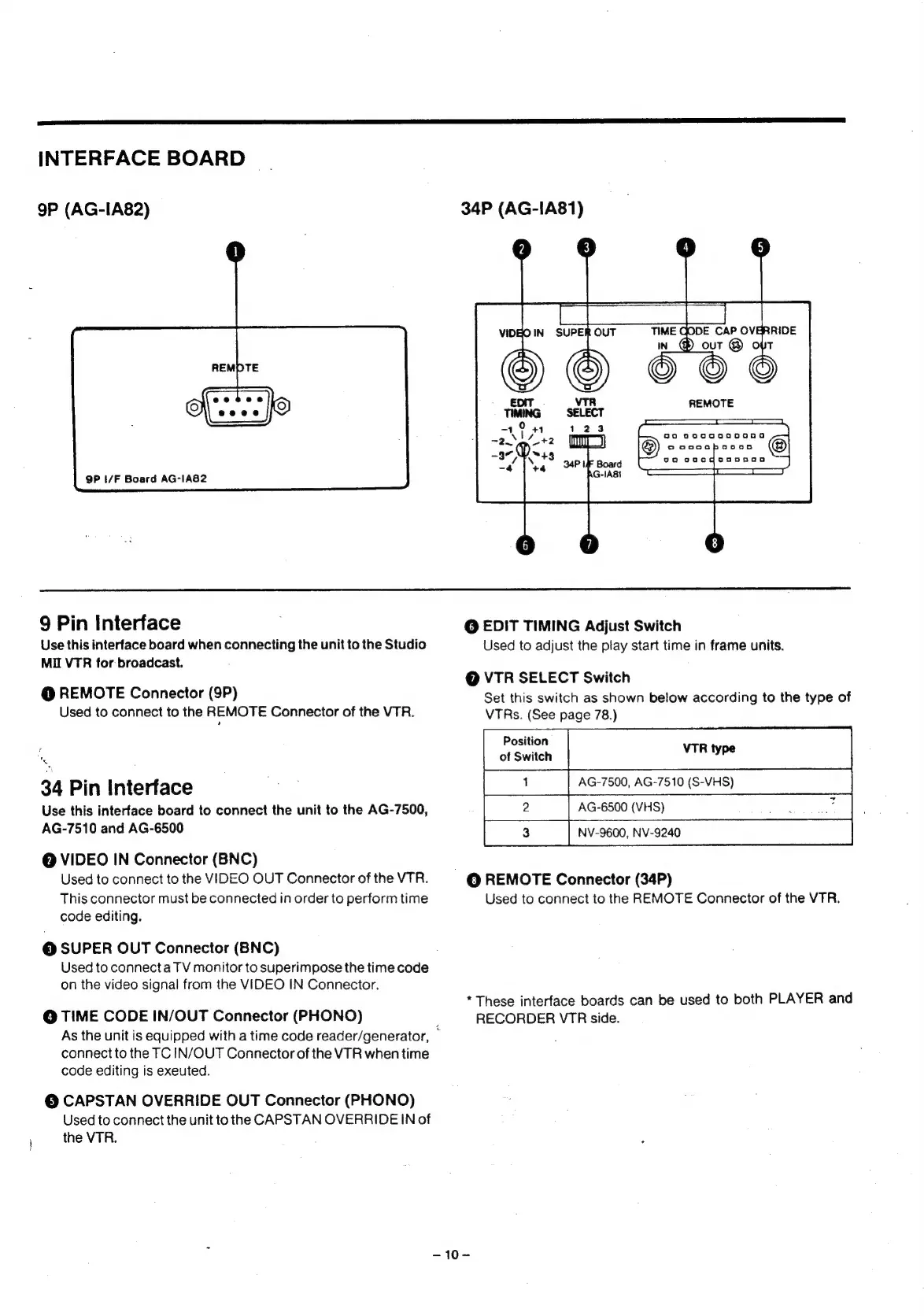
9P
(AG-IA82)
9P
I/F
Board
AG-IA82
9
Pin
Interface
Use
this
interface
board
when
connecting
the
unit
to
the
Studio
MI
VTR
for
broadcast.
@
REMOTE
Connector
(9P)
Used
to
connect
to
the
REMOTE
Connector
of
the
VTR.
N
34
Pin
Interface
Use
this
interface
board
to
connect
the
unit
to
the
AG-7500,
AG-7510
and
AG-6500
@
VIDEO
IN
Connector
(BNC)
Used
to
connect
to
the
VIDEO
OUT
Connector
of
the
VTR.
This
connector
must
be
connected
in
order
to
perform
time
code
editing.
©
SUPER
OUT
Connector
(BNC)
Used
to
connect
a
TV
monitor
to
superimpose
the
time
code
on
the
video
signal
from
the
VIDEO
IN
Connector.
©
TIME
CODE
IN/OUT
Connector
(PHONO)
As
the
unit
is
equipped
with
a
time
code
reader/generator,
;
connect
to
the
TC
IN/OUT
Connector
of
the
VTR
when
time
code
editing
is
exeuted.
@
CAPSTAN
OVERRIDE
OUT
Connector
(PHONO)
Used
to
connect
the
unit
to
the
CAPSTAN
OVERRIDE
IN
of
the
VTR.
34P
(AG-IA81)
so
0oeccaga00nG
©
aoecaboonGo
@|
goa
oaaqooosana
1S
eS
@
EDIT
TIMING
Adjust
Switch
Used
to
adjust
the
play
start
time
in
frame
units.
@
VTR
SELECT
Switch
Set
this
switch
as
shown
below
according
to
the
type
of
VTRs.
(See
page
78.)
Position
of
Switch
AG-7500,
AG-7510
(S-VHS)
~
AG-6500
(VHS)
ke
ae
NV-9600,
NV-9240
©
REMOTE
Connector
(34P)
Used
to
connect
to
the
REMOTE
Connector
of
the
VTR.
*
These
interface
boards
can
be
used
to
both
PLAYER
and
RECORDER
VTR
side.
-~10-