EasyManua.ls Logo

Panasonic AG-A800 - Error Messages

Panasonic AG-A800
43 pages
Print Icon
To Next Page IconTo Next Page
To Previous Page IconTo Previous Page
Loading...
Pulse
signal
from
the
AUX
Control
Connector
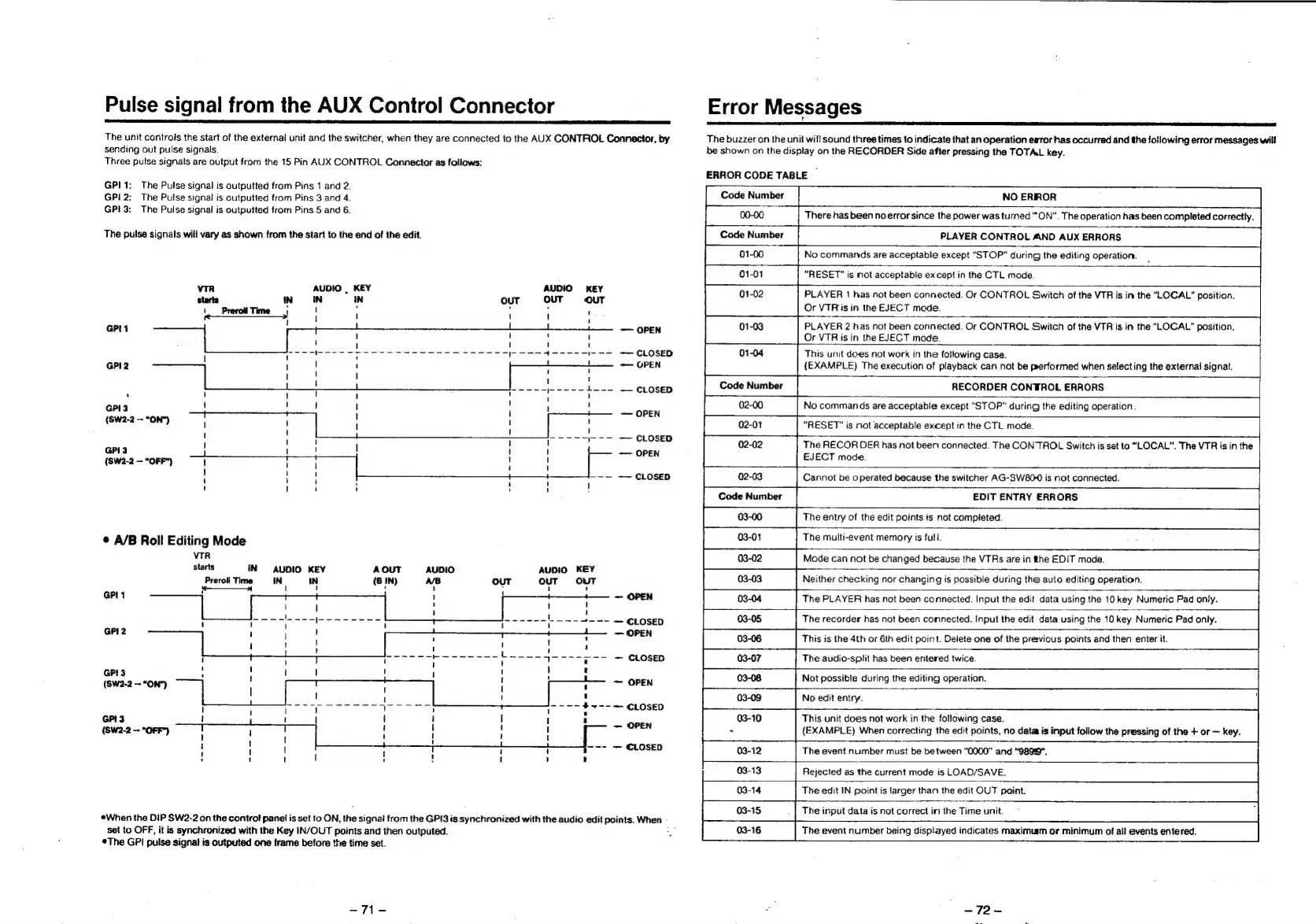
The
unit
controls
the
start
of
the
external
unit
and
the
switcher,
when
they
are
connected
to
the
AUX
CONTROL
Connector,
by
sending
out
pulse
signals.
Three
pulse
signals
are
output
from
the
15
Pin
AUX
CONTROL
Connector
as
follows:
GP!
1:
The
Putse
signal
is
outputted
from
Pins
1
and
2.
GPI
2:
The
Pulse
signal
is
outputted
from
Pins
3
and
4.
GPI3:
The
Pulse
signal
is
outputted
from
Pins
5
and
6.
The
pulse
signals
will
vary
as
shown
from
the
start
to
the
end
of
the
edit.
viR
AUDIO
|
KEY
AUDIO
KEY
starts
IN
IN IN
out
OUT
ouT
\_Preroll
Time
j
|
{
SS
1
GPIt
!
——
OPEN
CLOSED
GPI2
——
OPEN
Dr
L---
CLOSED
GPI3
!
OPEN
(SW2-2
~“ON*)
!
1
'
I
;
i)
GPI3
;
\ '
H
i
OPEN
(SW2-2
—“OFF*)
1
:
H
i
;
;
!
~—
CLOSED
'
i
H
©
A/B
Roll
Editing
Mode
vTR
starts
IN
AUDIO
KEY
AOUT
AUDIO
AUDIO
KEY
Preroli
Time
IN IN
(B
IN)
A/B
OUT
ouT
OUT
=
1
t
,
'
!
4
GPI1
OPEN
When
the
DIP
SW2-2
on
the
control
panel
is
set
to
ON,
the
eisigitel
from
the
GPI3
is
synchronized
with
the
audio
edit
points.
When
set
to
OFF,
it
is
synchronized
with
the
Key
IN/OUT
points
and
then
outputed.
*The
GP!
pulse
signa!
is
outputed
one
frame
before
the
time
set.
-71-
Error
Messages
The
buzzer
on
the
unit
will
sound
three
times
to
indicate
that
an
operation
ewror
has
occurred
and
the
following
error
messages
will
be
shown
on
the
display
on
the
RECORDER
Side
after
pressing
the
TOTAL
key.
ERROR
CODE
TABLE
~
Code
Number
NO
ERROR
00-00
There
has
been
no
error
since
the
power
was
turned
“ON”.
The
operation
has
been
completed
correctly.
Code
Number
PLAYER
CONTROL
AND
AUX
ERRORS
No
commands
are
acceptable
except
“STOP”
during
the
editing
operation.
“RESET”
is
not
acceptable
ex
cept
in
the
CTL
mode.
PLAYER
1
has
not
been
connected.
Or
CONTROL
Switch
of
the
VTR
is
in
the
“LOCAL”
position.
Or
VTRis
in
the
EJECT
mode.
01-03
PLAYER
2
has
not
been
connected.
Or
CONTROL
Switch
of
the
VTR
is
in
the
“LOCAL”
position.
Or
VTR
is
in
the
EJECT
mode.
This
unit
does
not
work
in
the
following
case.
(EXAMPLE)
The
execution
of
playback
can
not
be
performed
when
selecting
the
external
signal.
Code
Number
RECORDER
CONTROL
ERRORS
No
commands
are
acceptable
except
“STOP”
during
the
editing
operation.
“RESET”
is
not
acceptable
except
in
the
CTL
mode.
The
RECOR
DER
has
not
been
connected.
The
CONTROL
Switch
is
set
to
“LOCAL”.
The
VTR
is
in
the
EJECT
mode.
02-03
Cannot
be
o
perated
because
the
switcher
AG-SW80-0
is
not
connected.
Code
Number
EDIT
ENTRY
ERRORS
The
entry
of
the
edit
points
is
not
completed.
03-01
The
multi-event
memory
is
full.
Mode
can
not
be
changed
because
the
VTRs
are
in
the
EDIT
mode.
Neither
checking
nor
changing
is
possible
during
the
auto
editing
operation.
03-04
The
PLAYER
has
not
been
connected.
Input
the
edit
data
using
the
10
key
Numeric
Pad
only.
03-05
The
recorder
has
not
been
connected.
Input
the
edit
data
using
the
10
key
Numeric
Pad
only.
03-06
This
is
the
4th
or
6th
edit
point.
Delete
one
of
the
previous
points
and
then
enter
it.
03-07
The
audio-split
has
been
entered
twice.
03-08
Not
possible
during
the
editing
operation.
03-09
No
edit
entry.
\
03-10
This
unit
does
not
work
in
the
following
case.
+
(EXAMPLE)
When
correcting
the
edit
points,
no
data
is
input
follow
the
pressing
of
the
+
or
key.
03-12
The
event
number
must
be be
tween
“0000”
and
“9899”.
03-13
Rejected
as
the
current
mode
is
LOAD/SAVE.
03-14
The
edit
IN
point
is
larger
than
the
edit
OUT
point.
The
input
data
is
not
correct
in
the
Time
unit.
The
event
number
being
displayed
indicates
maximum
or
minimum
of
all
events
entered.
~72-