ENGLISH
Description
of parts
E-14
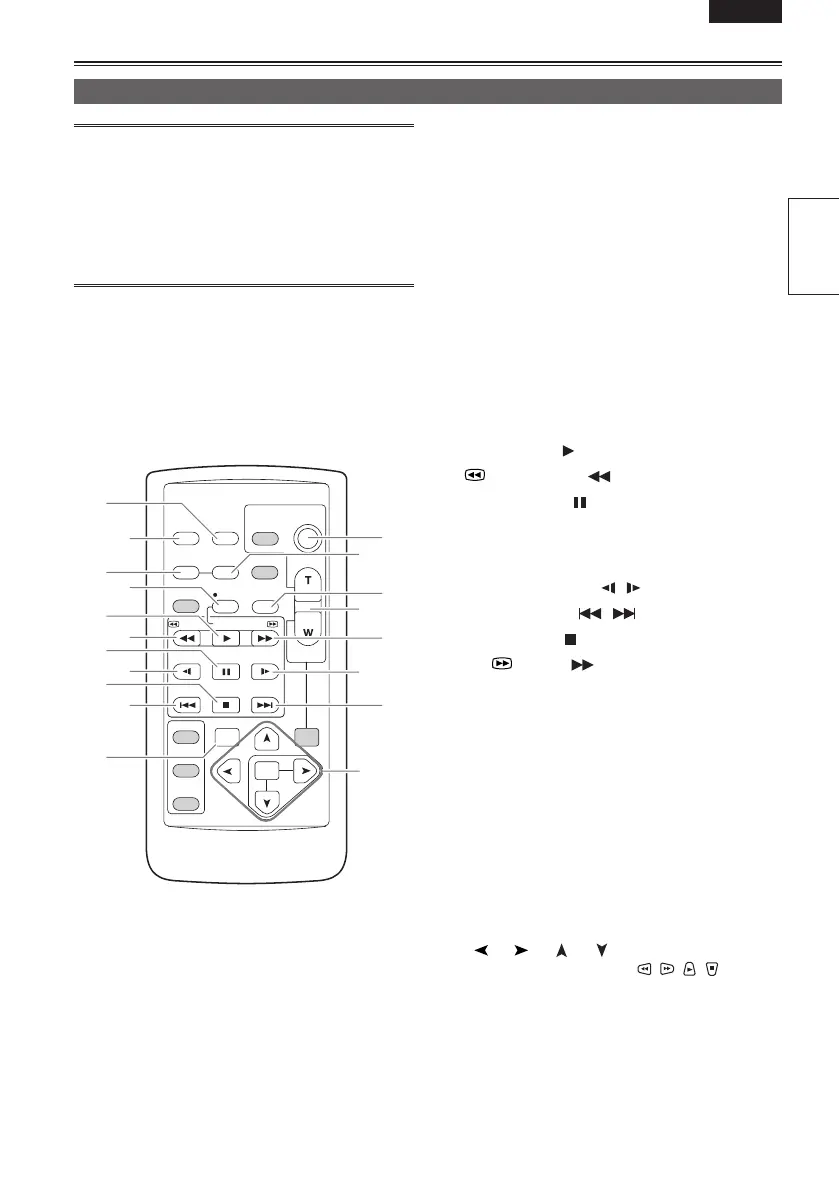
The following buttons are for functions that cannot
be executed on the camera-recorder.
• PHOTO SHOT
• MULTI/P-IN-P
• STORE
• PB. ZOOM
• TITLE
• SELECT
• OFF/ON
1 DATE/TIME button (Page 74)
2 OSD button (Page 74)
3 COUNTER button (Page 57)
Same function as the COUNTER button on the
main unit.
4 COUNTER RESET button (Page 57)
Same function as the COUNTER RESET
button on the main unit.
5 A.DUB button (Page 79)
Same function as the AUDIO DUB button on
the main unit.
6 REC button (Page 86)
Used during VCR mode
7 PLAY button (
) (Page 61)
8
/REW button ( ) (Page 61)
9 PAUSE button (
) (Page 61)
Like the operation buttons of the camera,
MENU operations are performed using SET
button.
10 STILL ADV button (
, ) (Page 72)
11 INDEX buttons (
, ) (Page 74)
12 STOP button (
) (Page 61)
13 FF/
button ( ) (Page 61)
Buttons for shooting and volume control
14 START/STOP button
Same function as the START/STOP button on
the main unit.
15 ZOOM/VOL buttons (Pages 32 and 74)
16 VAR. SEARCH button (Page 72)
17 MENU button
Functions the same as the MENU button on the
camera.
[
], [ ], [ ], [ ] buttons
Function the same as the
, , , buttons
on the camera.
OSD
COUNTER
RESET TITLE
STILL A D V
P A US E
STILL A D V
INDEX
SELECT
S T OR E
OFF/ON
P . B .DIGI T A L
V AR .
SEARCH
V O L +
-
P B .
ZOOM
MENU
SET
ITEM
S T O P INDEX
MU L TI /
P-IN-P
REC A.DUB
PL A Y /REW FF/
ZOOM
D A TE /
TIME
P H O T O
SH O T
S T A R T /
S T O P
1
14
4
5
15
13
10
11
17
2
3
6
7
8
9
10
12
11
16
Remote control



 To Next Page