E-31
Using SD memory cards
You can use SD memory cards to save and load
SCENE files and USER files. (Page 55)
Installing and removing the SD
memory card
Installation
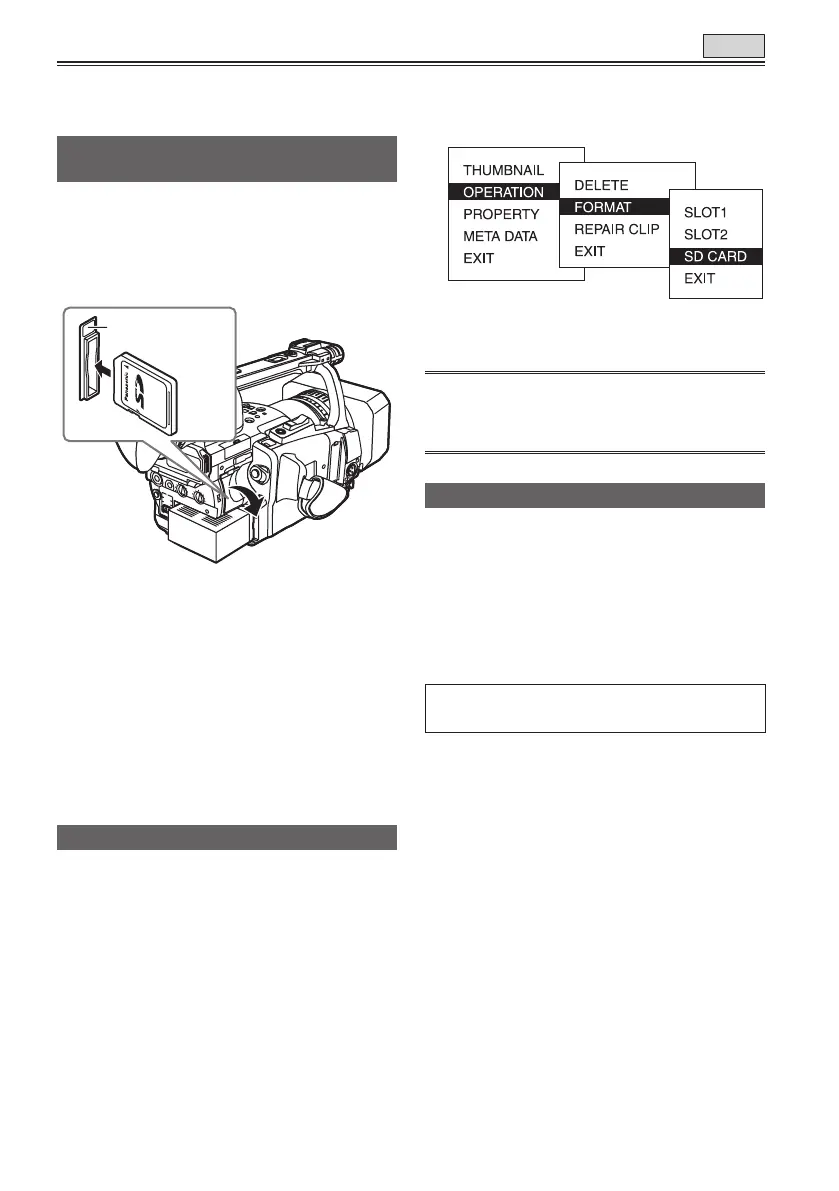
1 Open the cover, and insert the card while
making sure it is oriented in the proper
direction.
L
O
C
K
2 Close the cover.
Removal
1 Open the cover, and check that the access
lamp is not lit.
2 Press the card further into the unit, grasp
the card, and then remove.
3 Close the cover.
Formatting SD memory card
1 Switch the MEDIA switch to “P2”.
2 Set the POWER switch to ON. (Page 19)
3 Press the mode button and set it to MCR
mode (the MCR/VCR lamp lights).
4 Press the MENU button.
5 On the menu, select OPERATION, FORMAT
and then SD CARD. (Page 68)
• Select EXIT to cancel the formatting.
6 Select YES on the confirmation screen.
• The selected SD memory card is formatted.
You can also format from the SD CARD FORMAT
option on the CARD FUNCTIONS screen. (Page
113)
Cautions in using SD memory cards
• SD memory cards used with the AG-HVX200
should conform to SD standards. Be sure to
format cards using the AG-HVX200.
To format SD memory cards using a personal
computer, download the dedicated software from
the support site.
SD memory cards with the following capacity
(8MB - 2GB) can be used for the AG-HVX200:
For the latest information not available in the
Operating Instructions, visit the P2 Support Desk
at the following Web sites.
https://eww.pavc.panasonic.co.jp/pro-av/
• SD memory cards must not be used or stored in
an environment where they may be
Exposed to high temperatures/humidities;
Exposed to water droplets; or
Electrically charged.
• Be sure always close the cover when using an
SD memory card.
• You cannot use the SD memory card in the TAPE
mode.
TAPE
Access lamp
8 MB 16 MB 32 MB 64 MB 128 MB
256 MB 512 MB 1 GB 2 GB





 To Next Page