E-49
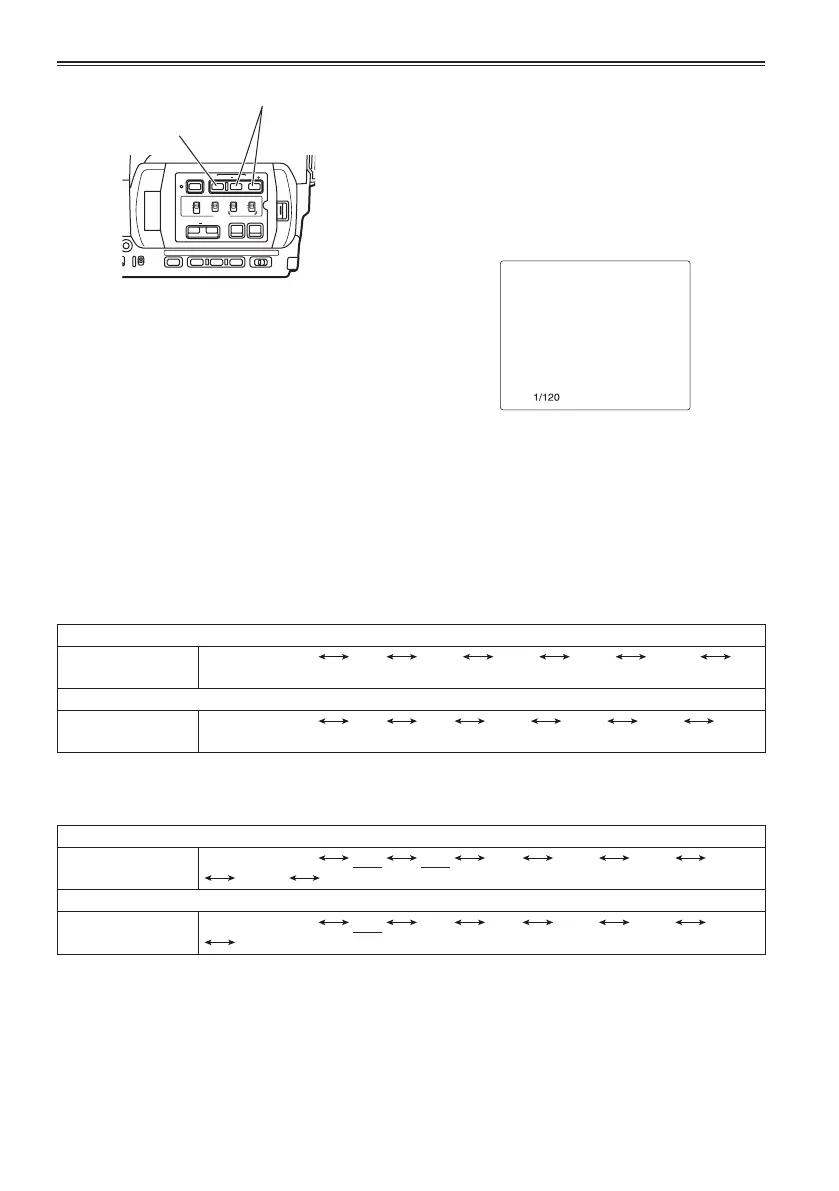
1 Press the SHUTTER button.
Each time you press the SHUTTER button, the
shutter speed switches between normal (OFF)
and the speed you selected with the SPEED
SEL button.
2 After you have pressed the SHUTTER
button, press SPEED SEL to select the
shutter speed.
The shutter speed changes as follows each
time you press SPEED SEL + (The order is
reversed for the SHUTTER SEL - button.)
• Remember that the faster the shutter speed,
the lower the sensitivity.
• If iris is set to auto, then it will open wider with
higher shutter speeds and thereby reduce
focal depth.
• It will take longer to focus when the
shutter speed has been reduced so it is
recommended that the unit be secured to a
tripod, etc. for use.
PUSH STILL
The current shutter speed appears on the
viewfinder and LCD screens unless you have
selected OFF in OTHER DISPLAY in the
DISPLAY SETUP screen of the setup menus.
It is not displayed if you have set the shutter
speed to normal (OFF).
SHUTTER button
CH 1 SELECT CH 2 SELECT
INPUT 1 INPUT 2
INT(L)
INPUT 1
INPUT 2
INT(R)
INPUT 2
ON
OFF
BARS
AUDIO
SHUTTER
SPEED SEL
COUNTER RESET/TC SET
ZEBRA OIS
RESET
ON
OFF
MIC POWER +48V
SPEED SEL button
Adjusting the shutter speed
With the 1080i/50i, 720/50P and 576i/50i formats
Standard (OFF)
1/50
SYNCRO SCAN 1/60 1/120 1/250 1/500 1/1000
1/2000
All other formats (25P)
Standard (OFF)
1/50
SYNCRO SCAN
1/25 1/60 1/120 1/250 1/500
1/1000
When FILM CAM is selected as the OPERATION TYPE option setting (Page 99)
With the 1080i/50i, 720/50P and 576i/50i formats
Standard (OFF)
1/50
SYNCRO SCAN
1/12 1/25 1/60 1/120 1/250 1/500
1/1000 1/2000
With the 25P and 25PN formats
Standard (OFF)
1/50
SYNCRO SCAN
1/12 1/25 1/60 1/120 1/250 1/500
1/1000
When VIDEO CAM is selected as the OPERATION TYPE option setting (Page 99) (slow shutter speeds
are underlined)





 To Next Page