Displays
ENGLISH
E-94
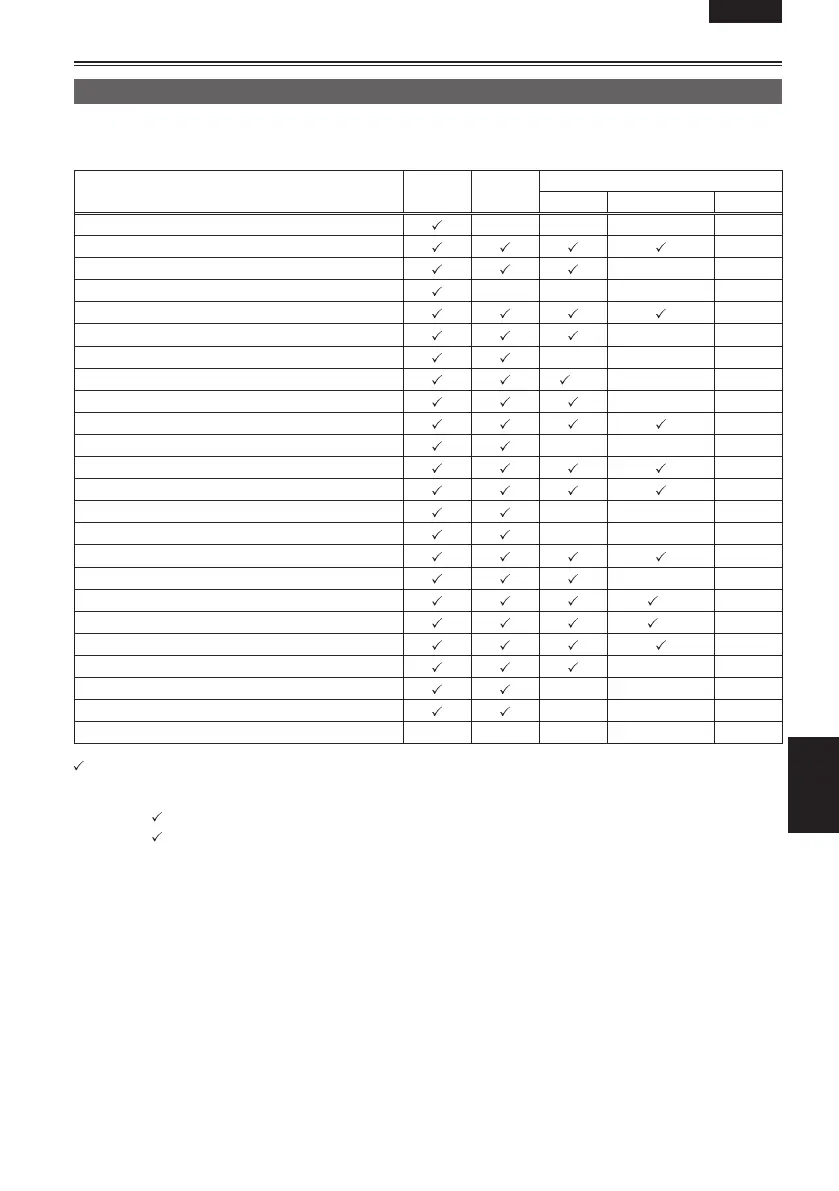
Setting the DISPLAY items
Display the following items on the viewfinder and LCD monitor screen by pressing the DISP/MODE CHK
button or by configuring OTHER DISPLAY of the DISPLAY SETUP screen of the setup menus. (Page 112)
Displays
MODE
CHECK
DISPLAY
Audio dubbing mode
ALL PARTIAL OFF
1 Time code display ————
3 AUTO/MANUAL switch operation display
x
5 Recording format/recording time display
xx
7 Information display
—xxx
8 Squeeze information display
x
9 Microphone level auto-control display
xx
12 Calendar display
———
13 Recording/playback frame rate display
∗
1
xx
14 Audio-sampling frequency display
xx
15 Shutter speed display
x
16 Audio level meter display
———
17 Auto-IRIS control display
x
18 IRIS display
x
19 Zoom position display
———
20 Focus control display
———
22 Recommended ND filter display
x
23 ND filter display
xx
24 Gain display
∗
2
x
26 AWB information display
∗
3
x
28 Optical Image Stabilizer display
x
29 Scene file name/DUB display
xx
30 Remaining battery display
———
31 Media remaining memory display ———
36 Safety zone display — — — — —
— : Displayed depending on other settings
The item in
in the MODE CHECK space appears when you press and hold the DISP/MODE CHK button.
The item in
in the DISPLAY space disappears when you press the DISP/MODE CHK button.
∗
1 Not displayed when FRAME RATE is set to 50i.
∗
2 0 dB is not displayed.
∗
3 Only preset 3.2K and 5.6K are displayed.
: Displayed x : Not displayed





 To Next Page