Preparation
ENGLISH
E-16
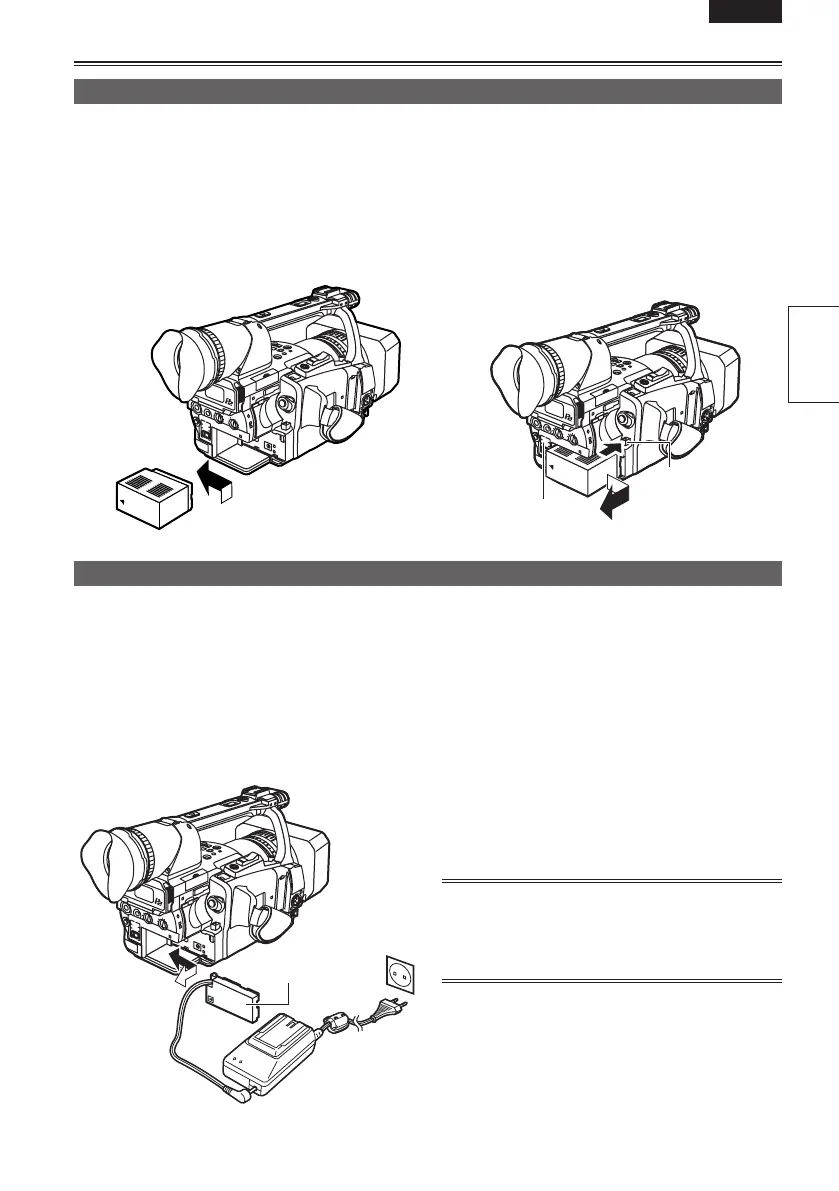
Installing and removing the power supply
Installation
Insert the battery until it clicks into place.
Removal
1 Set the POWER switch to OFF, and check
that the mode lamp is off.
2 Remove the battery while pressing the
battery release button.
• Support the battery with your hand to ensure
that it will not fall.
Installation
1 Connect the DC cord to the AC adapter.
2 Plug the AC power supply cord into the
power outlet.
3 Insert the DC cord’s battery connector until
it clicks into place.
Removal
1 Set the POWER switch to OFF, and check
that the mode lamp is off.
2 Remove the DC cord’s battery connector
while pressing the battery release button.
3 Disconnect the AC power supply cord from
the power outlet.
• You cannot charge the battery when supplying
power to the camera-recorder from the AC
adapter.
CAUTION:
• Disconnect the AC power supply cord from the
power outlet when the unit is not going to be
used.
DC cord’s battery
connector
Battery release
button
Mode lamp
Installing and removing the battery
Connecting and disconnecting the power cord





 To Next Page