E-81
Nonlinear editing with P2 card (PC mode)
You can edit the video data on P2 cards nonlinearly
by connecting the unit to a computer used for
editing by means of a USB cable (Windows) or 1394
cable (Apple Macintosh). (Connections : Page 76)
The following conditions must be met if
the USB cable is to be used to make the
connection.
• Your computer must run Windows 2000 or
Windows XP.
• USB dedicated driver (provided on the CD-ROM
supplied) must be installed in your computer.
• Your computer must support USB2.0 (High
Speed, Mass Storage Class).
(USB 1.1 is not supported.)
• Only one computer can be connected.
• No operations can be performed if a hub or other
unit is connected between the unit and your
computer.
Do not use a USB cable longer than 3 meters.
Otherwise, malfunctions may occur.
• Operation is not guaranteed in Macintosh
operating systems.
The following conditions must be met if
the 1394 cable is to be used to make the
connection.
• Your computer must run Apple MacOSX 10.3 or
later.
• Your computer must support 1394.a (SBP2
protocol).
• Operation is not guaranteed in Windows
operating systems.
• Insert the P2 card into the unit, and set the
MEDIA switch to the P2 position. (Page 24)
P2
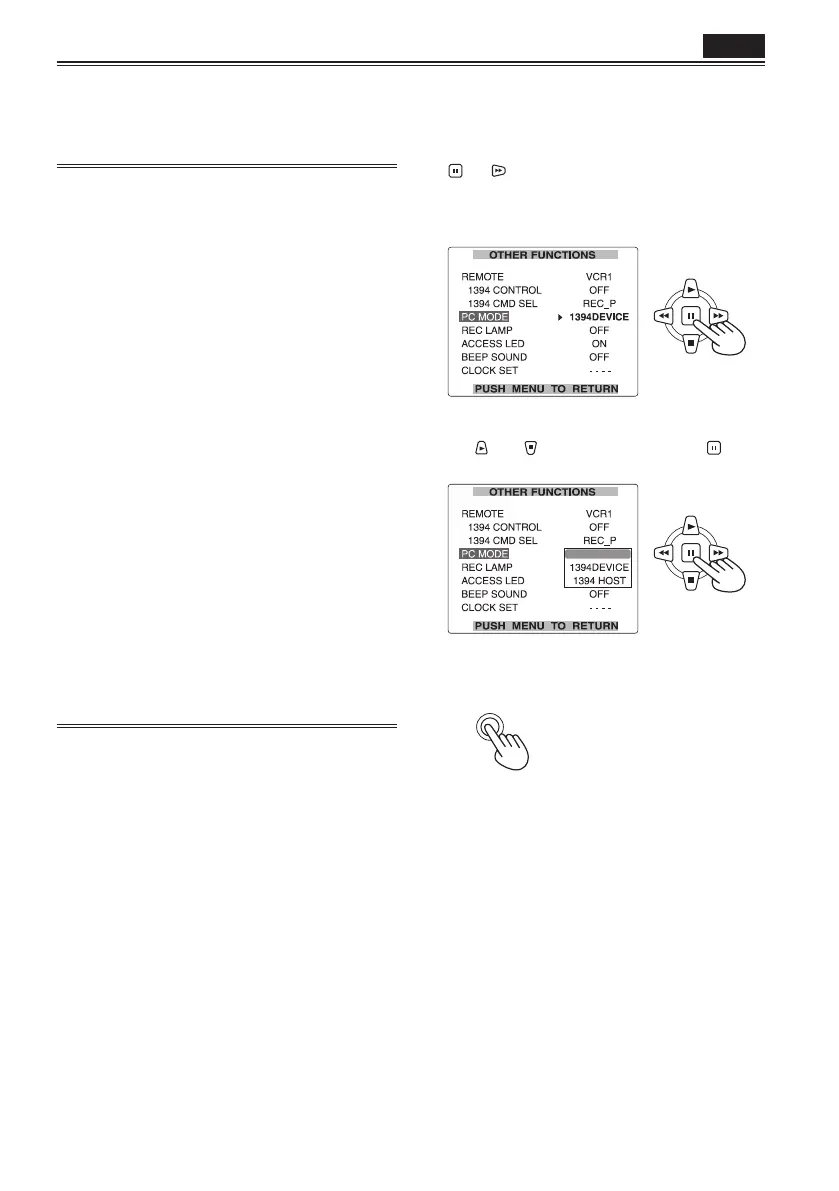
1 Set the unit’s POWER switch to ON.
2 Select PC MODE on the setting menu
OTHER FUNCTIONS screen, and press the
(or ) button.
• For menu operations (Page 95)
• You can also use the menu buttons on the
remote control. (Page 14)
3 Select USB DEVICE or 1394 DEVICE using
the
and buttons, and press the
button.
USB DEVICE
4 Press the MENU button twice to release
menu mode.
MENU





 To Next Page