E-77
1
2
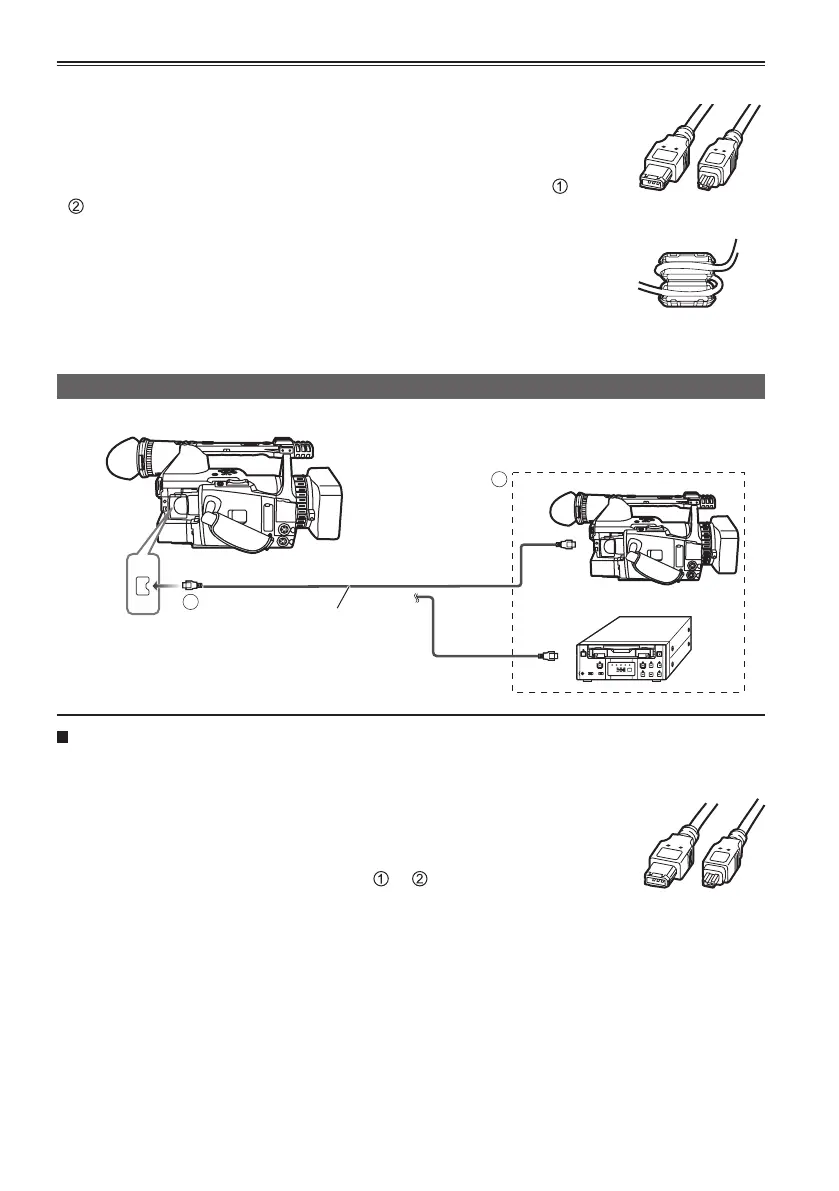
1394
Digital video equipment (Dubbing)
You can connect a digital video unit equipped with a DV connector and digitally transfer video
and audio signals as well as time code.
•
Before proceeding to connect or disconnect 1394 cable, be absolutely sure to turn off the power of the units.
• Before proceeding to connect the unit which uses a 6-pin type 1394 connector,
carefully check the shape of the 1394 cable and the connectors on the 1394
cable. Connecting a connector upside down may damage the parts inside the
unit and cause malfunctioning. Furthermore, connect the 1394 cable to the unit
which uses a 6-pin type 1394 connector first. (
→ )
• When recording signals from an external unit, first check that video signals are
supplied.
• While signals from an external unit are being recorded, do not stop output on the
external unit side or disconnect any of cables. This may lead to a failure to recognize the signals when
you do recording again.
• Do not apply force when connecting 1394 cable to 1394 connector as this may damage the connector.
• No guarantees are made for the playback images when signals from an external device are recorded.
(Video check level)
• The automatic recording function in the DVD unit may not function properly. In a case like this, proceed
with the recording manually.
•
When dubbing DVCPRO50 material, set the DIF SPEED of the unit at the transmission end to S200 or higher.
This camera
1394 cable (optional)
4-pin type
Other Digital video equipment
6-pin
type
4-pin
type
Connecting external units (continued)
•
Before proceeding to connect or disconnect 1394 cable, be absolutely sure to turn off the power of the units.
• Before proceeding to connect the unit which uses a 6-pin type 1394
connector, carefully check the shape of the 1394 cable and the connectors
on the 1394 cable. Connecting a connector upside down may damage the
parts inside the unit and cause malfunctioning. Furthermore, connect the
1394 cable to the unit which uses a 6-pin type 1394 connector first. (
→
). The above also applies to USB cable as well.
• Do not apply force when connecting 1394 cable to 1394 connector as this may
damage the connector.
• When connecting to a PC, attach the ferrite core (provided) to the 1394 cable
in such a way that the whole ferrite core fits within about 5 cm from the PC’s
connectors. After threading the cable as shown in the figure on the right, close
the ferrite core until it clicks into place and locks.
6-pin
type
4-pin
type
Ferrite core (provided)





 To Next Page