Playback
ENGLISH
E-70
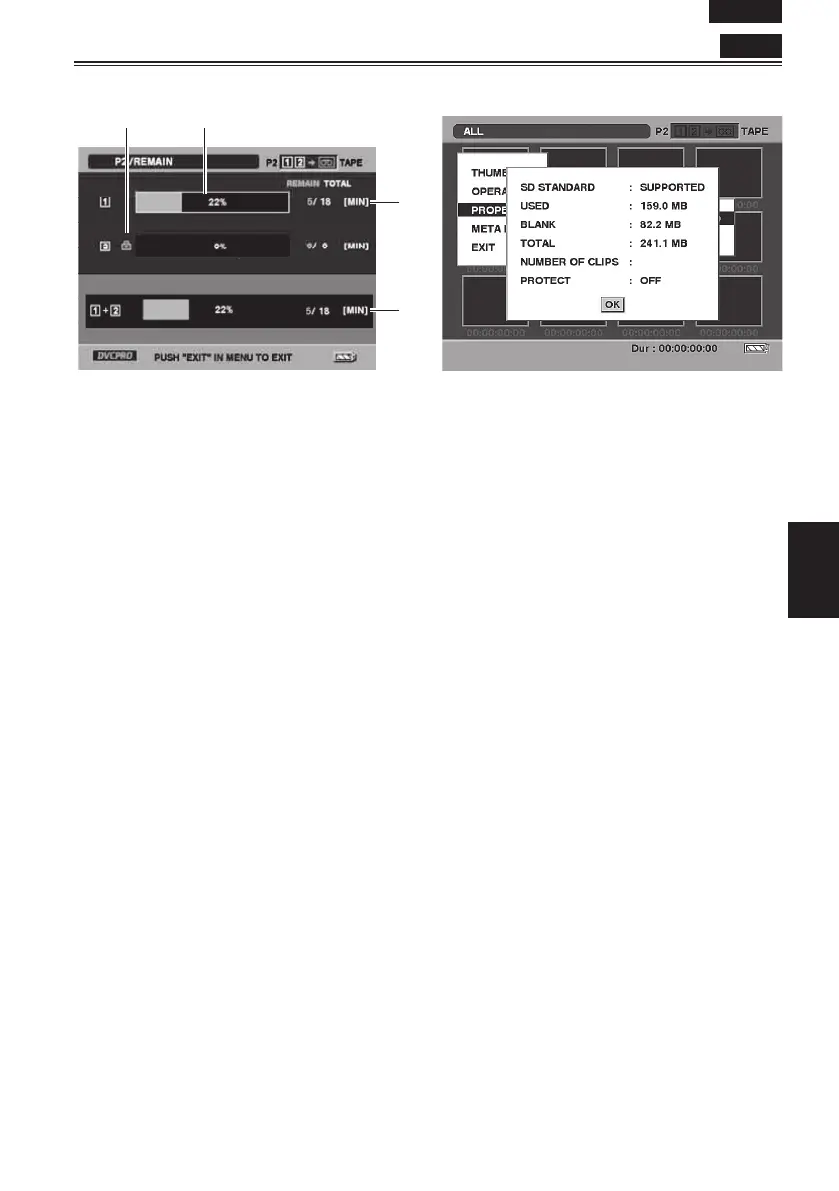
P2 card information screen
12
1 Write protection mark
2 P2 card status
The amount of memory remaining on the P2
card is displayed using a percentage bar. The
following displays may appear, depending on
the card status.
FORMAT ERROR:
An unformatted P2 card has been inserted.
NOT SUPPORTED:
A card not supported by the unit has been
inserted.
NO CARD:
A card has not been inserted.
• The information on the card in the selected
slot (indicated by the yellow number) can be
viewed by pressing the SET button.
BRAND: Name of manufacturer
MODEL NO.: Model number
SERIAL NO.: Serial number
USER ID: User ID
3 P2 card remaining memory/total memory
The P2 card’s remaining memory and total
memory are displayed here in 1-minute
increments. Fractions of a minute are rounded
off, meaning the display may not match the slot
total.
4 Slot total
The figure represents the total remaining
memory of the cards in the two slots. If a P2
card is write-protected, its remaining memory
will not be included in the total remaining
memory.
SD memory card information screen
SD STANDARD:
This indicates whether the SD memory card was
formatted in compliance with the SD standard
(SUPPORTED/NOT SUPPORTED).
USED: Space used
BLANK: Space available
TOTAL: Total space
NUMBER OF CLIPS: Number of clips
PROTECT:
This indicates that the SD memory card is write-
protected.
P2











 To Next Page