ENGLISH
- 18 (E) -
AW-E750 or AW-E655 models:
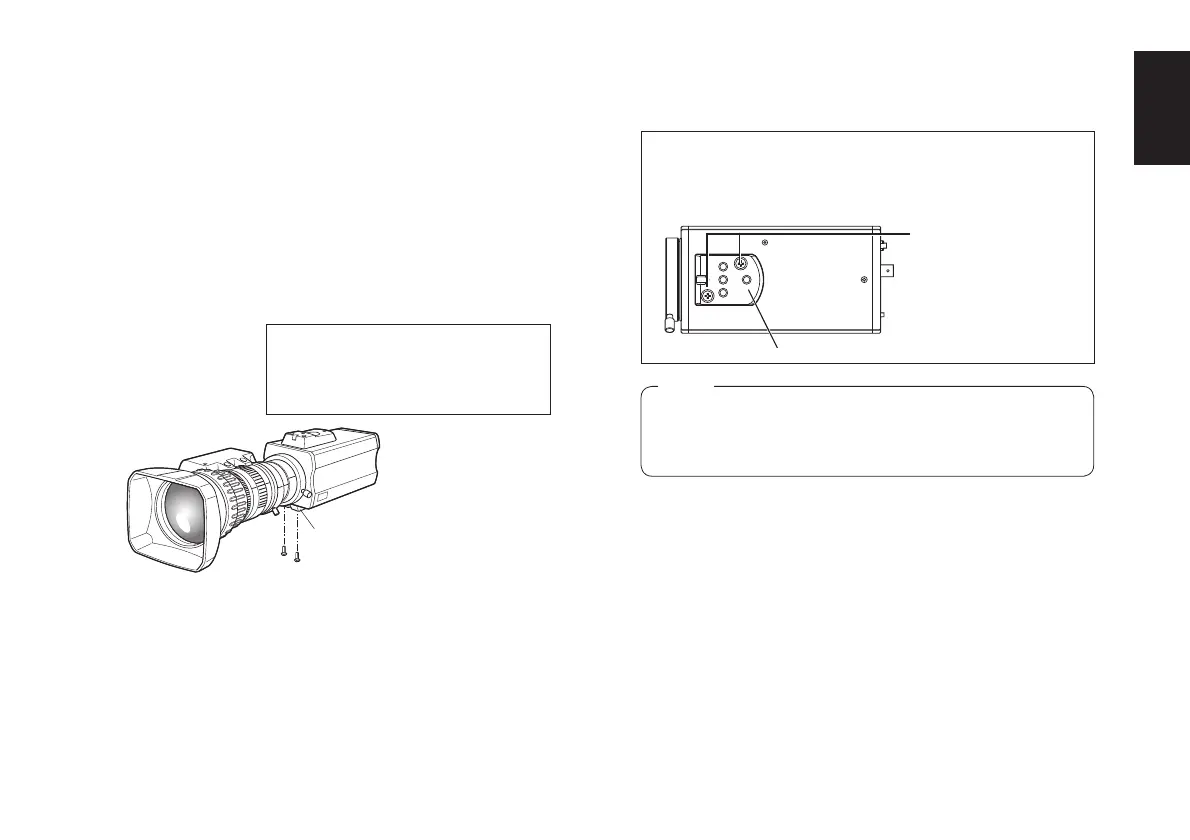
Use the screws provided to attach the accessory
camera mounting adapter to the bottom panel of the
camera.
AW-E650 or AW-E350 models:
Use the screws provided to attach the accessory
camera mounting adapter to the top or bottom panel
of the camera.
w Mounting the camera onto a camera mounting base (pan-tilt head or tripod)
Fix the camera mounting base, pan/tilt unit, and
tripod securely in the camera mounting screw hole
(Inch screw: 1/4-20UNC) of the attached camera
mounting adapter.
Use a screwdriver or similar to tighten the screws to
secure the camera mounting adapter.
Make sure that the camera mounting adapter is attached
the right way round.
Camer mounting adapter (supplied)
Mounting screws for
adapter (supplied)
Note
p Install the camera mounting adapter by tightening
it securely with a torque of 1.5 N • m (15 kgf • cm),
and check that there is no unsteadiness.
For use in a very bright location, paste
the supplied round seal on the hole
not used by the camera mounting
adapter.
Camera mounting
adapter



 To Next Page