- 17 (E) -
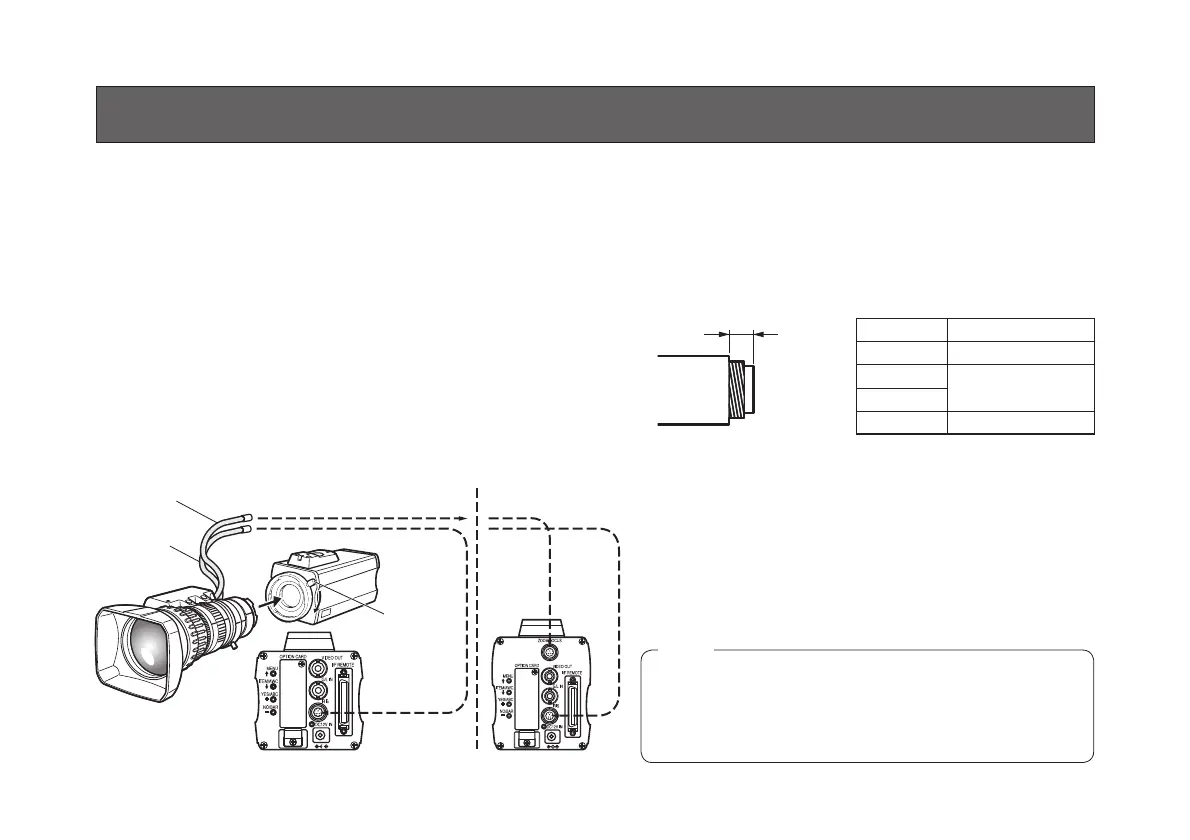
w Lens mounting
AW-E750, AW-E655, AW-E650
(Bayonet mount type of lens)
• Use the lens extension cable AW-CA12T12A (6˝/15 cm)
if your lens cable is too short.
Rotate the lens fixing ring knob counterclockwise and
remove the lens mount cap.
Mount the lens on the camera and rotate the lens
fixing ring knob clockwise in order to fix the lens
securely.
Connect the camera cable to the IRIS connector on
the back panel of the camera.
MOUNTING
AW-E350 (C mount type of lens)
• A 1/3-inch C mount type of lens can be used.
Be absolutely sure that a lens whose mount threads
extend no more than 4.3 mm from the lens mount
surface is used. Use of any other kind of lens may
damage the camera unit.
• Some lenses need to be attached in a different way.
Therefore, reference should also be made to the
operating instructions that accompany the lens.
Remove the lens mount cap, align the lens with
the thread ridges on the lens mount and screw it
securely into place.
Connect the lens cable to the IRIS connector.
Less than 4.3 mm
(AW-E750, AW-E650, AW-E350)
To Lens I/F Connector of
Camera Pan/tilt Unit
(model AW-E655 only)
Control Cable
Camera Cable
To Iris
Connector
Lens fixing
ring knob
<Recommended lenses>
Note
p Tighten the lens mount lock ring securely to secure
the lens, and check that there is no unsteadiness in
the lens. Also check that there is no unsteadiness
in the hood.
The connection and installation should be done by
qualified service personnel or system installers.
Refer any servicing to qualified service personnel.
Camera Lens
AW-E350 AW-LZ16MD55P
AW-E650
AW-LZ16MD73P
AW-E655
AW-E750 AW-LZ17MD9AG



 To Next Page