ENGLISH
- 36 (E) -
w TOTAL PEDESTAL LEVEL ADJUSTMENT
(Use an oscilloscope or a waveform monitor for this
adjustment.)
This step is to adjust the black levels (pedestal levels) of two
or more cameras to be the same.
[ADJUSTMENT by CAMERA or multi hybrid control panel]
1. Close the lens.
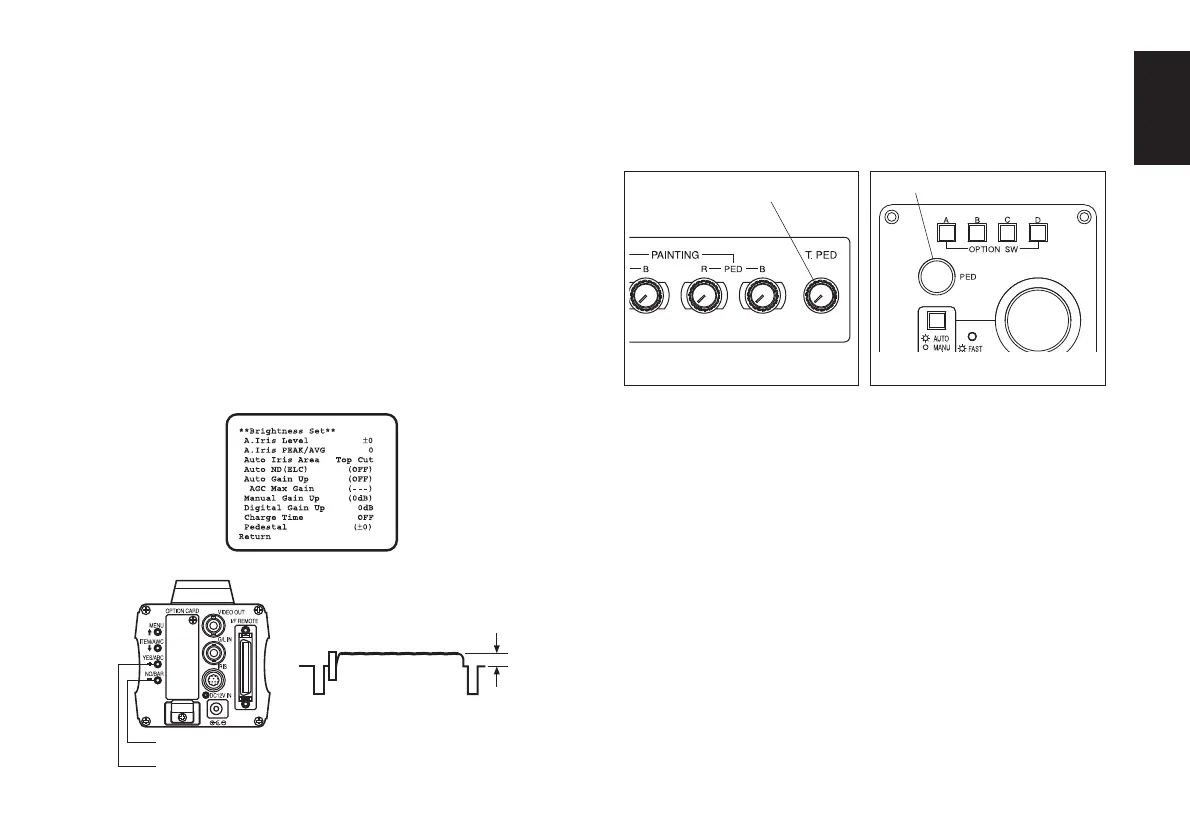
2. Select Pedestal item in the brightness setting Sub Menu
(Select [Pedestal] in the [Iris, Shutter, Gain Set] sub
menu in USER MODE.)
3. Set the pedestal level to 0.025 V with the YES/ABC
switch or the NO/BAR switch.
[ADJUSTMENT with RCU or ROP]
Adjust the pedestal level to 0.025 V with the total pedestal
adjustment control or PED dial.
NO/BAR Switch
YES/ABC Switch
0.025 V
Remote control unit
Total pedestal
adjustment control
Remote operation panel
PED dial



 To Next Page