ENGLISH
- 46 (E) -
w Setting and Changing of
the Setting (Halogen Mode,
Fluorescent Mode, Outdoor Mode)
Brightness Set Display
1. Video Level Adjustment [A.Iris Level: –50 to +50]
Convergence level of AUTO IRIS/AUTO GAIN UP/
AUTO ND (ELC) can be adjusted.
2. Detecting Ratio Adjustment
[A.Iris PEAK/AVG: P50 to A50]
The ratio of AUTO IRIS/AUTO GAIN UP/AUTO ND
(ELC) detected peak to average can be adjusted
within a predetermined range.
3. Photometric Measurement Method Setting
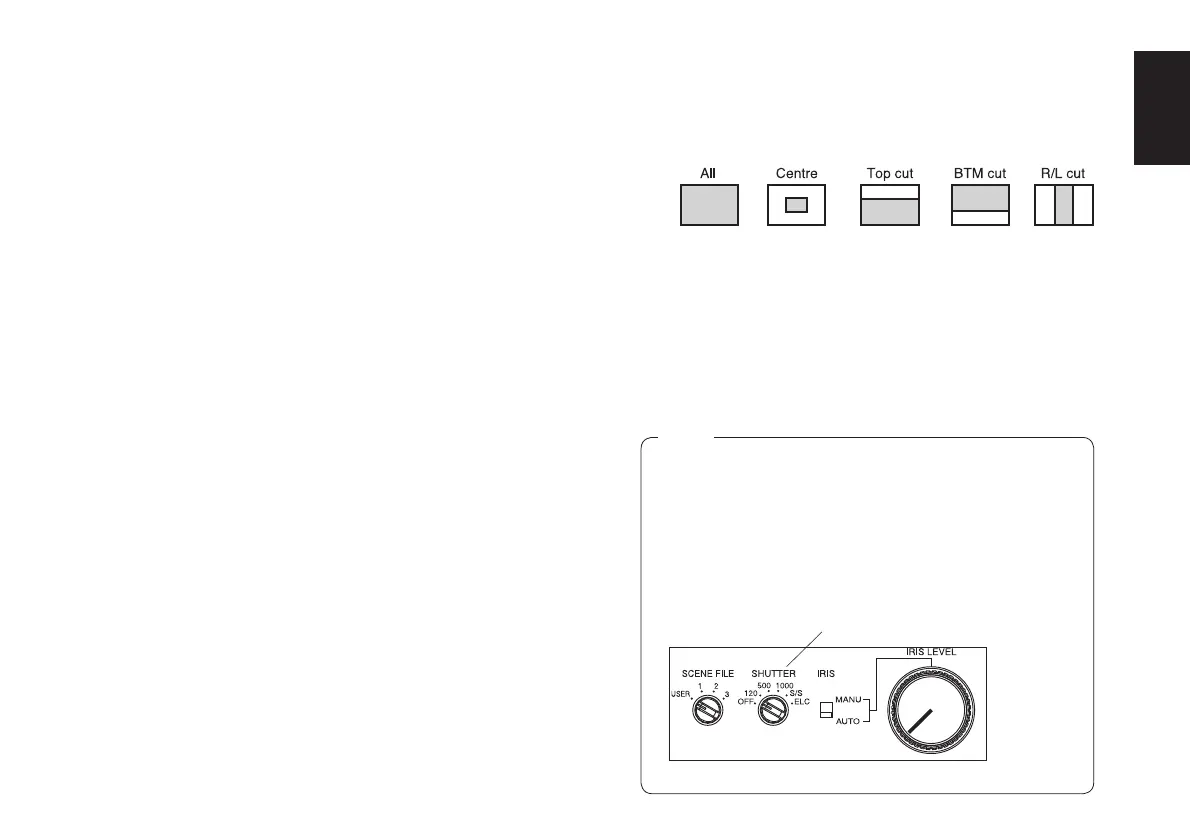
[Auto Iris Area: All, Centre, Top cut, BTM cut, R/L cut]
A photometric measurement method can be selected
for AUTO IRIS/AUTO GAIN UP/AUTO ND (ELC).
All: All the screen area is measured.
Centre: The screen is measured mainly in the centre
area, about one-third of both the top and bottom
and one-third of both the right and left portions of
the screen are excluded from measurement.
Top cut: About one-third of the top part of the screen
is excluded from measurement.
BTM cut: About one-third of the bottom portion of the
screen is excluded from measurement.
R/L cut: About one-third of both the right and
left portions of the screen are excluded from
measurement.
4. Auto ND (ELC) Setting [Auto ND (ELC): ON, OFF]
This cannot be set unless either “OFF” or “Auto” has
been set for the CCD storage time setting (-9).
ON: The electronic shutter is controlled to
automatically adjust the luminance.
OFF: Luminance is not automatically adjusted by the
electronic shutter.
• ON is automatically selected when the electronic
shutter (-2) on the submenu [Other Set] is set to
[Auto ND]. OFF is selected when other than [Auto
ND] is selected.
• ON is selected when the electronic shutter
selector switch is set to [ELC] in RCU mode, and
OFF is selected when it is set to other than [ELC].
Notes
Remote control unit
Electronic shutter selector switch



 To Next Page