Before Use
- 7 -
Quick Guide
This is the overview of the procedure to record pictures with this camera. For each
operation, be sure to refer to the corresponding pages.
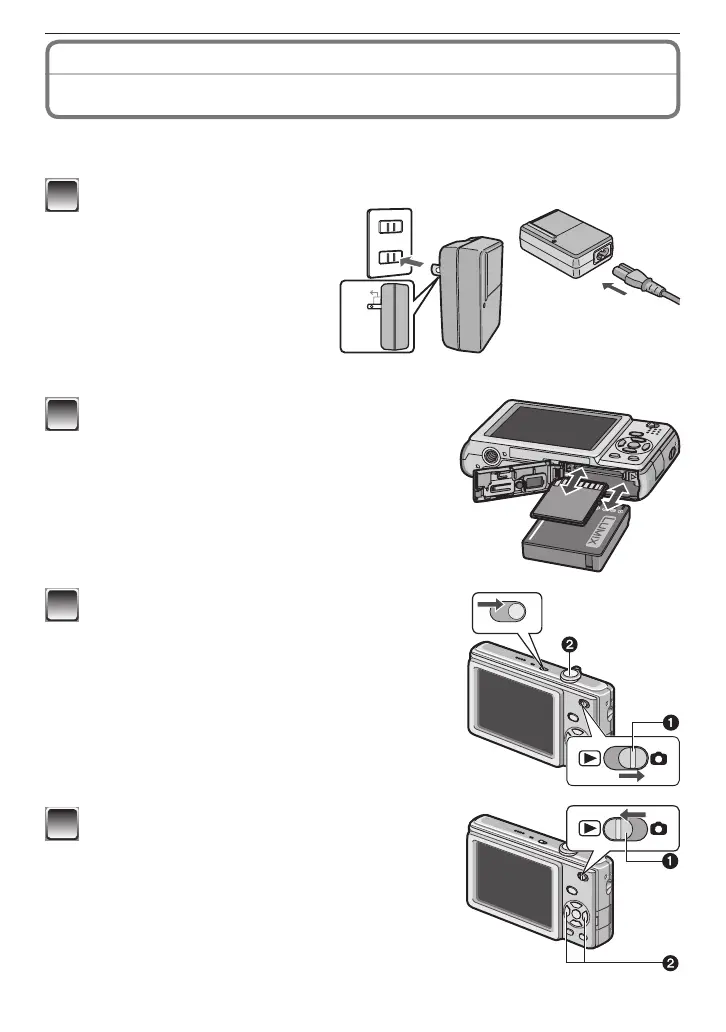
plug-in type
inlet type
1
Charge the battery. (P11)
• The battery is not charged
when the camera is shipped.
Charge the battery before
use.
2
Insert the battery and the card.
• When you do not use the card (optional), you
can record or play back pictures on the built-
in memory. Refer to P17 when you use a card.
3
Turn the camera on to take pictures.
• Set the clock. (P18)
1
Set the recording/playback switch to [
1
].
2
Press the shutter button to take pictures. (P29)
4
Play back the pictures.
1
Set the recording/playback switch to [
5
].
2
Select the picture you want to view. (P37)











 To Next Page