Preparation
16
VQT1B99
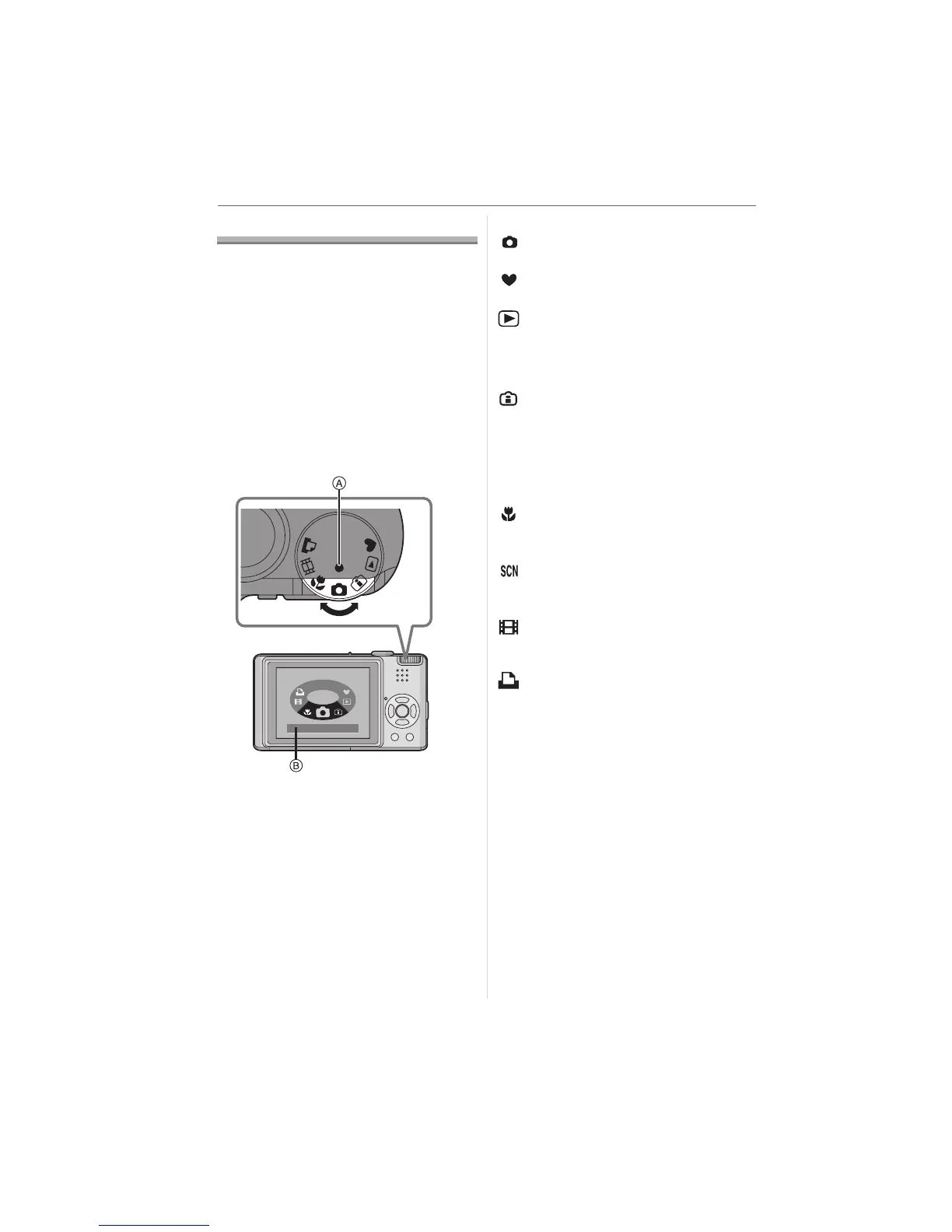
About the Mode Dial
If you turn on this unit and then rotate
the mode dial, you can not only switch
between recording and playback but
also switch to macro mode to take a
close-up picture of a subject or to a
scene mode that matches your
recording purpose.
∫ Selecting the mode
Align a desired mode with the part A.
Rotate the mode dial slowly and surely to
adjust to each mode. (Do not adjust it to
parts where there is no mode.)
• The above screen B appears on the LCD
monitor if the mode dial is rotated. (P21)
The mode currently selected appears on
the LCD monitor when the camera is
turned on.
∫ Basic
: Normal picture mode (P23)
Use this mode for normal recording.
: Simple mode (P25)
This mode is recommended for beginners.
: Playback mode (P30)
This mode allows you to play back
recorded pictures.
∫ Advanced
: Intelligent ISO sensitivity mode
(P42)
This mode automatically sets the optimal
ISO sensitivity and shutter speed according
to the movement and the brightness of the
subject.
: Macro mode (P43)
This allows you to take close-up pictures of
a subject.
: Scene mode (P44)
This allows you to take pictures that match
the scene being recorded.
: Motion picture mode (P52)
This mode allows you to record motion
pictures.
: Print mode (P90)
Use this to print pictures.
NORMAL PICTURE
SC
N
SCN












 To Next Page