Preparation
9
VQT1B99
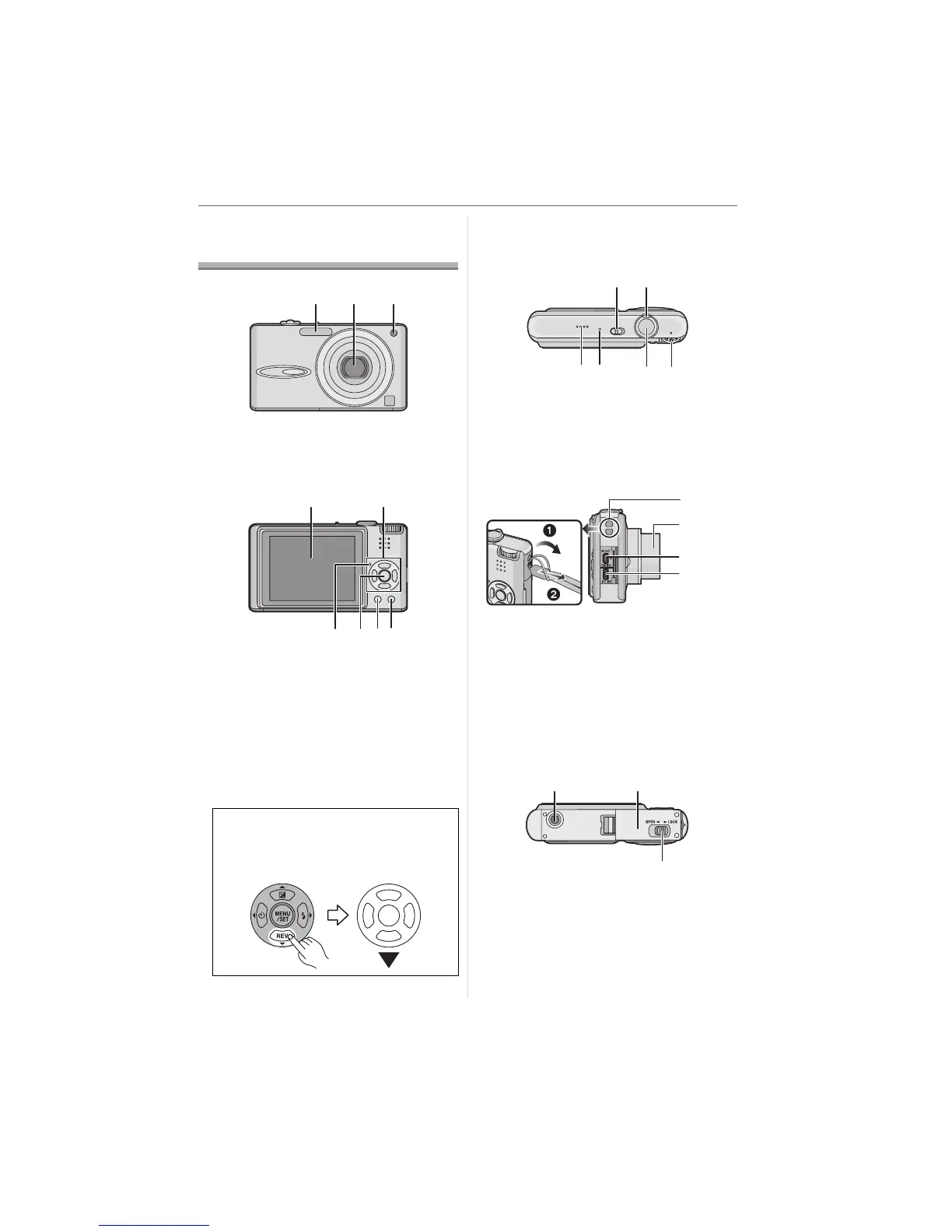
Names of the
Components
1 Flash (P35)
2 Lens (P5, 98)
3 Self-timer indicator (P39)
AF assist lamp (P66)
4 LCD monitor (P22, 32, 95)
5 Cursor buttons
2/Self-timer button (P39)
4/[REV] button (P29)
1/Flash setting button (P35)
3/Exposure compensation (P40)/
Auto bracket (P41)/
White balance fine adjustment (P60)/
Backlight compensation in simple mode
(P26) button
6 Status indicator (P19, 22)
7 [MENU/SET] button (P15)
8 [DISPLAY/LCD MODE] button (P32, 34)
9 [FUNC] (P58)/Delete (P30) button
10 Camera ON/OFF switch (P15)
11 Zoom lever (P27)
12 Speaker (P71)
13 Microphone (P52, 63, 82)
14 Shutter button (P23, 52)
15 Mode dial (P16)
16 Strap eyelet
17 Lens barrel
18 [AV OUT/DIGITAL] socket (P87, 90, 94)
19 [DC IN] socket (P87, 90)
• Always use a genuine Panasonic AC
adaptor (DMW-AC5E; optional).
• This camera cannot charge the battery
even though the AC adaptor (DMW-AC5E;
optional) is connected to it.
20 Tripod receptacle
• When you use a tripod, make sure the
tripod is stable when the camera is
attached to it.
21 Card/Battery door (P13)
22 Release lever (P13)
In these operating instructions,
operations using the cursor button are
described with illustrations below.
e.g.: When you press the 4 button
123
54
8 96 7
10
12
11
13 14 15
16
17
18
19
20 21
22












 To Next Page