Advanced (Playback)
72
VQT1B99
Creating still pictures
from a motion picture
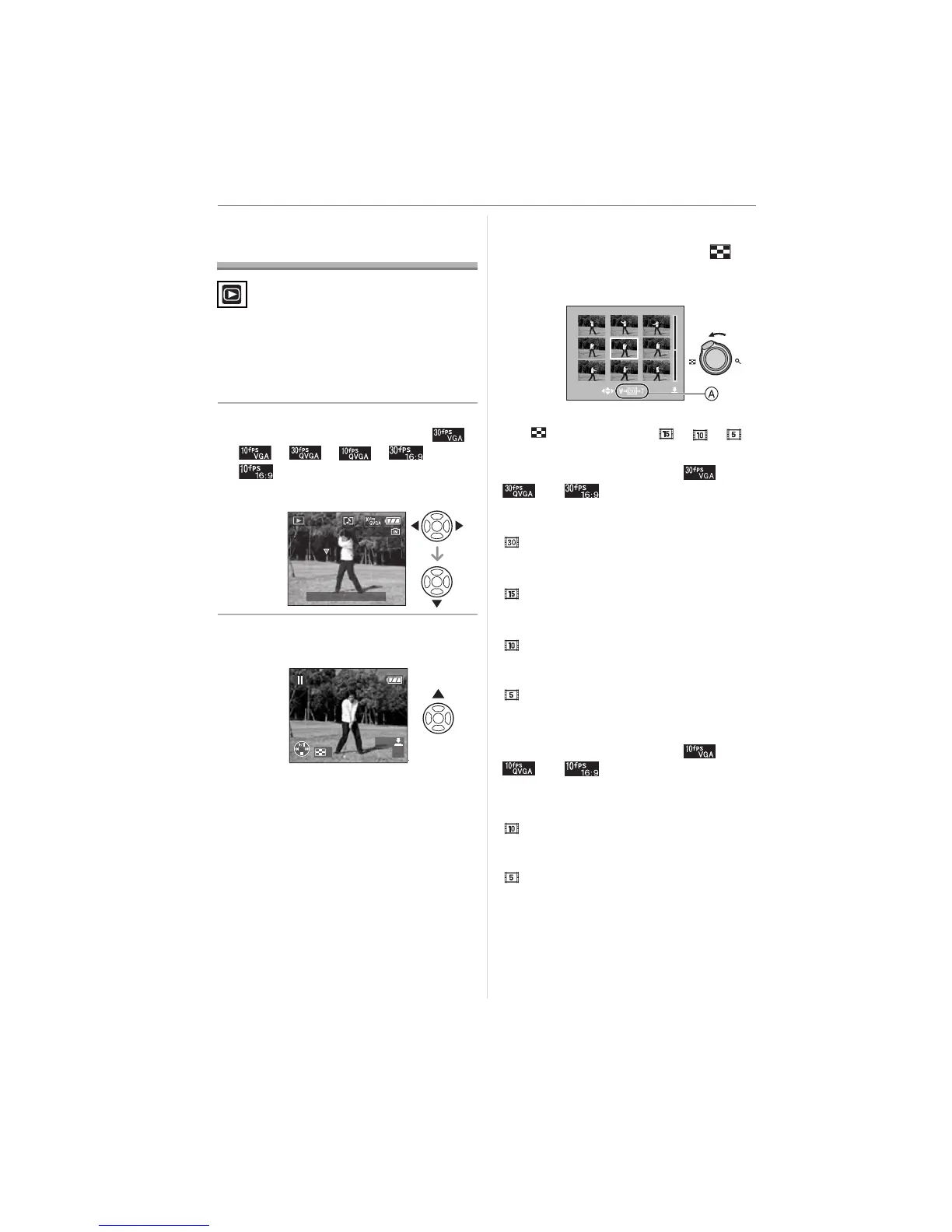
You can create a single still picture (with 1
screen or 9 screens) from a recorded
motion picture. This is effective in moving
scenes when you want to look carefully at
the movement of a sportsperson etc.
1 Press 2/1 to select a picture
with a motion picture icon [ ]/
[]/[]/[]/[]/
[ ] and then press 4 to play
back.
2 Press 3 to pause motion picture
playback.
• Press 3 again to return to motion
picture playback.
• Press 2/1 while paused to move
forward frame-by-frame.
• If you press the shutter button, you can
save the displayed still pictures as one
single picture. (Perform step
3)
∫ Saving a single still picture with 9
screens from the motion picture
• Rotate the zoom lever towards [ ]
[W] to display the 9 screens playback
screen.
• Rotate the zoom lever further towards
[] [W] to switch to [ ]/[ ]/[ ]
(A).
When a motion picture with [ ],
[ ]or [ ] was selected
The recorded motion picture is created
using 30 still picture frames per second.
[ ]: All the frames of the recorded motion
picture are displayed as still pictures
(1/30th second intervals)
[ ]: 1 frame is skipped/every second
frame is displayed as a still picture
(1/15th second intervals)
[ ]: 2 frames are skipped/every third
frame is displayed as a still picture
(1/10th second intervals)
[ ]: 5 frames are skipped/every sixth
frame is displayed as a still picture
(1/5th second intervals)
When a motion picture with [ ],
[ ]or [ ] was selected
The recorded motion picture is created
using 10 still picture frames per second.
[ ]: All the frames of the recorded motion
picture are displayed as still pictures
(1/10th second intervals)
[ ]: 1 frame is skipped/every second
frame is displayed as a still picture
(1/5th second intervals)
• You can move forward frame-by-frame
by pressing 3/4/2/1.
3/4: Move forward/backward
3 frames at a time.
1/3
5s
PLAY MOTION
PICTURE
10:00 1.DEC.2007
100
_
0001
W
5s
SAVE
SELECT
SAVE
T
W












 To Next Page