Advanced (Recording pictures)
32
VQT1B99
Advanced (Recording pictures)
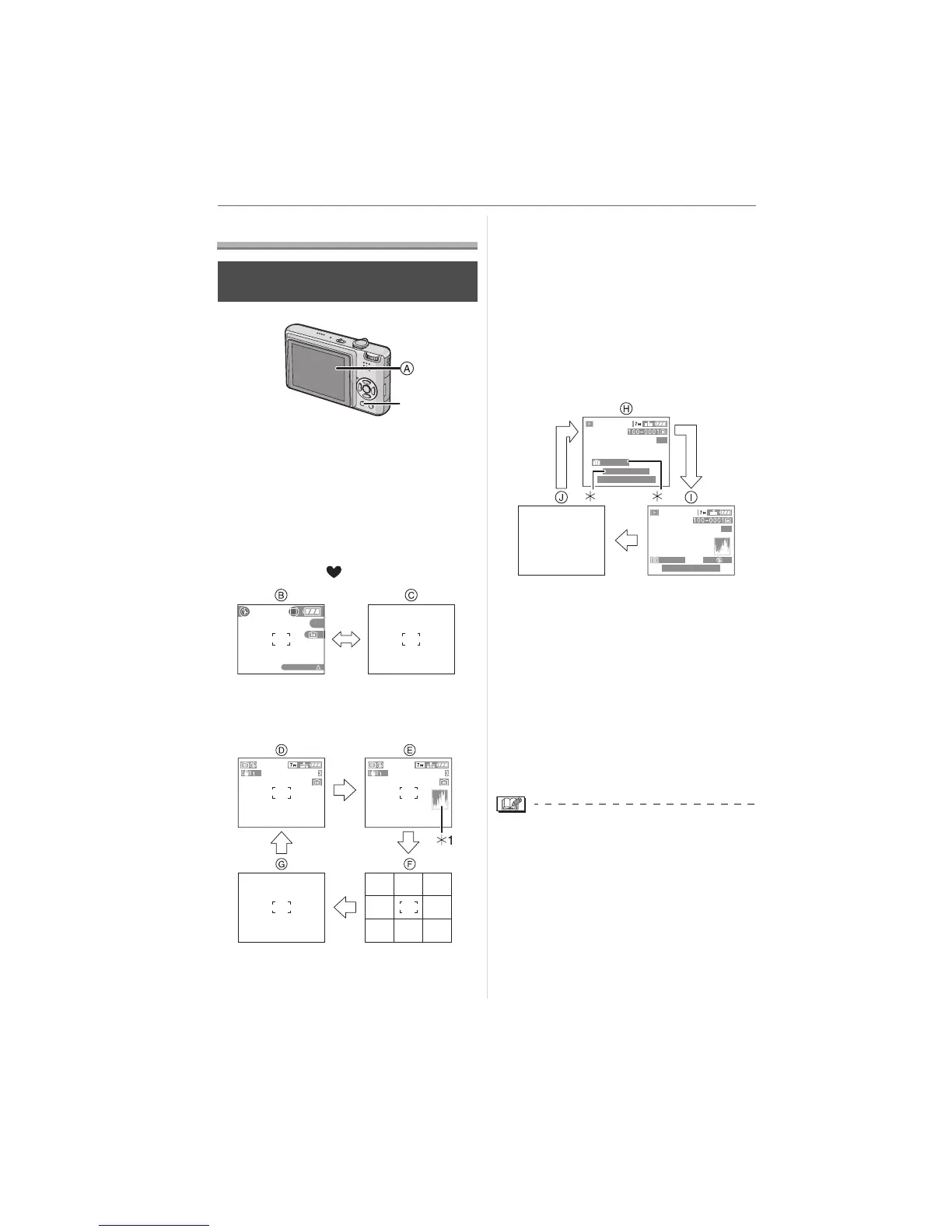
About the LCD Monitor
A LCD monitor
Press [DISPLAY] to change.
• When the menu screen appears, the
[DISPLAY] button is not activated. During
playback zoom (P70), while playing back
motion pictures (P71) and during a slide
show (P74), you can only select
“Normal display H” or “No display J”.
In simple mode [ ]
B Normal display
C No display
In recording mode
D Normal display
E Display with histogram
F No display (Recording guide line)
¢2
G No display
¢1 Histogram
¢2 Set the pattern of the guide lines
displayed by setting [GUIDE LINE] in
[SETUP] menu. (P19) You can also set
whether or not to have the recording
information and histogram displayed
when the guide lines are displayed.
In playback mode
H Normal display
I Display with recording information and
histogram
J No display
¢3 Displayed if [BIRTHDAY SET.] and
[WITH AGE] were set in [BABY1]/
[BABY2] (P47) or [PET] (P48) in scene
mode before taking pictures.
¢4 The number of days that have passed
since the travel date are displayed if
you set [TRAVEL DATE] (P54) before
taking pictures.
• In [NIGHT PORTRAIT] (P46),
[NIGHT SCENERY] (P46),
[STARRY SKY] (P49) and [FIREWORKS]
(P50) in scene mode, the guide line is
grey.
Changing the information
displayed
DISPLAY/LCD MODE
BACKLIGHT
3
F2.8 1/30
ISO
100
AWB
9
months
10
days
1/3
1/3
4
10:00 1.DEC.2007
10:00 1.DEC.2007
1ST DAY
3












 To Next Page