Advanced (Playback)
74
VQT1B99
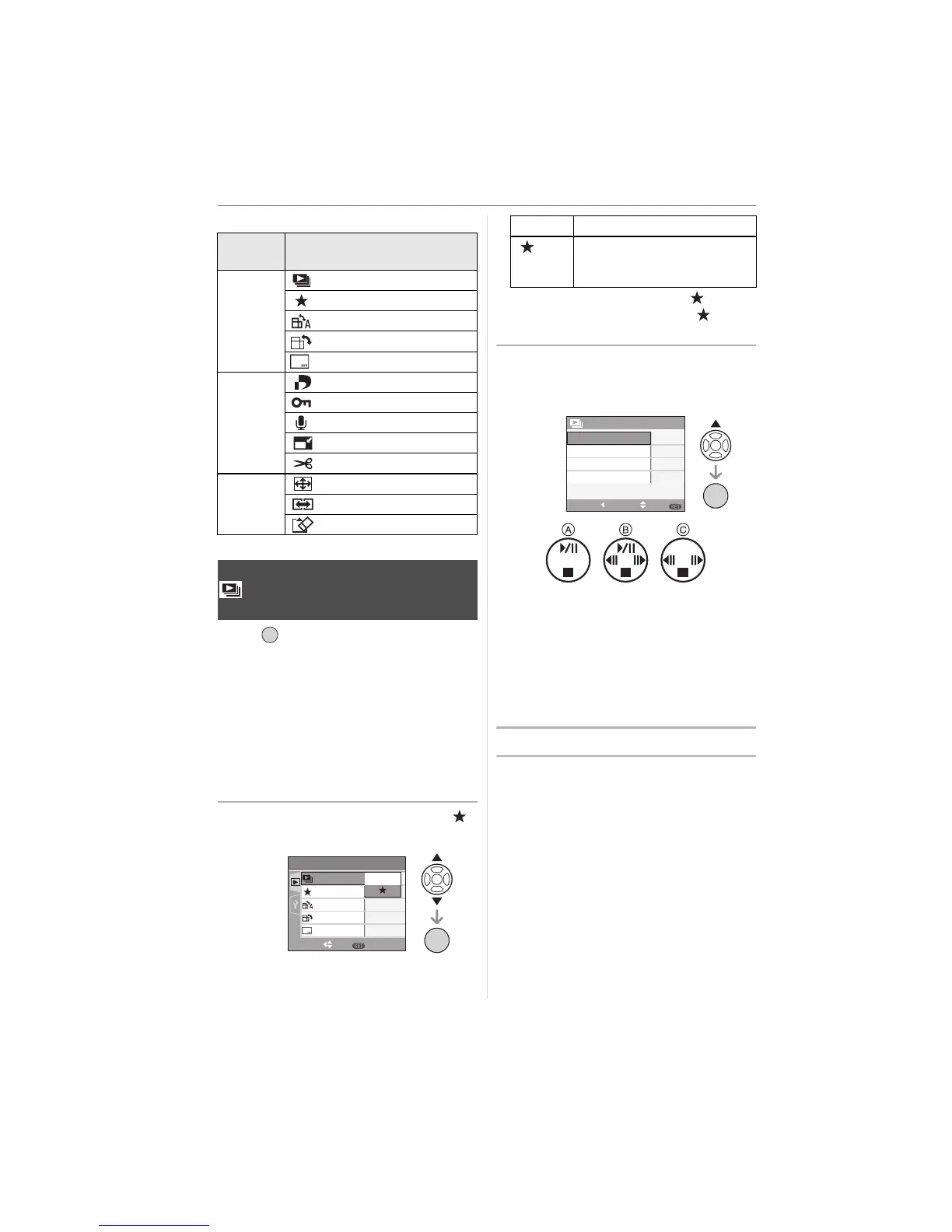
Items that can be set
Press [ ] to display the [PLAY] mode
menu and select the item to set. (P73)
This is recommended when playing back
pictures on a TV screen. You can skip
unwanted pictures if [FAVORITE] (P75) has
been set.
• When [FAVORITE] is set to [ON] >
step
1.
• When [FAVORITE] is set to [OFF] >
step
2.
1 Press 3/4 to select [ALL] or [ ]
and then press [MENU/SET].
• If none of the pictures have [ ]
displayed, you cannot select [ ] even
if [FAVORITE] is set to [ON].
2 Press 3 to select [START] and
then press [MENU/SET].
(Screen when [ALL] is selected)
• The cursor displayed during a slide
show A or while a slide show is paused
B or during [MANUAL] slide show C is
the same as 3/4/2/1.
• Press 3 to pause the slide show. Press
3 again to cancel pause.
• Press 2/1 while paused to display the
previous or next picture.
3 Press 4 to finish.
Menu
screen
Item
1/3
: [SLIDE SHOW] (P74)
: [FAVORITE] (P75)
: [ROTATE DISP.] (P76)
: [ROTATE] (P76)
: [DATE STAMP] (P77)
2/3
: [DPOF PRINT] (P79)
: [PROTECT] (P81)
: [AUDIO DUB.] (P82)
: [RESIZE] (P82)
: [TRIMMING] (P83)
3/3
: [ASPECT CONV.] (P84)
: [COPY] (P85)
: [FORMAT] (P86)
[SLIDE SHOW]
Playing back pictures in order for a
fixed duration
/SET
MENU
PLAY
1
/
3
ON
OFF
SET
MENU
FAVORITE
ROTATE DISP.
ROTATE
ALL
SLIDE SHOW
SELECT
/SET
MENU
DATE STAMP
[ALL] Displays all pictures.
[] Displays only those pictures
that have been set as
favourites (P75).
ALL SLIDE SHOW
SET
SELECT
MENU
CANCEL
START
EFFECT
AUDIO
2 SEC.
OFF
OFF
DURATION
/SET
MENU












 To Next Page