Advanced (Playback)
73
VQT1B99
2/1: Move forward/backward
1 frame at a time.
3 Press the shutter button.
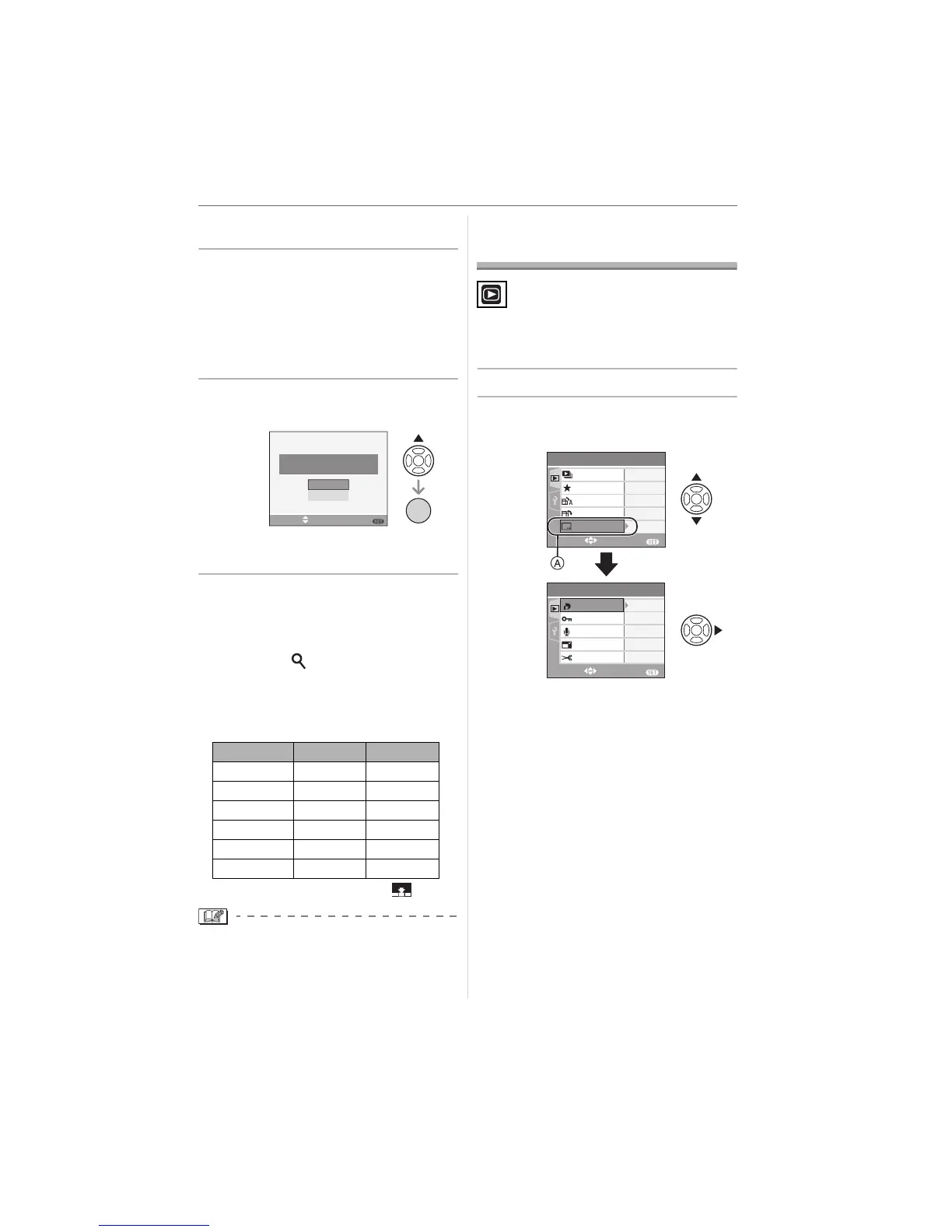
• The message [SAVE THESE NINE
PICTURES AS ONE SINGLE
PICTURE ?] appears. Also, the
message [SAVE AS A SINGLE
PICTURE ?] appears if you saved the
picture in step
2.
4 Press 3 to select [YES] and then
press [MENU/SET].
• The nine pictures are saved as one
single picture.
∫ To stop using the 9 screens playback
screen
After the 9 screens playback screen is
displayed, rotate the zoom lever several
times towards [ ] [T] or press [MENU/
SET]. The screen returns to the paused
motion picture playback screen.
∫ Picture size
• [QUALITY] (P62) is fixed to [ ].
• You may not be able to save still pictures
from a motion picture taken on other
equipment.
Using the [PLAY] mode
menu
You can use vario
us functions in playback
mode to rotate pictures, set protection for
them etc.
1 Press [MENU/SET].
2 Press 3/4 to select the menu
item and then press 1.
• Press 4 at A to switch to the next
menu screen.
• You can switch menu screens from any
menu item by rotating the zoom lever.
• After performing steps
1 and 2, refer
to the description of the menu item
in the operating instructions and
then set it.
Item 1picture 9pictures
[30fpsVGA] 0.3 M 2 M
[10fpsVGA] 0.3 M 2 M
[30fpsQVGA]
0.3 M 1 M
[10fpsQVGA]
0.3 M 1 M
[30fps16:9] 2M 2M
[10fps16:9] 2M 2M
SAVE THESE NINE PICTURES
AS ONE SINGLE PICTURE ?
NO
YES
SELECT SET
MENU
/SET
MENU
PLAY
1
/
3
ON
OFF
EXIT
MENU
SELECT
FAVORITE
ROTATE DISP.
ROTATE
SLIDE SHOW
PLAY
2
/
3
EXIT
MENU
SELECT
RESIZE
TRIMMING
AUDIO DUB.
PROTECT
DPOF PRINT
DATE STAMP












 To Next Page