Preparation
17
VQT1B99
Setting the Menu
∫ Displaying the menu screens
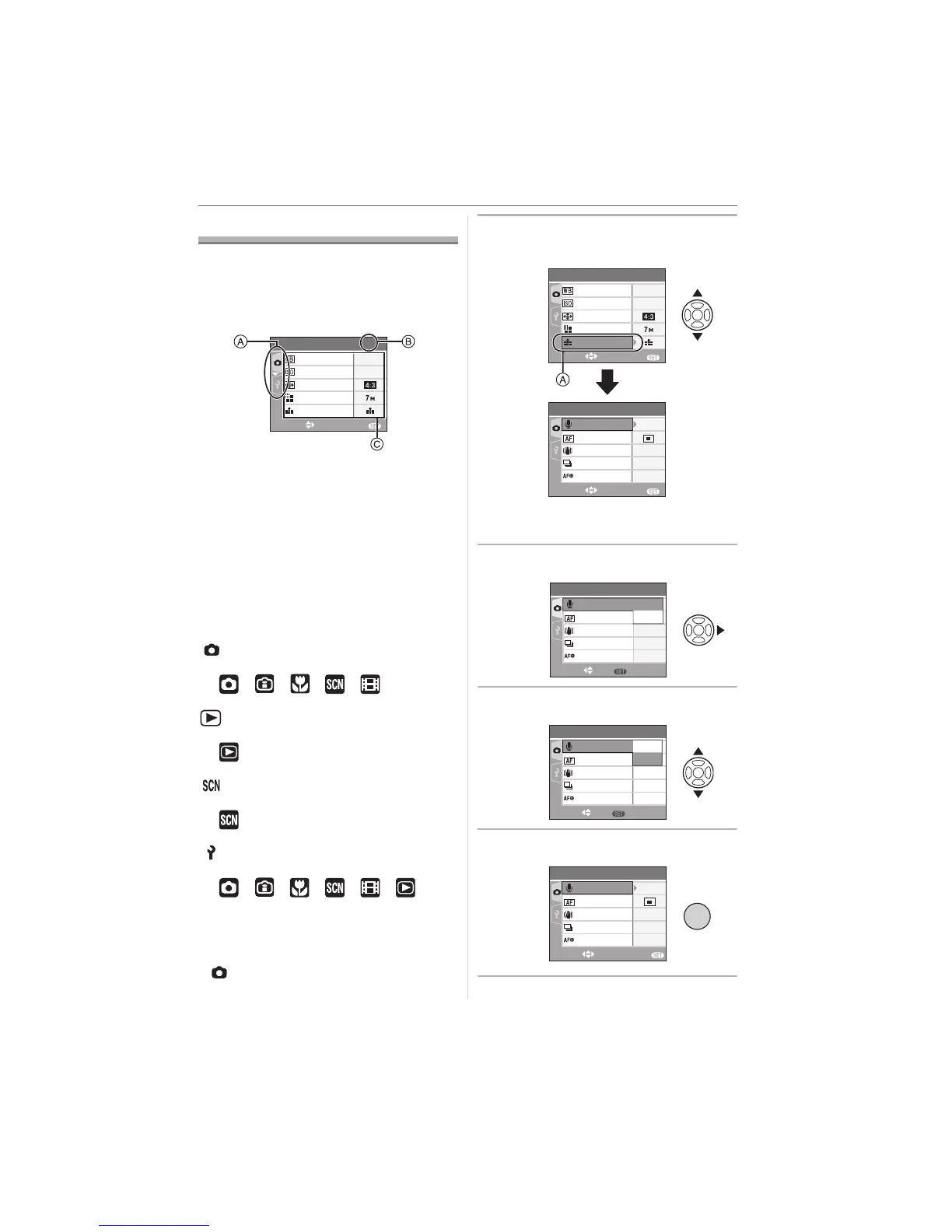
Press [MENU/SET].
e.g.: The first page of the total 3 pages is
displayed.
A Menu icons
B Current page
C Menu items and settings
• Rotate the zoom lever while selecting the
menu item to switch to the next/previous
page easily.
• The menu icons and the menu items that
are displayed differ depending on the
position of the mode dial.
∫ About the menu icons
[REC] mode menu (P58):
This is displayed when the mode dial is set
to [ ]/[ ]/[ ]/[ ]/[ ].
[PLAY] mode menu (P73):
This is displayed when the mode dial is set
to [ ].
[SCENE MODE] menu (P44):
This is displayed when the mode dial is set
to [ ].
[SETUP] menu (P18):
This is displayed when the mode dial is set
to [ ]/[ ]/[ ]/[ ]/[ ]/[ ].
∫ Setting menu items
• The following example shows how to set
[AUDIO REC.] when normal picture mode
[ ] is selected.
1 Press 3/4 to select the menu
item.
• Press 4 at A to switch to the next
screen.
2 Press 1.
3 Press 3/4 to select the setting.
4 Press [MENU/SET] to set.
EXIT
MENU
SELECT
AUTO
SENSITIVITY
PICT.SIZE
ASPECT RATIO
AWB
W.BALANCE
REC
1
/
3
QUALITY
EXIT
MENU
SELECT
AUTO
SENSITIVITY
SENSITIVITY
PICT.SIZE
ASPECT RATIO
AWB
W.BALANCE
REC
1
/
3
QUALITY
EXIT
MENU
SELECT
REC
2
/
3
AF ASSIST LAMP
ON
AF MODE
OFF
BURST
AUDIO REC.
STABILIZER
MODE1
OFF
SET
MENU
SELECT
REC
2
/
3
AF ASSIST LAMP
BURST
STABILIZER
OFF
MODE1
ON
AF MODE
OFF
AUDIO REC.
ON
REC
2
/
3
AF ASSIST LAMP
BURST
STABILIZER
AF MODE
SET
MENU
SELECT
OFF
MODE1
ON
OFF
AUDIO REC.
ON
/SET
MENU
REC
2
/
3
AF ASSIST LAMP
ON
BURST
STABILIZER
SELECT
AF MODE
EXIT
MENU
AUDIO REC.
OFF
MODE1
ON













 To Next Page