Basic
23
VQT1B99
Basic
Taking Pictures
The camera automatically sets the shutter
speed and the aperture value according to
the brightness of the subject.
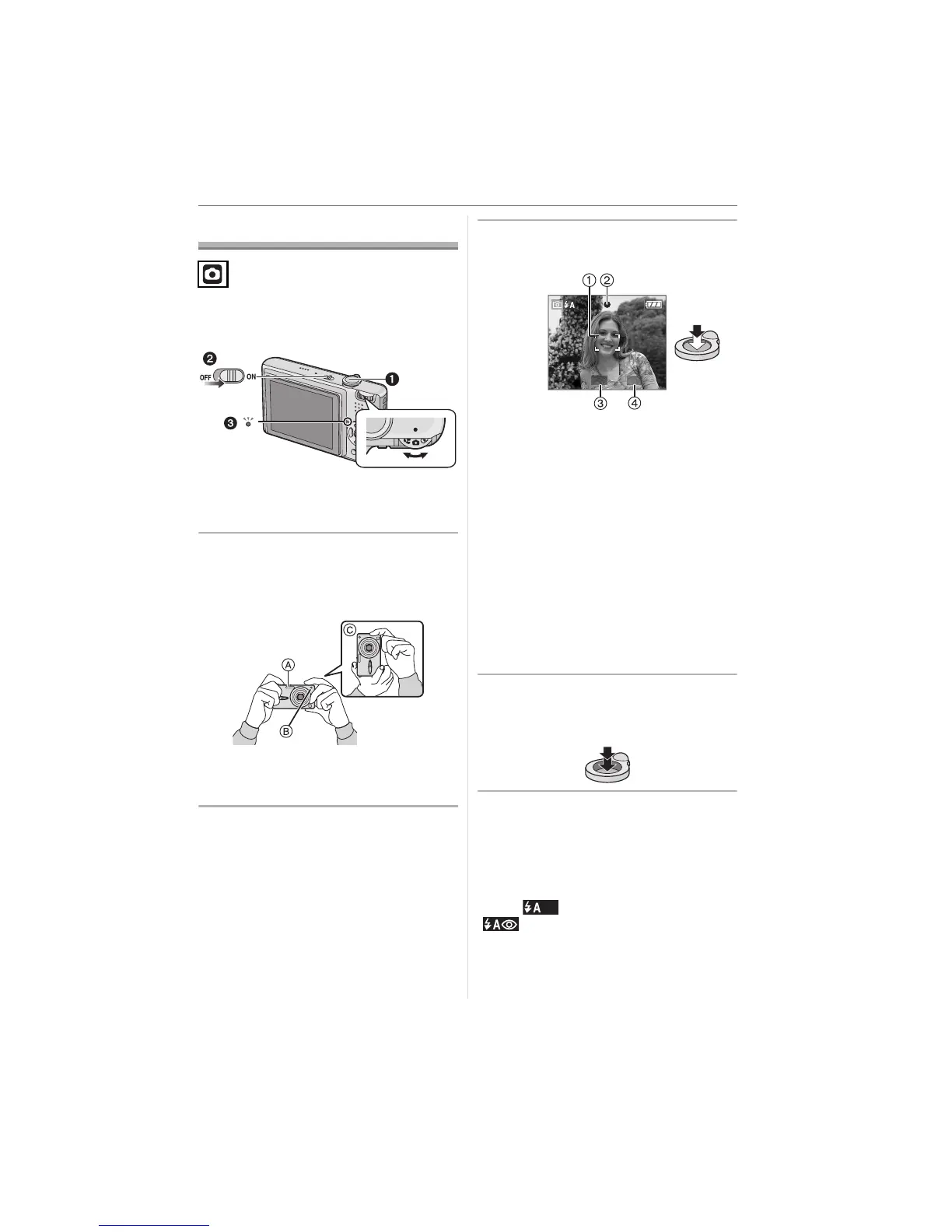
1: Shutter button
• The status indicator 3 lights for about
1 second when you turn this unit on 2.
1 Hold this unit gently with both
hands, keep your arms still at
your side and stand with your feet
slightly apart.
A:Flash
B: AF assist lamp
C: When holding the camera vertically
2 Aim the AF area at the point you
want to focus on.
3 Press the shutter button halfway
to focus.
•
The focus indication
2
lights green and
the AF area
1
turns from white to green.
3: Aperture value
4: Shutter speed
• The focus range is 50 cm to ¶.
• The subject is not focused in the
following cases.
– The focus indication blinks (green).
– The AF area turns white to red or
there is no AF area.
– The focus sound beeps 4 times.
• If the distance is beyond the focus
range, the picture may not be properly
focused even if the focus indication
lights.
4 Press the halfway pressed
shutter button fully to take a
picture.
∫ Using the flash
If the camera determines that the place
where the picture is being taken is dark, the
flash is activated when the shutter button is
pressed fully. (When the flash is set to
AUTO [ ]/AUTO/Red-eye reduction
[].)
• You can switch the flash se
• tting to match the recording. (P35)
1/30F2.8












 To Next Page