7. Fax
44
7.1.2 Using the automatic document feeder
1
If the {K} light is OFF, turn it ON by pressing {K}.
2 Set the original (page 20).
3 If necessary, change the resolution and contrast
according to the type of document.
L To select the resolution, see page 43.
L To select the contrast, see page 43.
4 {R}
5 Dial the fax number. i {X}
Note:
L To stop sending, see page 74.
L Do not open the document cover when sending a fax
with the automatic document feeder.
Pre-dialling a fax number
1. Enter the fax number.
2. Set the original (page 20). i {X}
Sending from memory (Quick scan feature)
1. Set the original (page 20).
2. Enter the fax number. i {M}
7.2 Storing items for the one-
touch dial feature and navigator
directory
The unit provides the one-touch dial feature (10 items)
and navigator directory (300 items).
L Station 1 to 3 can be used alternatively as broadcast
keys (page 46).
L Make sure that the {K} light is ON.
7.2.1 Storing one-touch dial item
1
Press {Y} repeatedly to display “DIRECTORY
SET”.
2 Select the desired station key.
For station 1–3:
1. Press the desired station key.
2. Press {V} or {^} repeatedly to select “DIAL
MODE”. i {OK}
For station 4–5:
Press the desired station key.
For station 6–10:
Press {S}, then press the desired station key.
3 Enter the name, up to 16 characters (see page 72 for
character entry). i {OK}
4 Enter the telephone number, up to 32 digits. i
{OK}
L To program other items, repeat steps 2 to 4.
5 {W}
Note:
L A hyphen or a space entered in a telephone number
counts as 2 digits.
7.2.2 Storing navigator directory items
1
Press {Y} repeatedly to display “DIRECTORY
SET”. i {>}
2 Enter the name, up to 16 characters (see page 72 for
character entry). i {OK}
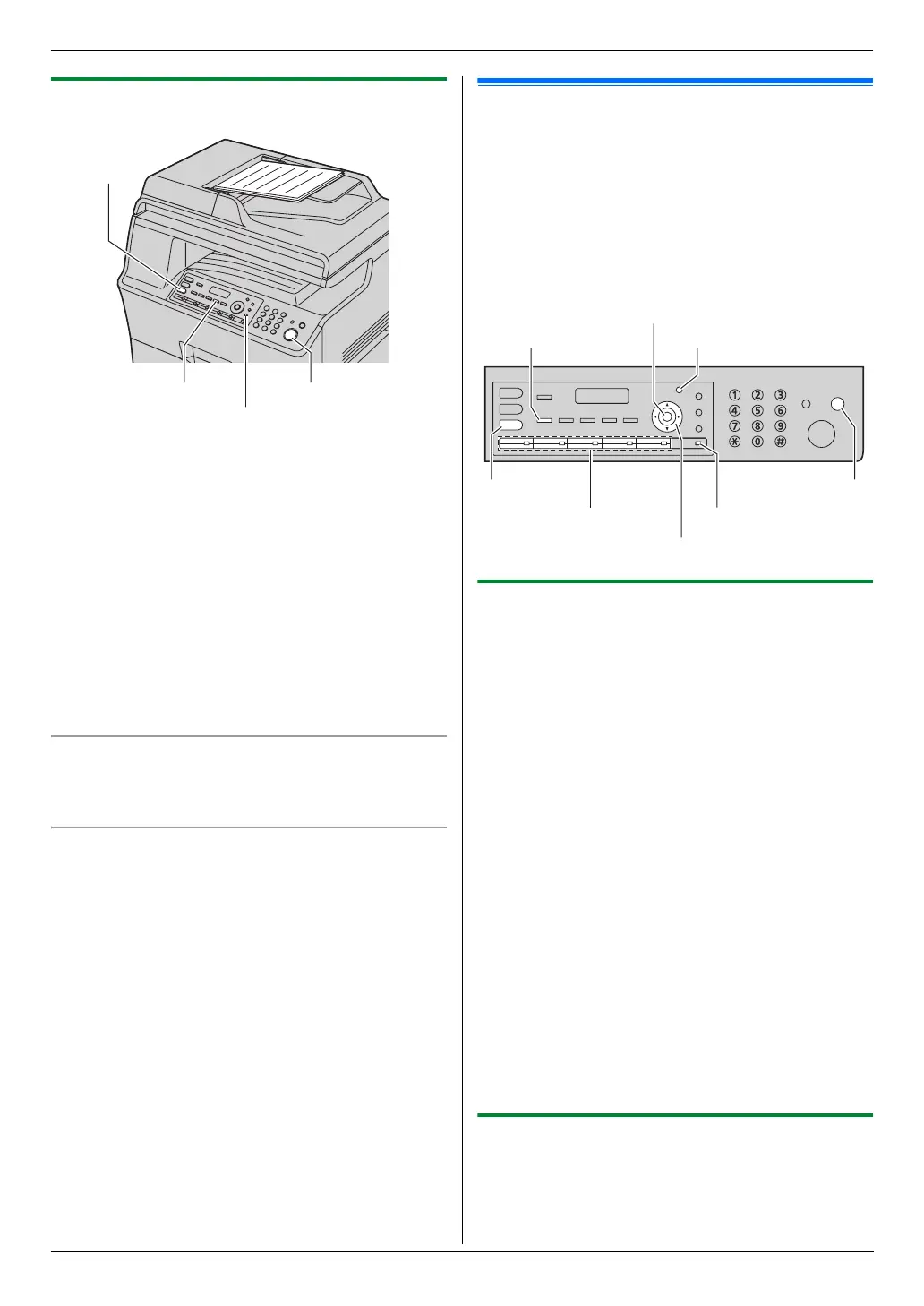
{M} (Quick Scan)
{R} (Monitor)
{X} (Start)
{K} (Fax)
{S} (Lower)
Station keys
{K} (Fax)
{L} (Directory)
{W} (Stop)
{OK}
{Y} (Menu)
{
V}{^}{>}




 To Next Page