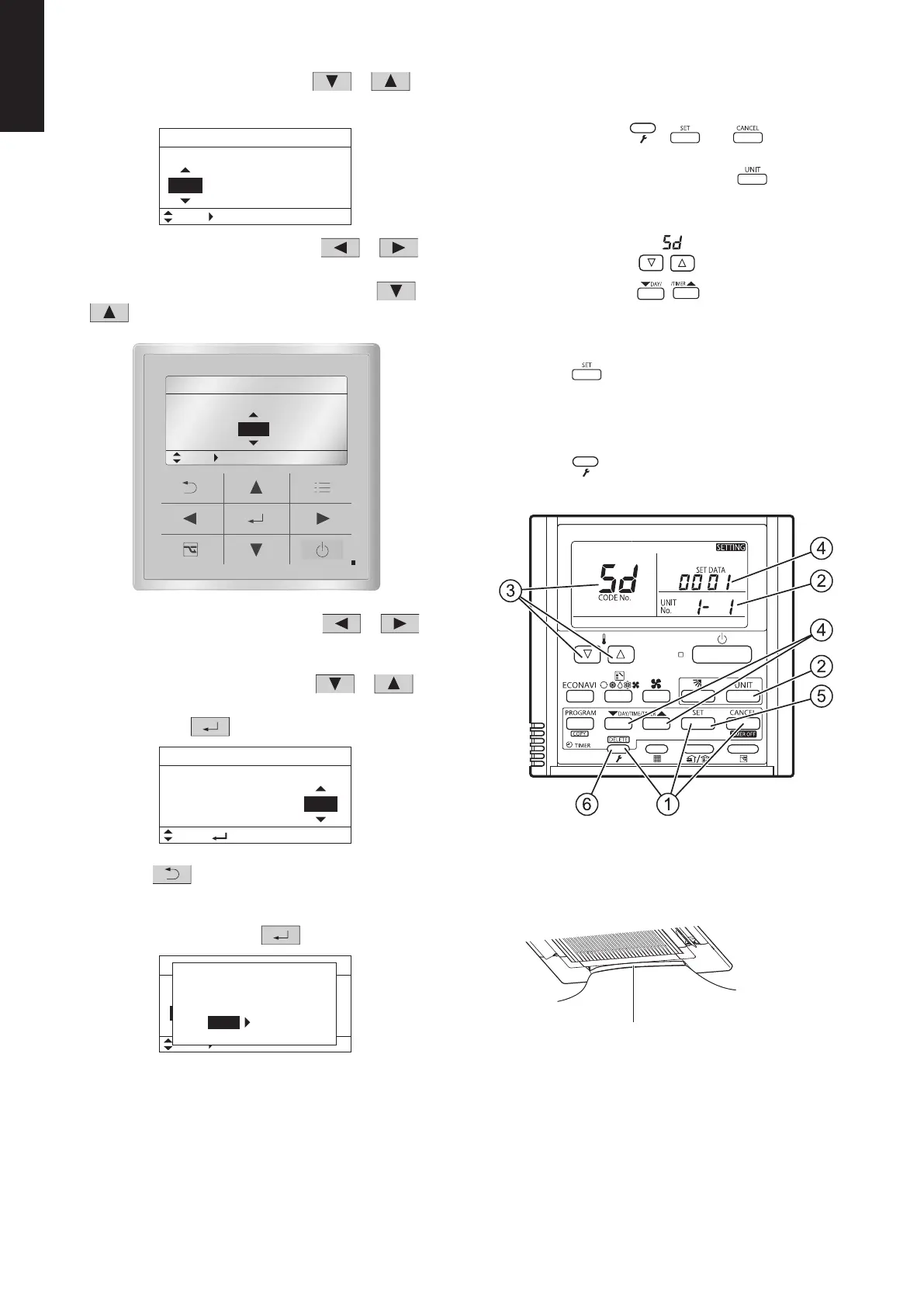
1-12-1-2-23
1
3
Select the “Unit no.” by pressing the
or
button for changes.
4
Select the “Code no.” by pressing the
or
button.
Change the “Code no.” to “5D” by pressing the
or
button (or keeping it pressed).
5
Select the “Set data” by pressing the
or
button.
Select one of the “Set data” in “Table for DC Fan
Motor Tap Settings” by pressing the
or
button.
Then press the
button.
6
Press the
button.
The “Exit detailed settings and restart?” (Detailed setting-
end) screen appears on the LCD display.
Select “YES” and press the
button.
If you wish to change the selected indoor unit, follow the
step
2
.
<Procedure of CZ-RTC4>
Stop the system before performing these steps.
1
Press and hold the
, and buttons
simultaneously for 4 seconds or longer.
2
If group control is in effect, press the
button to set.
At this time, the fan at the indoor unit begins and select
the address (unit No.) of the indoor unit operating.
3
Designate the item code
by adjusting the
Temperature Setting
/ buttons.
4
Press the timer time
/ buttons to select the
desired setting data.
* For item codes and setting data, see the “Table for DC
Fan Motor Tap Settings” on page 1-12-1-2-22.
5
Press the
button.
(The display stops blinking and remains lit, and setting is
completed.)
If you wish to change the selected indoor unit, follow the
step
2
.
6
Press the
button to return to normal remote
controller display.
A
°
°
(4) Setting the Flap Separately
1) The 4-air outlet flap can be adjusted separately during
operation. When not adjusted separately, all flaps
operate in the same manner.
Air outlet flap
(adjustment for up-down airflow direction)
Detailed settings
Unit no. Code no. Set data
1-1 10 0001
20:30 (THU)
Sel. Next
Detailed settings
Unit no.
Code no. Set data
5D 00011-1
20:30 (THU)
Sel. Next
Detailed settings
Unit no.
Code no. Set data
1-1
Sel.
20:30 (THU)
5D 0003
[ ] Confirm
Unit no.
Detailed settings
Code no.
Set data
ALL
20:30 (THU)
Sel. Next
01 0002
and restart?
E
NOYES
xit detailed settings
<Procedure of CZ-RTC5B>
Stop the system before performing these steps.
1
Keep pressing the
, and buttons
simultaneously for 4 or more seconds.
The “Maintenance func” screen appears on the LCD
display.
2
Press the
or button to see each menu.
If you wish to see the next screen instantly, press the
or button.
Select “8. Detailed settings” on the LCD display and
press the button.
The “Detailed settings” screen appears on the LCD display.
3
Select the “Unit no.” by pressing the
or
button for changes.
4
Select the “Code no.” by pressing the
or
button.
Change the “Code no.” to “ ” by pressing the or
button (or keeping it pressed).
=91
=90
=92
=93
Electrical component box
5
Select the “Set data” by pressing the or
button.
Select one of the Setting Data “YYYY” by pressing the
or button.
Then press the button.
Flap position
1
2
3
4
5
* Setting data “ ”
Setting data Flap position during operation
Without separate setting
Swing
Move to position
1
and stay
Move to position
2
and stay
Move to position
3
and stay
Move to position
4
and stay
Move to position
5
and stay
NOTE
The flap swings during the operation under “Setting
the Flap Separately”.
At this time, the unselected flaps are moved to the
position
1
.
6
Press the
button.
The “Exit detailed settings and restart?” (Detailed setting-
end) screen appears on the LCD display.
Select “YES” and press the button.
Maintenance func
Sel.
20:30 (THU)
Page [ ] Confirm
1. Outdoor unit error data
2. Service contact
3. RC setting mode
4. Test run
Maintenance func
Sel.
20:30 (THU)
Page [ ] Confirm
5. Sensor info.
6. Servicing check
7. Simple settings
8. Detailed settings
Detailed settings
Unit no. Code no. Set data
1-1
10
0001
20:30 (THU)
Sel. Next
Detailed settings
Unit no. Code no. Set data
XX YYYY1-1
20:30 (THU)
Sel. Next
Detailed settings
Unit no. Code no. Set data
1-1
Sel.
20:30 (THU)
XX YYYY
[ ] Confirm
SM830281-00_欧州向け R32シングル TD&SM.indb 23 20/01/09 15:00:00






 To Next Page