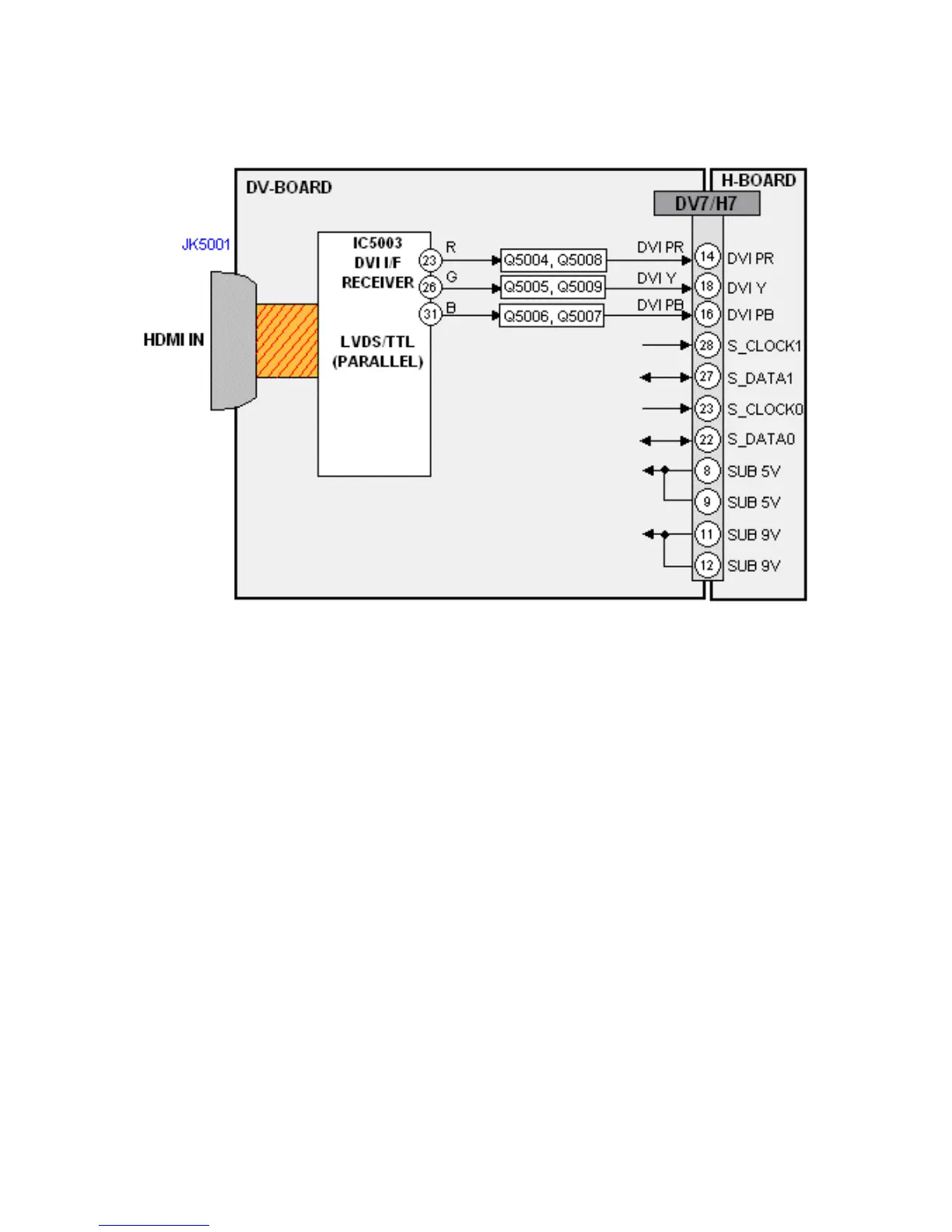
GPH6DU Chassis HDMI Signal Process
Figure 11 - HDMI Signal Process
The HDMI (High Definition Multimedia Interface) input is a port designed to receive
digital video and audio from a set-top box, a DVD player, or other digital devices.
IC5003 of the DV board converts the digital video to parallel analog Y, Pb, and Pr video
signals. The signals are output from IC5003 to a set of video amplifiers. After
amplification, the signals are applied to the A-Board via pins 14, 16, and 18 of the
connector DV7/DG51.
Note: To connect an external device that has a DVI output to a plasma panel model that
has an HDMI input only, use an adaptor cable and connect the Audio signal to the
Audio jacks located below the HDMI input. An HDMI-DVI conversion cable (TY-
SCH03DH) is available from Panasonic parts department.
19





 To Next Page