EasyManua.ls Logo

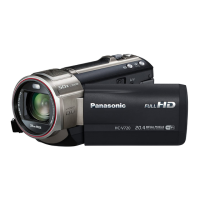
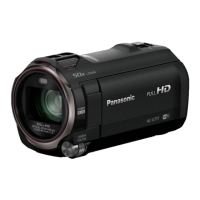
Panasonic HC-V720K - User Manual

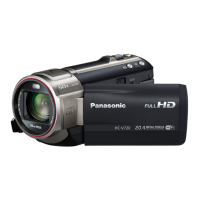
Panasonic HC-V720K
192 pages
Print Icon
To Next Page IconTo Next Page
Loading...
Owner’s Manual
High Definition Video Camera
Model No.
HC-V720
HC-V720M
HC-V710
Please read these instructions carefully before using this product, and save this manual for future
use.
VQT4Q88
until
2012/1/30
Register online at www.panasonic.com/register (U.S. customers only)

Table of Contents

Other manuals for Panasonic HC-V720K

Questions and Answers

  • D
    duranmaryAug 21, 2025
    What to do if my Panasonic HC-V720K is not detected by the PC when connected by USB cable?
    • H
      henrydianeAug 22, 2025
      Try re-inserting the SD card into the unit and then reconnect the supplied USB cable. You can also try selecting a different USB terminal on your PC. Ensure your operating environment meets the requirements. Alternatively, restart your PC and the camcorder, then reconnect the USB cable.
  • S
    saraaliSep 4, 2025
    How to fix color or brightness changes on Panasonic HC-V720K Camcorder?
    • B
      Bradley SchmidtSep 4, 2025
      Color or brightness changes, or horizontal bars, may appear when recording under fluorescent, mercury, or sodium lighting, but this is normal. In Motion Picture Recording Mode, use Intelligent Auto/Intelligent Auto Plus Mode or set the shutter speed to 1/60 in 60 Hz areas, or 1/100 in 50 Hz areas. This issue does not affect recorded images in Still Picture Recording Mode.
  • C
    Cody KaneSep 2, 2025
    How to fix incorrect remaining battery indication on Panasonic Camcorder?
    • A
      Alexander LopezSep 2, 2025
      The remaining battery capacity indication is an approximation. If it is not displayed correctly, fully charge the battery, discharge it completely, and then charge it fully again.
  • C
    Crystal PowellSep 1, 2025
    Why is the color balance strange on my Panasonic HC-V720K Camcorder when recording in a gymnasium?
    • J
      jonesvanessaSep 1, 2025
      In locations with multiple light sources, such as a gymnasium or hall, adjust the White Balance setting to (Indoor mode 2). If the image is still unclear, switch to (Manual adjustment mode).
  • J
    Jeff MartinAug 30, 2025
    Why does the Auto Focus function not work on my Panasonic Camcorder?
    • M
      Micheal MartinAug 30, 2025
      Switch to Intelligent Auto Mode or Intelligent Auto Plus Mode. If you are trying to record a scene difficult to focus on in Auto Focus Mode, use Manual Focus Mode to adjust the focus.
  • L
    Luis JarvisAug 29, 2025
    What to do if my Panasonic Camcorder displays “ERROR OCCURRED. PLEASE TURN UNIT OFF, THEN TURN ON AGAIN.”?
    • Q
      qsmithAug 29, 2025
      The unit has detected an error. Restart it by turning it off and on again. The unit will turn off automatically in about 1 minute if you don't turn it off and on. If the error message reappears after restarting, repair is needed.
  • B
    Brittney KellerAug 27, 2025
    What to do if my Panasonic HC-V720K Camcorder arbitrarily stops recording?
    • D
      Diana HansenAug 27, 2025
      Ensure you are using an SD card suitable for motion picture recording. The recordable time might be reduced due to data writing speed deterioration or repeated recording and deletion. Format the SD card or the built-in memory using the camcorder. If [AGS] is [ON], record in a normal horizontal position or set [AGS] to [OFF].
  • C
    Carla BensonAug 26, 2025
    I have forgotten the password for the Wi-Fi on my Panasonic Camcorder, what to do?
    • M
      maxwell44Aug 26, 2025
      Perform [Reset Wi-Fi Settings] from the Setup menu. This will reset the Wi-Fi setting to the condition at the time of purchase, allowing you to use the Wi-Fi setting menu. Note that this will delete all Wi-Fi settings, including the “LUMIX CLUB” login ID and registered wireless access points.
  • M
    Matthew ChoiAug 25, 2025
    What to do if my Panasonic HC-V720K cannot be operated even though it is turned on?
    • O
      oscar03Aug 25, 2025
      Remove the battery or AC adapter, wait approximately one minute, and then reconnect either the battery or AC adapter. Wait another minute, then turn the unit on again.
  • C
    cconwayAug 23, 2025
    Why can't I see images or sound when my Panasonic HC-V720K is connected to a TV?
    • N
      nicholas78Aug 23, 2025
      Refer to your TV's operating instructions and select the channel that corresponds to the input used for the connection. Adjust the [TV ASPECT] setting to match the TV's aspect ratio. Note that audio during playback is output from the TV, not the camcorder, so adjust the sound on the TV.

Summary

Read this first

Preparation

Main Parts Overview

Identifies and describes the main parts of the video camera.

Power Supply and Battery

Information on compatible batteries and power supply options.

Basic

Recording Motion Pictures

Step-by-step guide to starting and stopping motion picture recording.

Recording Still Pictures

How to capture still images using the camera.

Motion Picture;Still Picture Playback

How to select and play back recorded scenes and still pictures.

Advanced (Recording)

Changing the Recording Mode

How to switch between Intelligent Auto, Creative Control, Scene, and Manual modes.

Manual Recording Controls

Accessing manual controls for focus, white balance, shutter, and iris.

Recording Mode Settings

Switching picture quality and recording formats like AVCHD and iFrame.

Face Recognition Setup

Registering and managing faces for automatic focus and exposure.

Advanced (Playback)

Motion Picture Playback Operations

Controlling playback using icons like skip, slow-motion, and frame-by-frame.

Highlight Playback Feature

Creating and playing back highlight reels from recorded scenes.

Deleting Scenes and Still Pictures

Removing unwanted scenes or still pictures from storage.

Watching Video;Pictures on TV

Connecting the camera to a TV for viewing content.

Copy;Dubbing

Copying Between SD Card and Built-in Memory

Transferring files between the camera's SD card and internal memory.

Copying;Playing Back with USB HDD

Connecting and using a USB HDD for copying and playback.

Wi-Fi [HC-V720];[HC-V720 M]

Wi-Fi Function Overview

Important notes and precautions regarding the Wi-Fi function.

Wi-Fi Functions and Preparations

Details on Link to Cell, DLNA Play, Live Cast, and Home Cam, plus preparations.

With a PC

Others

Panasonic HC-V720K Specifications

General IconGeneral
Sensor typeCMOS
Total megapixels17.52 MP
Optical sensor size1/2.33 \
Digital zoom- x
Optical zoom21 x
Image stabilizerYes
Focal length range2.82 - 59.2 mm
Interchangeable lens-
Image stabilizer typeHybrid Image Stabilization (HIS)
Camera file systemDCF, Exif 2.2
Camcorder media typeMemory card
Disc types supportedNo
Compatible memory cardsSD, SDHC
Internal storage capacity- GB
Focus adjustmentAuto/Manual
Display diagonal3 \
Viewfinder typeNot available
Camcorder typeHandheld camcorder
Minimum illumination3 lx
On Screen Display (OSD) languagesENG, ESP, FRE
Product colorBlack
Video resolutions960 x 540, 1920 x 1080 pixels
Video formats supportedAVCHD, H.264, MP4, MPEG4
Maximum video resolution- pixels
Image formats supportedJPEG XR
Audio systemDolby Digital
USB 2.0 ports quantityUSB 2.0 ports have a data transmission speed of 480 Mbps, and are backwards compatible with USB 1.1 ports. You can connect all kinds of peripheral devices to them.
Wi-Fi standards802.11b, 802.11g, Wi-Fi 4 (802.11n)
Charging sourceAC, USB
Battery capacity1940 mAh
Video recording time- h
Number of batteries supported1
Cables includedAC, DC, HDMI, USB
Bundled softwareHD Writer AE 5.0
Weight and Dimensions IconWeight and Dimensions
Depth124.4 mm
Width60.1 mm
Height69.3 mm
Weight277 g

Related product manuals