EasyManua.ls Logo

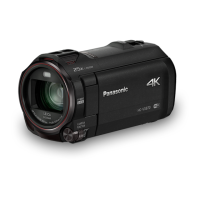
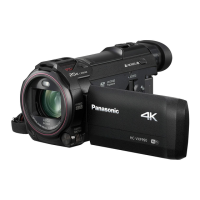
Panasonic HC-VX1 - User Manual

Panasonic HC-VX1
288 pages
Print Icon
To Next Page IconTo Next Page
Loading...
Operating Instructions
High Definition Video Camera 4K Video Camera
Model No.
HC-V800
Model No.
HC-WXF1
HC-V808 HC-WXF1M
HC-VXF1
HC-VXF11
HC-VX1
HC-VX11
Please read these instructions carefully before using this product, and save this manual for future
use.
DVQP1585ZA
F0218SQ0
until
2018/03/30
HC-WXF1-VXF1-VX1-V800EBEP-DVQP1585_eng.book 1 ージ 018年2月22日 木曜日 午後12時30

Table of Contents

Other manuals for Panasonic HC-VX1

Questions and Answers

  • A
    Angela TuckerSep 2, 2025
    Why won't my computer recognize my Panasonic Camcorder via USB?
    • K
      kristopher02Sep 2, 2025
      If your Panasonic Camcorder is not detected by the PC when connected by the USB cable, re-insert the SD card into the unit and reconnect the supplied USB cable. Try selecting another USB terminal on the PC. Check the operating environment. Connect the supplied USB cable again after restarting the PC and turning on this unit again.
  • T
    Thomas RosarioAug 31, 2025
    Why can't I copy files from my Panasonic HC-VX1 SD card via USB?
    • T
      tyler34Aug 31, 2025
      If you cannot copy scenes on the SD card by connecting your Panasonic Camcorder to other equipment with the USB cable, the other equipment might not have recognized the SD card. Try unplugging the USB cable and reconnecting it.
  • A
    amy12Aug 29, 2025
    Why is there no sound or picture when connecting my Panasonic HC-VX1 to the TV?
    • P
      Pamela WatsonAug 30, 2025
      If images or sounds are not output even when your Panasonic Camcorder is correctly connected to a TV, read the operating instructions of your TV and select the channel that matches the input used for the connection. Note that the audio during playback mode is not output from this unit when connected to a TV. Sound levels cannot be adjusted using this unit, so adjust the sound on the TV.
  • R
    Ryan HarrisAug 27, 2025
    What to do if my Panasonic HC-VX1 Camcorder displays 'Error occurred'?
    • N
      Nicholas OlsonAug 28, 2025
      If your Panasonic Camcorder displays the message “ERROR OCCURRED. PLEASE TURN UNIT OFF, THEN TURN ON AGAIN,” the unit has detected an error. Try restarting the unit by turning it off and then on again. If the error message continues to appear after restarting, the unit may require repair. Disconnect the power and consult the dealer from whom you purchased the camcorder. Do not attempt to repair the unit yourself.
  • L
    lwashingtonAug 27, 2025
    Why does my Panasonic HC-VX1 Camcorder battery drain so fast?
    • A
      Andrew HooverAug 27, 2025
      To address the issue of your Panasonic Camcorder not turning on, not staying on long enough, or the battery draining quickly, ensure the battery is fully charged. If you are in a cold environment, be aware that battery life is reduced in cold places. If the operating time remains short even after a full charge, the battery may be worn out and require replacement.
  • D
    Daniel KruegerAug 25, 2025
    What to do if my Panasonic HC-VX1 Camcorder cannot be turned on?
    • M
      Molly JonesAug 25, 2025
      If your Panasonic Camcorder won't turn on, ensure the battery is adequately charged. If it still fails to power on, remove the battery or AC adapter, wait approximately one minute, then reconnect it and try turning the unit on again. If normal operation is still not restored, detach the power connected, and consult the dealer who you purchased this unit from.
  • L
    Linda EspinozaAug 22, 2025
    Why does my Panasonic HC-VX1 Camcorder battery run down quickly or not turn on?
    • H
      Hannah AndersonAug 22, 2025
      There are several reasons why your Panasonic camcorder might not turn on or the battery drains quickly. Ensure the battery is sufficiently charged by charging it again. Note that in cold environments, battery life can be shorter. Finally, the battery has a limited lifespan, and if it drains quickly even after a full charge, it likely needs replacement.

Summary

Read this first

Preparation

Names and Functions of Main Parts

Identifies and describes the main external parts and controls of the video camera, including lens, buttons, and terminals.

Power supply

Details battery compatibility, insertion/removal, charging procedures, and important notes regarding battery usage and safety.

Basic

Recording motion pictures

Guides users on how to start, pause, and stop motion picture recording, including screen indications and recording modes.

Recording still pictures

Explains the process of taking still pictures, including focus indication, half-press, and full-press operations.

Motion picture;Still picture playback

Details how to play back recorded motion pictures and still pictures, including media selection and thumbnail navigation.

Advanced (Recording)

Recording with the Sub Camera (Twin Camera)

Explains how to use the sub camera for simultaneous recording, including rotating the camera and adjusting its angle.

Changing the Recording Mode

Describes how to switch between various recording modes like Intelligent Auto, Creative Control, HDR Movie, and Scene Modes.

Advanced (Playback)

Playback Operations

Details various playback operations such as skip, slow-motion, frame-by-frame, and direct playback using on-screen icons.

Deleting scenes;still pictures

Provides instructions on how to delete scenes or still pictures, either individually, in batches, or from the thumbnail display.

Wi-Fi

With a PC

Others

Troubleshooting

Offers solutions for common problems encountered with the unit, covering power, operation, and image issues.

Cautions for use

Outlines important safety precautions and general advice for using the unit, handling, cleaning, and environmental considerations.

Panasonic HC-VX1 Specifications

General IconGeneral
Sensor TypeBSI MOS Sensor
LensLeica Dicomar Lens
Optical Zoom24x
Image StabilizationHybrid O.I.S.
4K Video RecordingYes
LCD Screen Size3.0-inch
TouchscreenYes
Built-in Wi-FiYes
LCD Screen Resolution460, 800 dots
Storage MediaSD/SDHC/SDXC Memory Card
Recording FormatMP4
Battery TypeLithium-ion
Video Resolution3840 x 2160
Frame Rate60 fps (Full HD)
Audio RecordingDolby Audio (2-channel)
MicrophoneStereo
SpeakerYes
HDMI OutputYes
USB InterfaceUSB 2.0
Dimensions (W x H x D)68 x 77 x 142 mm
Sensor Size1/2.5 inch

Related product manuals