12
VQT2V00
≥ We recommend using Panasonic batteries (l 7, 13, 138).
≥ If you use other batteries, we cannot guarantee the quality of this product.
≥ Do not heat or expose to flame.
≥ Do not leave the battery(ies) in an automobile exposed to direct sunlight for a long period
of time with doors and windows closed.
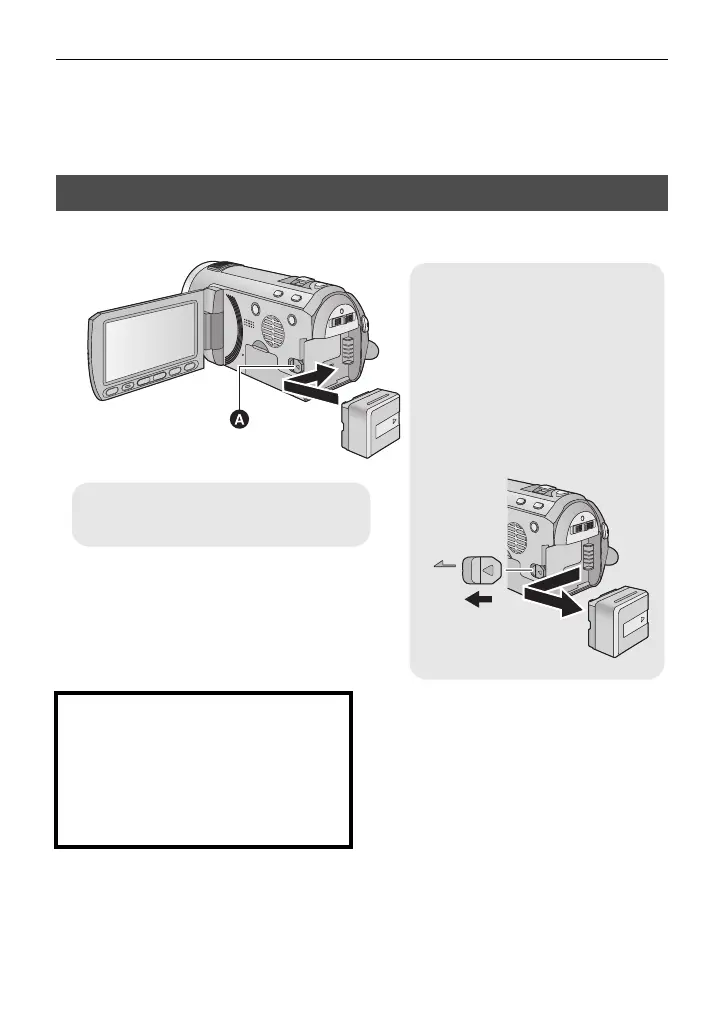
Install the battery by inserting it in the direction shown in the figure.
Inserting/removing the battery
Removing the battery
Be sure to hold down the power
button until the status indicator
goes off. Then remove the battery
while supporting the unit to prevent
it dropping.
Move the battery release lever in
the direction indicated by the
arrow and remove the battery
when unlocked.
A Insert the battery until it clicks and
locks.
CAUTION
Danger of explosion if battery is
incorrectly replaced. Replace only with
the same or equivalent type
recommended by the manufacturer.
Dispose of used batteries according to
the manufacturer’s instructions.















 To Next Page