138
VQT2V00
Others
Optional accessories
Product numbers correct as of Apr 2010. These may be subject to change.
Some optional accessories may not be available in some countries.
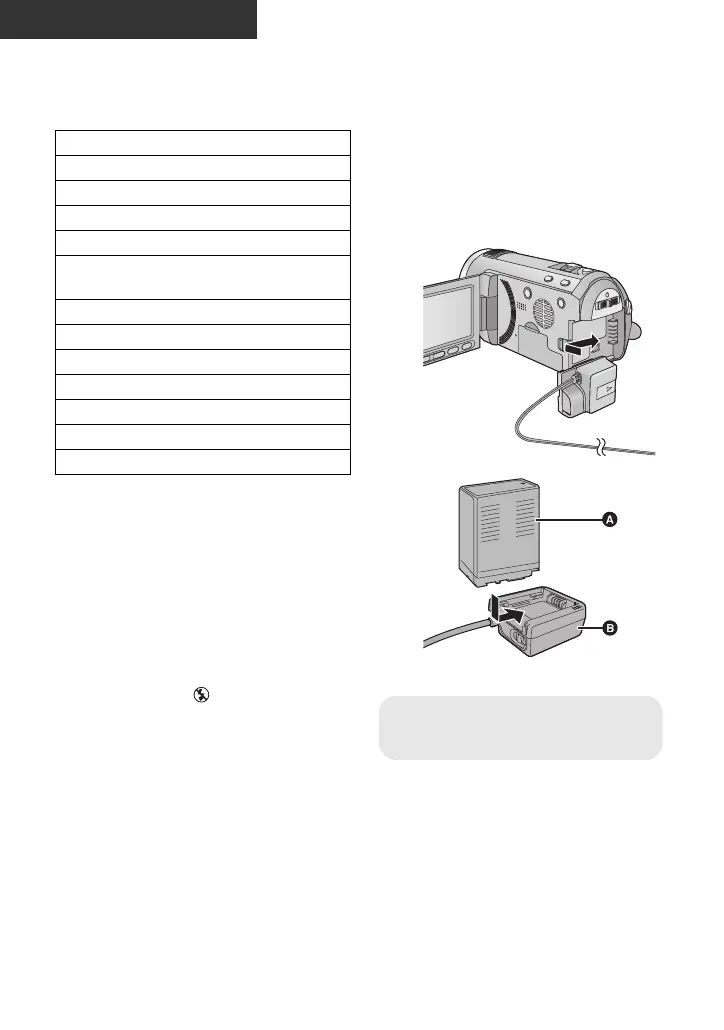
∫ Attaching the battery pack
holder kit
To use the VW-VBG6 for this unit, the
battery pack holder kit/VW-VH04 (optional)
is required.
1 Insert the DC cable to this unit.
2 Insert the battery to the battery holder.
≥ Do not pinch the DC cable with the LCD
monitor.
AC adaptor (VW-AD21E-K)
*1
Battery pack (lithium/VW-VBG130)
Battery pack (lithium/VW-VBG260)
Battery pack (lithium/VW-VBG6)
*2
Battery pack holder kit (VW-VH04)
HDMI mini cable (RP-CDHM15,
RP-CDHM30)
Wide conversion lens (VW-W4607H)
Wide end conversion lens (VW-WE08H)
*3
Filter kit (VW-LF46NE)
*4
Video DC light (VW-LDC103E)
*5
Light bulb for video DC light (VZ-LL10E)
Shoe adaptor (VW-SK12E)
DVD burner (VW-BN2)
*1 The supplied DC cables cannot be
used on this unit.
*2 The battery pack holder kit/VW-VH04
(optional) is necessary.
*3 When using the VW-WE08H, set the
zoom to W (wide) side. The focus will
be slightly out when it is set to T (tele)
side, so remove the VW-WE08H when
recording set to T (tele) side.
*4 When using the VW-LF46NE, remove
the lens hood (supplied) and set to the
flash setting to (OFF).
*5 The shoe adaptor/VW-SK12E
(optional) is necessary.















 To Next Page