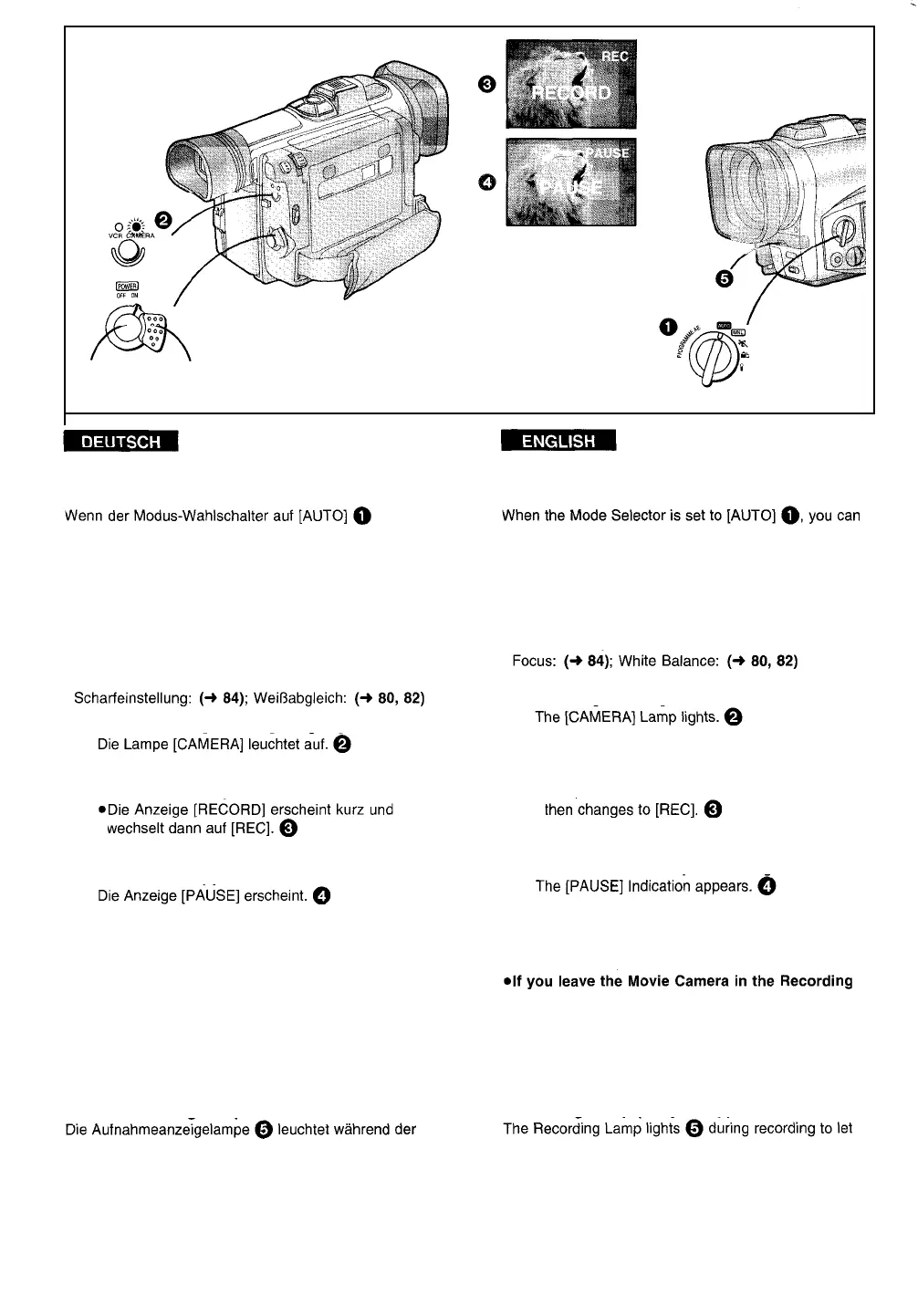
2, 3 1, 4
Aufnehmen Recording
eingestellt ist, können Sie ganz einfach den
Camerarecorder einschalten und durch Drücken der
Start-/Stopp-Taste mit dem Aufnehmen beginnen. Der
Camerarecorder erledigt dabei die Scharfeinstellung
und den Weißabgleich automatisch.
l
Je nach Aufnahmesituation und Beleuchtung sind
korrekte automatische Scharfeinstellung und
Weißabgleich u. U. nicht möglich. In solchen Fällen
sollten Sie diese manuell durchführen.
1
Den Schalter [POWER] auf [ON] stellen.
2
Die Start-/Stopp-Taste drücken.
l
Die Aufnahme beginnt.
3
Zum Umschalten auf Aufnahmepause:
Die Start-/Stopp-Taste erneut drücken.
4
Zum Beenden der Aufnahme:
Den Schalter [POWER] auf [OFF] stellen.
simply turn on the Movie Camera and press the Start/
Stop Button to start recording, and the focus and white
balance are adjusted automatically.
l
Dezending on the light Source and recording Situation,
correct automatic focusing and white balance
adjustment may not be possible. In such cases, adjust
them manually.
1
Set the [POWER] Switch to [ON].
2
Press the Start/Stop Button.
l
Recording Starts.
l
The [RECORD] Indication appears briefly and
3
To pause recording:
Press the Start/Stop Button again.
4
To finish recording:
Set the [POWER] Switch to [OFF].
*Wenn Sie den Camerarecorder länger als 6
Minuten im Modus Aufnahmepause lassen,
schaltet er sich automatisch aus, um das Band zu
schützen und Akkustrom zu sparen. Um aus
diesem Zustand erneut aufzunehmen, den
Schalter [POWER] zuerst auf [OFF] und dann
wieder auf [ON] stellen.
Aufnahmeanzeigelampe
Aufnahme, damit Ihre Akteure vor dem Camerarecorder
wissen, wann die Aufnahme läuft. Wenn Sie [REC
LAMP] im Menü [CAMERA MENUS] auf [OFF]
einstellen, leuchtet die Aufnahmeanzeigelampe nicht
mehr.
Pause Mode for more than 6 minutes, it
automatically switches off to protect the tape and
to conserve battery power. To resume recording
from this condition, set the [POWER] Switch to
[OFF] and then to [ON] again.
Recording Lamp (Tally Lamp)
the People in front of the Movie Camera know that
recording is being performed.
If you set [REC LAMP] on the [CAMERA MENUS] Menu
to [OFF], the Recording Lamp does not light.
-30-


 To Next Page