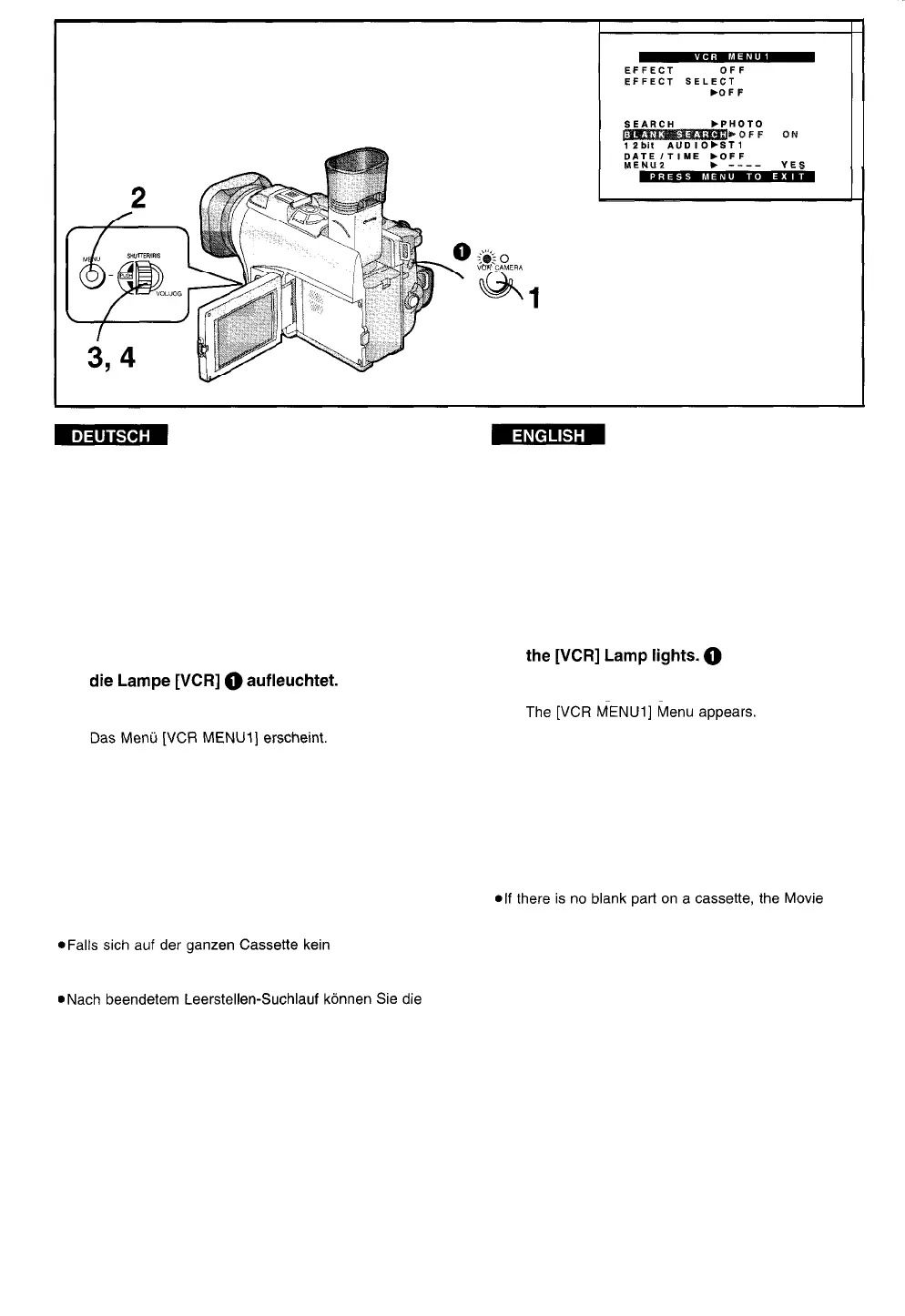
Auffinden des Endes des
aufgezeichneten Bandabschnittes
auf der Cassette
(Leerstellen-Suchlauf)
Searching for the End of the
Recorded Part on a Cassette
(Blank Search)
Mit der Leerstellen-Suchlauf-Funktion können Sie das
Ende des aufgezeichneten Bandabschnittes auf einer
Cassette (oder einen aufnahmefreien Bandabschnitt
zwischen Aufnahmen) schnell und bequem auffinden.
1
Die Taste [VCR/CAMERA] drücken, so daß
2
Die Taste [MENU] drücken.
3 Den Regler [PUSH] drehen, um [BLANK
SEARCH] zu wählen.
4
Den Regler [PUSH] drücken, um [ON] zu
wählen.
Ca. 1 Sekunde vor dem Ende der letzten
aufgezeichneten Szene schaltet der
Camerarecorder auf Standbild-Wiedergabe um.
aufnahmefreier Bandabschnitt befindet, schaltet der
Camerarecorder am Bandende auf Stopp um.
Taste [VCFKAMERA] drücken, so daß die Lampe
[CAMERA] aufleuchtet, und dann mit dem Aufnehmen
beginnen. Die neue Szene wird mit sauberem
Szenenübergang an das Ende der vorhergehenden
Szene angefügt.
With the Blank Search Function, you can quickly locate
the end of the recorded part On a cassette (or a blank
patt between recordings).
1
Press the [VCR/CAMERA] Button so that
2
Press the [MENU] Button.
3 Turn the [PUSH] Dial to select [BLANK
SEARCH].
4 Press the [PUSH] Dial to select [ON].
Approximately 1 second before the end of the last
recorded Scene, the Movie Camera switches over
to the Still Playback Mode.
Camera Stops at the end of the tape.
l
When the Blank Search has finished, you can press
the [VCR/CAMERA] Button so that the [CAMERA]
Lamp lights, and then Start recording. The new Scene
is recorded with a smooth transition from the last to
the new Scene.
-58-



 To Next Page