Aufnehmen mit Spezial-Effekten
(Digital-Effekte) (Fortsetzung)
Recording with Special Effects
(Digital Effects) (Continued)
n
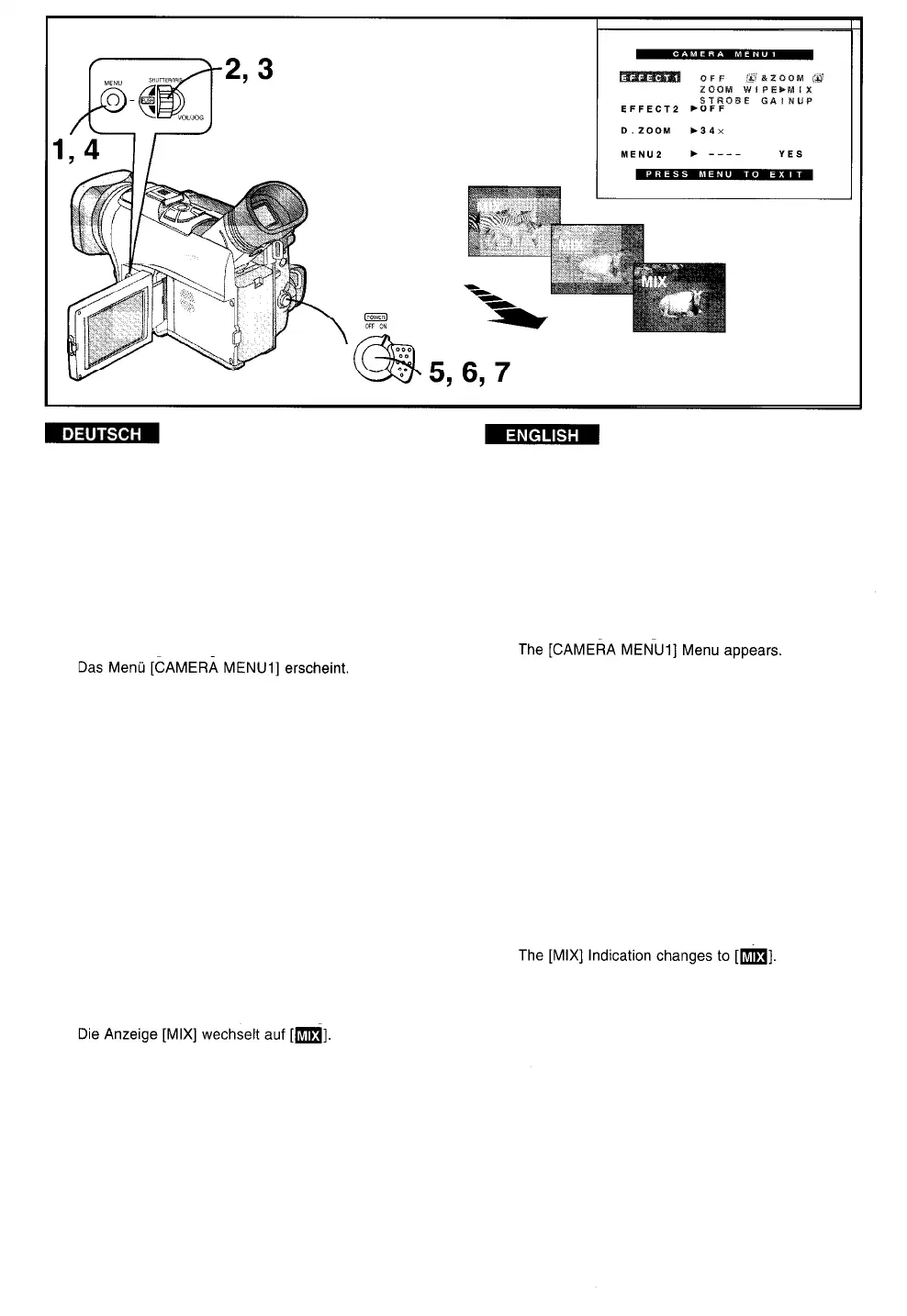
Szenenübergänge mit Mischblende (Mix)
n
Mix Mode
Diese Funktion blendet ein Standbild der zuletzt
aufgenommenen Szene langsam aus und blendet
gleichzeitig das laufende Bild der neuen Szene darüber
lt gradually fades out a still picture of the last recorded
Scene while fading in the moving picture of the new
Scene.
ein
1
2
3
4
5
6
7
1
Die Taste [MENU] drücken.
2
Den Regler [PUSH] drehen, um [EFFECT1]
zu wählen.
3
Den Regler [PUSH] drücken, um [MIX] zu
4
wählen.
Die Taste [MENU] drücken, um das Menü
5
auszublenden.
Die Anzeige [MIX] erscheint.
Die Start-/Stopp-Taste drücken, um die
6
Aufnahme zu starten.
Die normale Aufnahme beginnt,
Die Start-/Stopp-Taste drücken, um eine
Aufnahmepause einzulegen.
7
Das letzte Bild wird im Speicher festgehalten.
Die Start-/Stopp-Taste drücken, um die
Aufnahme erneut zu starten.
Das letzte Bild der vorhergehenden Szene wird
jetzt langsam ausgeblendet und gleichzeitig die
neue Szene darüber eingeblendet.
Press the [MENU] Button.
Turn the [PUSH] Dial to select [EFFECT1].
Press the [PUSH] Dial to select [MIX].
Press the [MENU] Button to exit the Menu.
The [MIX] Indication appears.
Press the Start/Stop Button to Start
recording.
The normal recording Starts.
Press the Start/Stop Button to pause
recording.
The last picture is stored in memory.
Press the Start/Stop Button to Start
recording again.
The last picture gradually fades out while the new
Scene fades in.
-78-



 To Next Page